Loading...
Loading...
Loading...
Loading...
Loading...
Loading...
Loading...
Loading...
Loading...
Loading...
Loading...
Loading...
Loading...
Loading...
Loading...
Loading...
Loading...
Loading...
Loading...
Loading...
Loading...
Loading...
Loading...
Loading...
Loading...
Loading...
Loading...
Loading...
Loading...
Loading...
Loading...
Loading...
Loading...
Loading...
Loading...
Loading...
Loading...
Loading...
Loading...
Loading...
Loading...
Loading...
Available as an advanced option for framework authors, qb will call out to a column formatter prior to processing a column as part of the SQL query. This allows frameworks like Quick to define queries using aliases and transform them to columns during execution.
You can provide your own column formatter function to qb through the init method or by calling setColumnFormatter. It is a function that takes a column string and returns a string
query.setColumnFormatter( function( column ) {
return lcase( arguments.column );
} );At times you may need to duplicate a query. Using clone you have a performant way to duplicate a query without using the duplicate method.
var q1 = query.from( "users" ).where( "firstName", "like", "Jo%" );
var q2 = q1.clone();
q2.getFrom(); // "users"When you need to remove all configuration for a query, you can call the reset method.
expression
string
true
The raw sql for the FOR clause.
query
.select( [ "id", "name" ] )
.from( "users" )
.forRaw( "JSON AUTO" );var q1 = query.from( "users" ).where( "firstName", "like", "Jo%" );
var q2 = q1.reset();
q2.getColumns(); // "*"We welcome all types of contributions!
The most common type of contribution is to fix an incorrect SQL generation for a database grammar.
To debug what SQL is being ran, you can always call toSQL on any QueryBuilder or SchemaBuilder object. Additionally, you can listen to the preQBExecute interception point for the generated SQL.
Each of the database grammars have two tests — {Grammar}QueryBuilderSpec.cfc and {Grammar}SchemaBuilderSpec.cfc. These tests run the same qb syntax across the different grammars. In each test are methods that return SQL strings like so:
// MSSQLQueryBuilderSpec.cfc
function orWhere() {
// If just a string is returned, we assume the bindings is an empty array ([])
return {
sql = "SELECT * FROM [users] WHERE [id] = ? OR [email] = ?",
bindings = [ 1, "foo" ]
};
}// OracleSchemaBuilderSpec.cfc
function boolean() {
// returns an array since schema builder can execute multiple statements.
return [ "CREATE TABLE ""USERS"" (""ACTIVE"" NUMBER(1, 0) NOT NULL)" ];
}If you find an issue with the SQL generated from a grammar, please file a pull request with the correct SQL in these tests. It's okay if you don't submit a fix as well. (But we'd greatly appreciate it!) Doing so will help expedite the fix.
If you want to add support for a new database grammar, simply copy these two tests from an existing grammar, rename them, change the getBuilder method to return your new grammar, and fill out the SQL as it should be. That will guide your implementation to be 100% compatible with the other grammars in qb.
Make complex, out-of-order queries possible
Abstract away differences between database engines
BoxLang 1+
Adobe ColdFusion 2021+
Lucee 5+
qb supports the following database grammars:
MySQL (MySQLGrammar@qb)
Oracle (OracleGrammar@qb)
Postgres (PostgresGrammar@qb)
Microsoft SQL Server (SqlServerGrammar@qb)
SQLite (SQLiteGrammar@qb)
Derby (DerbyGrammar@qb)
The Box modules discussion group and community can be found here:
Installation is easy through CommandBox and ForgeBox. Simply type box install qb to get started.
Compare these two examples:
The differences become even more stark when we introduce more complexity:
With qb you can easily handle setting order by statements before the columns you want or join statements after a where clause:
qb enables you to explore new ways of organizing your code by letting you pass around a query builder object that will compile down to the right SQL without you having to keep track of the order, whitespace, or other SQL gotchas!
Here's a gist with an example of the powerful models you can create with this! https://gist.github.com/elpete/80d641b98025f16059f6476561d88202
To start a new query, instantiate a new Builder: wirebox.getInstance( "QueryBuilder@qb" ).
By default, qb uses a generic Grammar. You can specify your specific grammar in ColdBox by setting the defaultGrammar in your moduleSettings.
If you are not using WireBox, just make sure to wire up the Builder object with the correct grammar:
SELECT [id], [name]
FROM [users]
FOR JSON AUTO// Plain old CFML
var results = queryExecute( "SELECT * FROM users" );
// qb
var qb = wirebox.getInstance( "QueryBuilder@qb" );
var results = qb.from( "users" ).get();// Plain old CFML
var results = queryExecute(
"SELECT * FROM posts WHERE published_at IS NOT NULL AND author_id IN ?",
[ { value = "5,10,27", cfsqltype = "CF_SQL_NUMERIC", list = true } ]
);
// qb
var qb = wirebox.getInstance( "QueryBuilder@qb" );
var results = qb.from( "posts" )
.whereNotNull( "published_at" )
.whereIn( "author_id", [ 5, 10, 27 ] )
.get();var qb = wirebox.getInstance( "QueryBuilder@qb" );
var results = qb.from( "posts" )
.orderBy( "published_at" )
.select( "post_id", "author_id", "title", "body" )
.whereLike( "author", "Ja%" )
.join( "authors", "authors.id", "=", "posts.author_id" )
.get();
// Becomes
var results = queryExecute(
"SELECT post_id, author_id, title, body FROM posts INNER JOIN authors ON authors.id = posts.author_id WHERE author LIKE ? ORDER BY published_at",
[ { value = "Ja%", cfsqltype = "CF_SQL_VARCHAR", list = false, null = false } ]
);moduleSettings = {
qb = {
defaultGrammar = "MySQLGrammar@qb"
}
};var grammar = new qb.models.Query.Grammars.MySQLGrammar();
var builder = new qb.models.Query.Builder( grammar );Raw expressions are the qb escape hatch. While qb strives to provide ways to execute the majority of queries, you will occasionally need to provide raw sql values that are not processed by qb. These SQL snippets are called raw or Expressions in qb.
raw expressions are useful, but shoud be used only if there is not another way to accomplish the same action using other qb methods. This is because a raw expression has the potential to use syntax specific to one database grammar or another, preventing you from easily switching from one grammar to another, one of the major benefits of using qb.
The first way to retrieve an Expression is to call the raw method on the QueryBuilder object.
The sql snippet passed to raw is not processed by qb at all. With that in mind, it is important to follow all best practices and security recommendations with the sql you use with raw.
Expressions can be passed to most qb methods, like select, from, where, or orderBy, among others. Additionally, qb provides some convenience methods to add raw values in different parts of the query:
returnFormat refers to the transformation your executed query makes (if any) before being returned to you. You can choose one of three return formats:
"array"
"query"
"none"
A custom function
By default, qb returns an array of structs as the result of your query. This is the same as specifying array as your returnFormat:
You can get the original query object that CFML generates by setting the returnFormat to query:
This setting can be overridden on a per-instance basis by calling setReturnFormat():
If you want complete control over your return result, you can provide a function as a returnFormat. The results of the function will be returned as the results of the builder.
forRaw
Name
Type
Required
Default
Description
sql
string
true
The raw sql to wrap up in an Expression.
moduleSettings = {
"qb": {
"returnFormat": "array"
}
};moduleSettings = {
"qb": {
"returnFormat": "query"
}
};To start a new query, instantiate a new Builder: wirebox.getInstance('QueryBuilder@qb').
By default, qb uses a generic Grammar. You can specify your specific grammar in ColdBox by setting the defaultGrammar in your moduleSettings.
The grammars provided by qb are:
MySQLGrammar
OracleGrammar
PostgresGrammar
SqlServerGrammar
SQLiteGrammar
DerbyGrammar
If you are not using WireBox, make sure to wire up the Builder object with the correct grammar:
Here are the full configuration settings you can use in the module settings:
QB binds all parameters by default and guesses the SQL type based on passed values. The default SQL type for numeric values is CF_SQL_NUMERIC, which is a floating point number, for the widest compatibility. This can cause performance problems with large recordsets in some database engines. You can provide a different default in coldbox.cfc if you wish to override this setting:
Note: These instructions assume a basic knowledge of FW/1, a working FW/1 application structure with qb installed in the
/subsystemsdirectory (manually or via CommandBox), and a database configured to run with your application.
Once the application structure is setup, now we need to wire up qb to a bean factory using DI/1.
First we will add a mapping in Application.cfc.
Next we need to tell DI/1 where qb's components are and how to reference them for later use in the application. We can do so by defining the configuration settings in the variables.framework.subsystems struct in Application.cfc. The example below makes use of a load listener to declare each component instance and pass in any constructor arguments.
Now that everything is configured, you can launch your application with CommandBox by entering start in the terminal or use whatever method you're accustomed to.
To access qb from your application's code, you can call on it by using getBeanFactory().
query.from( "users" ).select( query.raw( "MAX(created_date)" ) );
SELECT MAX(created_date) FROM `users`
var qb = wirebox.getInstance( "QueryBuilder@qb" );
qb
.setReturnFormat( 'query' )
.from( 'users' )
.get()moduleSettings = {
"qb": {
"returnFormat": function( q ) {
return application.wirebox.getInstance(
"name" = "Collection",
"initArguments" = { "collection": q }
);
}
}
};moduleSettings = {
qb = {
defaultGrammar = "MySQLGrammar@qb"
}
};var grammar = new qb.models.Grammars.MySQLGrammar();
var builder = new qb.models.Query.QueryBuilder( grammar );moduleSettings = {
qb : {
"defaultGrammar": "AutoDiscover@qb",
"defaultReturnFormat": "array",
"preventDuplicateJoins": false,
"convertEmptyStringsToNull": true,
"numericSQLType": "NUMERIC",
"integerSQLType": "INTEGER",
"decimalSQLType": "DECIMAL",
"defaultOptions": {},
"sqlCommenter": {
"enabled": false,
"commenters": [
{ "class": "FrameworkCommenter@qb", "properties": {} },
{ "class": "RouteInfoCommenter@qb", "properties": {} },
{ "class": "DBInfoCommenter@qb", "properties": {} }
]
},
"shouldMaxRowsOverrideToAll": function( maxRows ) {
return maxRows <= 0;
}
}
}moduleSettings = {
qb = {
defaultGrammar = "MySQLGrammar@qb",
numericSQLType = "CF_SQL_BIGINT"
}
};this.mappings = {
"/qb" = expandPath("./subsystems/qb")
};qb = {
diLocations = "/qb/models",
diConfig = {
loadListener = function( di1 ) {
di1.declare( "BaseGrammar" ).instanceOf( "qb.models.Query.Grammars.Grammar" ).done()
.declare( "MySQLGrammar" ).instanceOf( "qb.models.Query.Grammars.MySQLGrammar" ).done()
.declare( "QueryUtils" ).instanceOf( "qb.models.Query.QueryUtils" ).done()
.declare( "QueryBuilder" ).instanceOf( "qb.models.Query.QueryBuilder" )
.withOverrides({
grammar = di1.getBean( "MySQLGrammar" ),
utils = di1.getBean( "QueryUtils" ),
returnFormat = "array"
})
.asTransient();
}
}
}// Create an instance of qb
builder = getBeanFactory( "qb" ).getBean( "QueryBuilder" );
// Query the database
posts = builder.from( "Posts" ).get();
posts = builder.from( "Posts" ).where( "IsDraft", "=", 0 ).get();This method allows you to create a table object.
Argument
Type
Required
Default
Description
The majority of the work comes from calling methods on the Blueprint object. A Blueprint defines the and for your tables.
Example:
This would convert to the following SQL in MySQL:
Only one table can be created at a time. If you wanted to create multiple tables, you would call create multiple times.
The callback argument is where you define the schema of your table. It is passed a Blueprint object. This is commonly aliased as table in the callback. Blueprint defines the field, index and constraint methods to build your table. You can find a comprehensive list of all available methods here for and here for .
This method allows you to create a table using a query. It is similar to a view except that the data is inserted once at table creation.
This is an UnsupportedOperation on DerbyGrammar.
Like with a view, the columns are defined by the data returned by the query. The data returned by the query will be inserted into the table.
This method allows you to create a view using a query.
Two interception points are available from QB: preQBExecute and postQBExecute. These fire before and after the queryExecute call, respectively.
The following information is available in the interceptData struct:
The following information is available in the interceptData struct:
A SchemaBuilder instance can be put into pretend mode by calling the pretend method. In this mode, the SchemaBuilder will turn all query operations into no-ops. A log of the SQL that would have been executed can be retrieved from the query log.
Once a SchemaBuilder instance has been set to pretend mode, it cannot be unset. Instead, you will need to obtain a new SchemaBuilder instance.
Each instance of a SchemaBuilder maintains a log of queries it executed. This can be accessed by calling getQueryLog. This will return an array of structs like so:
This can be very useful in combination with the feature to see what SQL will be executed before actually executing it.
A query builder is a stateful, transient object. That means that if you want to execute two different queries, you need two separate instances of QueryBuilder.
As such, be careful when injecting QueryBuilder in to a component. If the component is a singleton, you will need to create the QueryBuilder inline or use a provider. This applies to ColdBox handlers as well.
While the above may seem innoculous, it can run in to issues as multiple requests come in to your application. Each request is sharing the same query builder instance and subsequent requests will have unintended results as the where clause keeps growing request after request.
The solution is to either create the QueryBuilder inline, ensuring that each request has its own query to execute:
Or to use a WireBox provider to create a new query each time it is accessed:
Each query execution method allows for the passing of an options struct. This is the same struct you would pass to .
qb allows you to specify default options when creating the QueryBuilder instance using the defaultOptions argument.
You can set defaultOptions for the default QueryBuilder (QueryBuilder@qb
The type to return: query or result.
query
Query | null
The query object or null if there isn't one.
result
Struct
The query result struct.
Name
Type
Description
sql
String
The SQL string to execute.
bindings
Struct
The struct of bindings (keys and values) for the query.
options
Struct
Any options to pass along to queryExecute.
returnObject
String
Name
Type
Description
sql
String
The SQL string to execute.
bindings
Struct
The struct of bindings (keys and values) for the query.
options
Struct
Any options to pass along to queryExecute.
returnObject
The type to return: query or result.
String
A callback function used to define the table body. It is passed a QueryBuilder as the only argument.
options
struct
false
{}
Options to pass to queryExecute.
execute
boolean
false
true
Run the query immediately after building it.
A callback function used to define the table body. It is passed a QueryBuilder as the only argument.
options
struct
false
{}
Options to pass to queryExecute.
execute
boolean
false
true
Run the query immediately after building it.
table
string
true
The name of the table to create.
callback
function
true
A callback function used to define the table body. It is passed a Blueprint as the only argument.
options
struct
false
{}
Options to pass to queryExecute.
execute
boolean
false
true
Run the query immediately after building it.
newTableName
string
true
The name of the table to create.
callback
function
true
view
string
true
The name of the view to create.
callback
function
true
[
{
"sql": "CREATE TABLE `users` (`id` INT PRIMARY KEY AUTO_INCREMENT, `email` VARCHAR NOT NULL)",
"bindings": [],
"options": { "datasource": "main" },
"returnObject": "array",
"pretend": false,
"result": {},
"executionTime": 21
}
]One caveat when using a WireBox Provider: WireBox Providers proxy methods on to a new instance of the provided mapping on all methods except get. get is a method on the Provider itself. If you call get as the first method on a Provider it will return a new instance of QueryBuilder, not execute the query. In those (rare) cases you will need to call query.get().get().
Once you have access to a QueryBuilder instance, you can create a new query using the same datasource, utils, returnFormat, paginationCollector, columnFormatter, and defaultOptions as the current QueryBuilder instance.
// This will cause you pain and grief...
var user = query.from( "users" )
.where( "username", rc.username )
.first();
var posts = query.from( "posts" ).get();
// This will error because `username` is not a column in `posts`.// This will cause you pain and grief...
var user = query.from( "users" )
.where( "username", rc.username )
.first();
var posts = query.newQuery().from( "posts" ).get();
// This will work as we expect it to.schema.create( "users", function( table ) {
table.increments( "id" );
table.string( "email" );
table.string( "password" );
table.timestamp( "created_date" );
table.timestamp( "modified_date" );
table.timestamp( "last_logged_in" ).nullable();
} );CREATE TABLE `users` (
`id` INTEGER(10) UNSIGNED NOT NULL AUTO_INCREMENT,
`email` VARCHAR(255) NOT NULL,
`password` VARCHAR(255) NOT NULL,
`created_date` TIMESTAMP NOT NULL,
`modified_date` TIMESTAMP NOT NULL,
`last_logged_in` TIMESTAMP,
CONSTRAINT `pk_users_id` PRIMARY KEY (`id`)
)component {
property name="query" inject="QueryBuilder@qb";
function create( event, rc, prc ) {
// This will cause you pain and grief...
query.table( "posts" )
.where( "id", rc.id )
.update( event.getOnly( [ "body" ] ) );
}
}component {
function create( event, rc, prc ) {
getInstance( "QueryBuilder@qb" )
.table( "posts" )
.where( "id", rc.id )
.update( event.getOnly( [ "body" ] ) );
}
}component {
property name="query" inject="provider:QueryBuilder@qb";
function create( event, rc, prc ) {
query.table( "posts" )
.where( "id", rc.id )
.update( event.getOnly( [ "body" ] ) );
}
}config/ColdBox.cfcmoduleSettingsYou can also combine this with WireBox to create custom QueryBuilder instances pointing to different datasources and even different grammars.
In Application.cfc you can specify your default datasource which will be used by qb. If you want to retrieve data from other datasources you can specify this in all retrieval functions by using the extra options parameter such as:
If you also want to use a non-default SQL Grammar you have to specify this when creating your QueryBuilder.
qb can inline the query bindings into the SQL string that it has built up. This is used by other tools like toSQL or dump to provide a richer debugging experience. It is also publicly available for other libraries to use, such as CommandBox Migrations.
Replace the question marks (?) in a sql string with the bindings provided.
sql
String
true
The SQL with question marks (?) to replace with bindings.
bindings
Array<Struct>
true
The bindings to use when replacing the question marks (?) in the provided SQL string.
Helper method to disable wrapping identifiers only for the given query.
Helper method to enable wrapping identifiers only for the given query.
Name
Type
Required
Default
Description
condition
boolean
true
The condition to switch on.
onTrue
Function
true
The callback to execute if the condition is true. It is passed the builder object as the only parameter.
The when helper is used to allow conditional statements when defining queries without using if statements and having to store temporary variables.
You can pass a third argument to be called in the else case.
when callbacks are automatically scoped and grouped. That means that if a where clause is added inside the callback with an OR combinator the clauses will automatically be grouped (have parenthesis put around them.) You can disable this feature by passing withoutScoping = true to the when callback.
The query builder also provides a variety of aggregate methods such as count, max, min, and sum. These methods take the headache out of setting up these common aggregate functions.
When executing any of the aggregate functions, any where restrictions on your query will still be applied.
Instead of returning a query, these methods return a simple value.
moduleSettings = {
"qb": {
"defaultOptions": {
"timeout": 60
}
}
};component {
function afterAspectsLoad() {
binder.map( "MyCustomQueryBuilder" )
.to( "qb.models.Query.QueryBuilder" )
.initArg( name = "grammar", ref = "AutoDiscover@qb" )
.initArg( name = "defaultOptions", value = {
"datasource": "my_custom_datasource"
} );
}
}query.from( "users" )
.get( options = { datasource: "MyOtherDatasourceName" } );var query = wirebox.getInstance( "QueryBuilder@qb" )
.setGrammar( wirebox.getInstance( "SqlServerGrammar@qb" ) );qb.from( "users" ).select( [ "id", "email" ] ).withoutWrappingValues().get();SELECT id, email FROM usersqb.from( "users" ).select( [ "id", "email" ] ).withWrappingValues().get();-- MySQL
SELECT `id`, `email` FROM `users`
-- SQL Server
SELECT [id], [email] FROM [users]
-- Postgres, SQLite, Oracle
SELECT "id", "email" FROM "users"var q = query.from( "posts" );
if ( someFlag ) {
q.orderBy( "published_date", "desc" );
}query.from( "posts" )
.when( someFlag, function( q ) {
q.orderBy( "published_date", "desc" );
} )
.get();query.from( "posts" )
.when(
someFlag,
function( q ) {
q.orderBy( "published_date", "desc" );
},
function( q ) {
q.orderBy( "modified_date", "desc" );
}
);qb.from( "users" )
.where( "active", 1 )
.when( len( url.q ), function( q ) {
q.where( "username", "LIKE", q & "%" )
.orWhere( "email", "LIKE", q & "%" );
} );SELECT *
FROM "users"
WHERE "active" = ?
AND (
"username" = ?
OR "email" = ?
)inline
boolean
false
false
Flag to inline the bindings value or not. If true, a SQL-executable value will be replaced. If false, the binding struct will be replaced.
onFalse
Function
false
function( q ) { return q; }
The callback to execute if the conditions is false. It is passed the builder object as the only parameter.
withoutScoping
boolean
false
false
Flag to turn off the automatic scoping of where clauses during the callback.
Argument
Type
Required
Default
Description
columns
any
true
A column or array of columns that represents the foreign key reference.
Example:
SchemaBuilder
SQL (MySQL)
Sets the referencing table for a foreign key relationship. For example, countries for a country_id column.
Argument
Type
Required
Default
Description
table
string
true
The referencing table name.
Example:
SchemaBuilder
SQL (MySQL)
Set the strategy for updating foreign keys when the parent key is updated.
Argument
Type
Required
Default
Description
option
string
true
The strategy to use. Available values are: RESTRICT, CASCADE, SET NULL, NO ACTION, SET DEFAULT
Example:
SchemaBuilder
SQL (MySQL)
Set the strategy for updating foreign keys when the parent key is deleted.
Argument
Type
Required
Default
Description
option
string
true
The strategy to use. Available values are: RESTRICT, CASCADE, SET NULL, NO ACTION, SET DEFAULT
Example:
SchemaBuilder
SQL (MySQL)
schema.create( "users", function( table ) {
table.unsignedInteger( "country_id" ).references( "id" ).onTable( "countries" );
} );CREATE TABLE `users` (
`country_id` INTEGER UNSIGNED NOT NULL,
CONSTRAINT `fk_users_country_id` FOREIGN KEY (`country_id`) REFERENCES `countries` (`id`) ON UPDATE NO ACTION ON DELETE NO ACTION
)schema.create( "users", function( table ) {
table.unsignedInteger( "country_id" ).references( "id" ).onTable( "countries" );
} );CREATE TABLE `users` (
`country_id` INTEGER UNSIGNED NOT NULL,
CONSTRAINT `fk_users_country_id` FOREIGN KEY (`country_id`) REFERENCES `countries` (`id`) ON UPDATE NO ACTION ON DELETE NO ACTION
)schema.create( "users", function( table ) {
table.unsignedInteger( "country_id" )
.references( "id" )
.onTable( "countries" )
.onUpdate( "CASCADE" );
} );CREATE TABLE `users` (
`country_id` INTEGER UNSIGNED NOT NULL,
CONSTRAINT `fk_users_country_id` FOREIGN KEY (`country_id`) REFERENCES `countries` (`id`) ON UPDATE CASCADE ON DELETE NO ACTION
)schema.create( "users", function( table ) {
table.unsignedInteger( "country_id" )
.references( "id" )
.onTable( "countries" )
.onDelete( "SET NULL" );
} );CREATE TABLE `users` (
`country_id` INTEGER UNSIGNED NOT NULL,
CONSTRAINT `fk_users_country_id` FOREIGN KEY (`country_id`) REFERENCES `countries` (`id`) ON UPDATE NO ACTION ON DELETE SET NULL
)true
A single column name, a list of column names, or an array of column names to group by. An can be passed as well.
Passing a single string will group by that one column.
You can also pass a list of column names. A single comma (",") will be used as the delimiter.
An array of column names can be provided.
Calling groupBy multiple times will to the current groups.
An Expression can be passed in place of a column.
Name
Type
Required
Default
Description
column
string |
true
The name of the column or with which to constrain the query.
operator
any
false
Adds a having clause to a query.
Expressions can be used in place of the column or the value.
Name
Type
Required
Default
Description
groups
string | array
true
The limit value for the query.
Sets the limit value for the query.
Name
Type
Required
Default
Description
value
numeric
true
The limit value for the query.
Sets the limit value for the query. Alias for limit.
Name
Type
Required
Default
Description
value
numeric
true
The offset value for the query.
Sets the offset value for the query.
Name
Type
Required
Default
Description
page
numeric
true
The page number to retrieve.
maxRows
numeric
true
Helper method to calculate the limit and offset given a page number and count per page.
This method combines forPage, count, and get to create a pagination struct alongside the results. Information on the simplePaginate or paginate methods, including custom pagination collectors, can be found in the Retreiving Results section of the documentation.
Name
Type
Required
Default
Description
value
numeric
options
struct
false
{}
Any additional queryExecute options.
toSQL
boolean
false
Returns true if the query returns any rows. Returns false otherwise.
options
struct
false
{}
Any additional queryExecute options.
errorMessage
string
false
Returns true if the query returns any rows. Throws a RecordNotFound exception otherwise.
column
string
false
"*"
The column on which to count records.
defaultValue
any
false
Returns an integer number of rows returned by the query.
column
string
true
The column on which to find the max.
defaultValue
any
false
Returns the maximum value for the given column.
column
string
true
The column on which to find the min.
defaultValue
any
false
Returns the minimum value for the given column.
column
string
true
The column to sum.
defaultValue
any
false
Returns the sum of all returned rows for the given column.
Name
Type
Required
Default
Description
column
string
true
The column to sum.
options
struct
false
{}
Returns the sum of all returned rows for the expression.
Name
Type
Required
Default
Description
asQuery
boolean
false
false
Flag to retrieve the columnList as a query instead of an array.
datasource
string
false
Retrieves the columns for the configured table.
qb supports the for appending contextual information to executed queries.
sqlCommenter support is off by default, but can be activated by setting the sqlCommenter.enabled setting.
Once enabled, qb will append a comment on to every non-commented query. This happens as the query is ran, so you will not see this output when calling or .
sqlCommenter will only add a comment to non-commented queries. If you query contains a comment anywhere in it, sqlCommenter will ignore it.
query.from( "users" )
.groupBy( "country" );SELECT *
FROM `users`
GROUP BY `country`query.from( "users" )
.groupBy( "country,city" );SELECT *
FROM `users`
GROUP BY `country`, `city`query.from( "users" )
.groupBy( [ "country", "city" ] );SELECT *
FROM `users`
GROUP BY `country`, `city`query.from( "users" )
.groupBy( "country" )
.groupBy( "city" );SELECT *
FROM `users`
GROUP BY `country`, `city`query.from( "users" )
.groupBy( query.raw( "DATE(created_at)" ) );SELECT *
FROM `users`
GROUP BY DATE(created_at)query.from( "users" )
.groupBy( "email" )
.having( "email", ">", 1 );SELECT *
FROM `users`
GROUP BY `email`
HAVING `email` > ?query.from( "users" )
.groupBy( "email" )
.having( query.raw( "COUNT(email)" ), ">", 1 );SELECT *
FROM `users`
GROUP BY `email`
HAVING COUNT(email) > ?query.from( "users" )
.limit( 5 );SELECT *
FROM `users`
LIMIT 5query.from( "users" )
.take( 5 );SELECT *
FROM `users`
LIMIT 5query.from( "users" )
.offset( 25 );SELECT *
FROM `users`
OFFSET 25query.from( "users" )
.forPage( 3, 15 );SELECT *
FROM `users`
LIMIT 15
OFFSET 30SELECT COUNT(*) AS aggregate
FROM `users`SELECT COUNT(*) FROM [users]query.from( "users" ).where( "username", "like", "jon%" ).exists();SELECT COUNT(*) AS aggregate
FROM `users` WHERE `username` LIKE 'jon%'query.from( "users" ).where( "username", "like", "jon%" ).existsOrFail();SELECT COUNT(*) AS aggregate
FROM `users` WHERE `username` LIKE 'jon%'query.from( "users" ).count();query.from( "users" ).max( "age" );SELECT MAX(age) AS aggregate FROM `users`query.from( "users" ).min( "age" );SELECT MIN(age) AS aggregate FROM `users`query.from( "employees" ).sum( "salary" );SELECT SUM(salary) AS aggregate FROM `employees`query.from( "accounts" ).sumRaw( "netAdditions + netTransfers" )SELECT SUM(netAdditions + netTransfers) AS aggregate FROM `accounts`query.from( "users" ).columnList();[ "id", "firstName", "lastName", "username", "email", "password" ]The number of records per page. If a number less than 0 is passed, 0 is used instead.
false
Returns the query as SQL, if true, instead of executing it.
An optional string error message.
0
The default value for the COUNT query, if no records are returned.
options
struct
false
{}
Any additional queryExecute options.
toSQL
boolean
false
false
Returns the query as SQL, if true, instead of executing it.
The default value for the MAX query, if no records are returned.
options
struct
false
{}
Any additional queryExecute options.
The default value for the MIN query, if no records are returned.
options
struct
false
{}
Any additional queryExecute options.
0
The default value for the SUM query, if no records are returned.
options
struct
false
{}
Any additional queryExecute options.
Any additional queryExecute options.
Optional datasource to from which to retrieve the columnList.
The operator to use for the constraint (i.e. "=", "<", ">=", etc.). A value can be passed as the operator and the value left null as a shortcut for equals (e.g. where( "column", 1 ) == where( "column", "=", 1 ) ).
value
any
false
The value with which to constrain the column. An Expression can be passed as well.
combinator
string
false
"and"
The boolean combinator for the clause. Valid options are "and" or "or". Avoid passing this parameter explicitly. Where possible use the andHaving and orHaving methods instead.
An example query with a sqlCommenter comment looks like this:
The default configuration structure for sqlCommenter is as follows:
When the enabled flag is false, no comments will be appended.
The commenters array are the different components that will add contextual information to each query. You define them by defining a struct with a class key pointing to a WireBox mapping and a properties key containing a struct of any necessary properties.
Each Commenter must implement the ICommenter interface. (The implements keyword is not required.). They will be called with the sql being commented and the current datasource. It should return a struct of key/value pairs that will become comments.
Here is an example of the FrameworkCommenter@qb:
You may use any. all, or none of the commenters provided by qb. You may also create your own for your application. You may even see commenters pop up on ForgeBox for popular use cases.
For example, if you use cbauth (or cbsecurity using cbauth), this commenter will add the current user ID to each query.
The comment generated by sqlCommenter is escaped and url-encoded. It can be reversed by calling the SQLCommenter.parseCommentedSQL method with the full query or the SQLCommenter.parseCommentString method with just the comment.
Name
Type
Required
Default
Description
sql
string
true
The commented SQL string to parse.
Parses a commented SQL string into the SQL and a struct of the key/value pair comments.
Name
Type
Required
Default
Description
commentString
string
true
The comment string to parse into a struct.
Parses a comment string into a struct.
Out of the box, qb includes a ColdBoxSQLCommenter. Since sqlCommenter adds contextual information, some level of framework or application integration is necessary. You can create your own sqlCommenter instance by extending the qb.models.SQLCommenter.SQLCommenter abstract component. If you create a SQLCommenter for a specific framework, consider sharing it with others on ForgeBox.
moduleSettings = {
"qb": {
"sqlCommenter": {
"enabled": true
}
}
};SELECT * FROM foo /*action='index',dbDriver='mysql-connector-java-8.0.25%20%28Revision%3A%2008be9e9b4cba6aa115f9b27b215887af40b159e0%29',event='Main.index',framework='coldbox-6.0.0',handler='Main',route='%2F'*/settings = {
"sqlCommenter": {
"enabled": false,
"commenters": [
{ "class": "FrameworkCommenter@qb", "properties": {} },
{ "class": "RouteInfoCommenter@qb", "properties": {} },
{ "class": "DBInfoCommenter@qb", "properties": {} }
]
}
};component singleton accessors="true" {
property name="coldboxVersion" inject="coldbox:coldboxSetting:version";
property name="properties";
/**
* Returns a struct of key/value comment pairs to append to the SQL.
*
* @sql The SQL to append the comments to. This is provided if you need to
* inspect the SQL to make any decisions about what comments to return.
* @datasource The datasource that will execute the query. If null, the default datasource will be used.
* This can be used to make decisions about what comments to return.
*/
public struct function getComments( required string sql, string datasource ) {
return { "version": "coldbox-#variables.coldboxVersion#" };
}
}component singleton accessors="true" {
property name="auth" inject="AuthenticationService@cbauth";
property name="properties";
/**
* Returns a struct of key/value comment pairs to append to the SQL.
*
* @sql The SQL to append the comments to. This is provided if you need to
* inspect the SQL to make any decisions about what comments to return.
* @datasource The datasource that will execute the query. If null, the default datasource will be used.
* This can be used to make decisions about what comments to return.
*/
public struct function getComments( required string sql, string datasource ) {
return { "userId": variables.auth.getUserId() };
}
}getInstance( "ColdBoxSQLCommenter@qb" )
.parseCommentedSQL( "SELECT * FROM foo /*action='index',dbDriver='mysql-connector-java-8.0.25%20%28Revision%3A%2008be9e9b4cba6aa115f9b27b215887af40b159e0%29',event='Main.index',framework='coldbox-6.0.0',handler='Main',route='%2F'*/" );{
"sql": "SELECT * FROM foo",
"comments": {
"action": "index",
"dbDriver": "mysql-connector-java-8.0.25 (Revision: 08be9e9b4cba6aa115f9b27b215887af40b159e0)",
"event": "Main.index",
"framework": "coldbox-6.0.0",
"handler": "Main",
"route": "/"
}
}getInstance( "ColdBoxSQLCommenter@qb" )
.parseCommentString(
"/*action='index',dbDriver='mysql-connector-java-8.0.25%20%28Revision%3A%2008be9e9b4cba6aa115f9b27b215887af40b159e0%29',event='Main.index',framework='coldbox-6.0.0',handler='Main',route='%2F'*/"
);{
"action": "index",
"dbDriver": "mysql-connector-java-8.0.25 (Revision: 08be9e9b4cba6aa115f9b27b215887af40b159e0)",
"event": "Main.index",
"framework": "coldbox-6.0.0",
"handler": "Main",
"route": "/"
}cfqueryparam including null, list, etc. This applies anywhere parameters are used including where, update, and insert methods.This can be used when inserting or updating records as well.
qb will use a different SQL type for integers and decimals. You can customize the SQL types by setting the integerSqlType and decimalSqlType settings.
Additionally, qb automatically calculates a scale based on the value provided if the value is a floating point number.
Bindings are the values that will be sent as parameters to a prepared SQL statement. This protects you from SQL injection. In CFML, this uses cfqueryparam to parameterize the values.
If you need to inspect the bindings for the current query you can retrieve them in order using the getBindings method.
Use these methods only for debugging. Modifying the bindings directly will likely cause issues when executing your query. Adding or removing bindings should be done using the public API.
Name
Type
Required
Default
Description
No arguments
This method returns the current bindings in order to be used for the query.
You can also retrieve the bindings associated to their corresponding types.
Name
Type
Required
Default
Description
No arguments
This method returns the current bindings to be used for the query associated to their corresponding types.
Adds a single binding or an array of bindings to a query for a given type.
newBindings
Struct | Array<Struct>
true
A single binding or an array of bindings to add for a given type.
type
String
false
Adds all of the bindings from another builder instance.
qb
QueryBuilder
true
Another builder instance to copy all of the bindings from.
Name
Type
Required
Default
Description
from
Used to set the base table for the query.
You can optionally specify an alias for the table.
An alias for from where you like how calling table looks.
Sometimes you need more control over your from clause in order to add grammar specific instructions, such as adding SQL Server table hints to your queries.
Since the fromRaw() takes your string verbatim, it's important that you make sure your SQL declaration is escaped properly. Failure to properly escape your table names may result in SQL errors.
Using fromRaw will most likely tie your code to a specific database, so think carefully before using the fromRaw method if you want your project to be database agnostic.
Many database engines allow you to define User Defined Functions. For example, SQL Server allows you to define UDFs that will return a table. In these type of cases, it may be necessary to bind parameters to your from clause.
You can bind parameters to the fromRaw() method by passing a secondary argument that is an array of the parameters to bind.
Complex queries often contain derived tables. Derived tables are essentially a temporal table defined as a subquery in the from statement.
In additional a function callback, a separate QueryBuilder instance can be passed to the fromSub method.
Adds an alias to the specified from table or renames a current alias. Any existing aliased values in columns, wheres, joins, groupBys, or orders that match the previous alias will be remapped to the new alias. This includes the full table name when used as an alias.
Sometimes you want to add constraints on a table level, rather than a column level. The following methods will let you accomplish that.
Create a generic index from one or more columns.
Argument
Type
Required
Example:
SchemaBuilder
SQL (MySQL)
Create a foreign key constraint from one or more columns. Follow up this call with calls to the TableIndex's and methods.
Example:
SchemaBuilder
SQL (MySQL)
Create a primary key constraint from one or more columns.
Example:
SchemaBuilder
SQL (MySQL)
Create a unique constraint from one or more columns.
Example:
SchemaBuilder
SQL (MySQL)
The query builder also lets you create union statements on your queries using either UNION or UNION ALL strategies.
The union methods take either a Query Builder instance or a closure which you use to define a new QueryBuilder instance.
Union statements are added in the order in which the union methods are invoked, but the union statements can be in any order in your API call stack. This means you can safely declare your union method calls before the select, from and orderBy calls on the source Query Builder instance.
union() — This method builds a SQL statement using the UNION clause which combines two SQL queries into a single result set containing all the matching rows. The two queries must have the same defined columns and compatible data types or the SQL engine will generate an error. The union clause only returns unique rows.
unionAll() — This builds a SQL statement using the UNION ALL clause. This is the same as union but includes duplicate rows.
IMPORTANT: The QueryBuilder instances passed to a union statement cannot contain a defined order. Any use of the orderBy() method on the unioned QueryBuilder instances will result in an OrderByNotAllowedexception. To order the results, add an orderBy() call to the parent source Query Builder instance.
Adds a UNION statement to the query.
Adding multiple union statements will append it to the query.
It can also add union queries as QueryBuilder instances.
Adds a UNION ALL statement to the query.
Adding multiple unionAll statements will append it to the query.
It can also add union queries as QueryBuilder instances.
QB ships with a schema builder to help you build your database objects. This provides a few benefits:
The syntax is expressive and fluent, making it easy to understand what is being executed
The syntax is database-agnostic. Specific quirks are isolated in a Grammar file, making it easy to migrate between engines.
You start with a SchemaBuilder object. The SchemaBuilder takes the same Grammar that a QueryBuilder
query.from( "users" )
.where( "id", "=", { value = 18, cfsqltype = "VARCHAR" } );SELECT *
FROM `users`
WHERE `id` = ?query.table( "users" )
.insert( {
"id" = { value 1, cfsqltype = "VARCHAR" },
"age" = 18,
"updatedDate" = { value = now(), cfsqltype = "DATE" }
} );INSERT INTO `users`
(`id`, `age`, `updatedDate`)
VALUES
(?, ?, ?)moduleSettings = {
"qb": {
"integerSqlType": "INTEGER",
"decimalSqlType": "DECIMAL"
}
};query.from( "users" )
.join( "logins", function( j ) {
j.on( "users.id", "logins.user_id" );
j.where( "logins.created_date", ">", dateAdd( "m", -1, "01 Jun 2019" ) );
} )
.where( "active", 1 );[
{ value = "01 May 2019", cfsqltype = "TIMESTAMP" },
{ value = 1, cfsqltype = "INTEGER" }
]query.from( "users" )
.join( "logins", function( j ) {
j.on( "users.id", "logins.user_id" );
j.where( "logins.created_date", ">", dateAdd( "m", -1, "01 Jun 2019" ) );
} )
.where( "active", 1 );{
"commonTables" = [],
"select" = [],
"join" = [
{ value = "01 May 2019", cfsqltype = "CF_SQL_TIMESTAMP" },
],
"where" = [
{ value = 1, cfsqltype = "CF_SQL_NUMERIC" }
],
"union" = [],
"insert" = [],
"insertRaw" = [],
"update" = []
};"where"
The type of binding to add.
Name
Type
Required
Default
Description
No arguments
A shared lock prevents the selected rows from being modified until your transaction is committed.
query.from( "users" )
.where( "id", 1 )
.sharedLock();SELECT *
FROM `users`
WHERE `id` = ?
LOCK IN SHARE MODESELECT *
FROM [users] WITH (ROWLOCK,HOLDLOCK)
WHERE [id] = ?SELECT *
FROM "users"
WHERE "id" = ?
FOR SHARELOCK TABLE "USERS"
IN SHARE MODE NOWAIT;
SELECT *
FROM "USERS"
WHERE "ID" = ?skipLocked
Boolean
false
false
A lock for update lock prevents the selected rows from being modified or selected with another shared lock until your transaction is committed.
The main difference between a sharedLock and lockForUpdate is that a lockForUpdate prevents other reads or selects as well as updates.
When using the skipLocked flag, the query will skip over locked records and only return and lock available records.
Name
Type
Required
Default
Description
No arguments
noLock will instruct your grammar to ignore any shared locks when executing the query.
Currently this only makes a difference in SQL Server grammars.
Name
Type
Required
Default
Description
value
string
true
The custom lock directive to add to the query.
The lock method will allow you to add a custom lock directive to your query. Think of it as the raw method for lock directives.
These lock directives vary from grammar to grammar.
Name
Type
Required
Default
Description
No arguments
Clears any lock directive on the query.
string | Expression
true
The name of the table or a Expression object from which the query is based.
Name
Type
Required
Default
Description
table
string | Expression
true
The name of the table or a Expression object from which the query is based.
Name
Type
Required
Default
Description
from
string
true
The sql snippet to use as the table.
bindings
array
false
[]
Name
Type
Required
Default
Description
alias
string
true
The alias for the derived table.
input
Function | QueryBuilder
true
alias
string
The new alias to use for the table.
Any bindings needed for the expression.
Either a QueryBuilder instance or a closure to define the derived query.
Default
Description
columns
string or array
true
The column or array of columns that make up the index.
name
string
false
A generated name consisting of the table name and column name(s).
The name of the index constraint.
Argument
Type
Required
Default
Description
columns
string or array
true
The column or array of columns that references a key or keys on another table.
name
string
false
A generated name consisting of the table name and column name(s).
Argument
Type
Required
Default
Description
columns
string or array
true
The column or array of columns that make up the primary key.
name
string
false
A generated name consisting of the table name and column name(s).
Argument
Type
Required
Default
Description
columns
string or array
true
The column or array of columns that make up the unique constraint.
name
string
false
A generated name consisting of the table name and column name(s).
referencesonTableThe name of the foreign key constraint.
The name of the primary key constraint.
The name of the unique constraint.
Name
Type
Required
Default
Description
input
Function | QueryBuilder
true
The function or QueryBuilder instance to use as the unioned query.
all
boolean
false
false
Name
Type
Required
Default
Description
input
Function | QueryBuilder
true
The function or QueryBuilder instance to use as the unioned query.
Determines if statement should be a "UNION ALL". Passing this as an argument is discouraged. Use the dedicated unionAll where possible.
query.from( "users" )
.where( "id", 1 )
.lockForUpdate();SELECT *
FROM `users`
WHERE `id` = ?
FOR UPDATESELECT *
FROM [users] WITH (ROWLOCK,UPDLOCK,HOLDLOCK)
WHERE [id] = ?SELECT *
FROM "users"
WHERE "id" = ?
FOR UPDATESELECT *
FROM "USERS"
WHERE "ID" = ?
FOR UPDATEquery.from( "users" )
.where( "id", 1 )
.lockForUpdate( skipLocked = true )
.orderBy( "id" )
.limit( 5 );SELECT *
FROM `users`
WHERE `id` = ?
ORDER BY `id`
LIMIT 5
FOR UPDATE SKIP LOCKEDSELECT TOP 5 *
FROM [users] WITH (ROWLOCK,UPDLOCK,HOLDLOCK,READPAST)
WHERE [id] = ?
ORDER BY [id]SELECT *
FROM "users"
WHERE "id" = ?
ORDER BY "id"
LIMIT 1
FOR UPDATE SKIP LOCKEDquery.from( "users" )
.where( "id", 1 )
.noLock();SELECT *
FROM [users] WITH (NOLOCK)
WHERE [id] = ?query.from( "users" );SELECT * FROM `users`query.from( "users as u" );SELECT * FROM `users` AS `u`query.table( "users" ).insert( { "name" = "jon" } );INSERT INTO `users` (`name`) VALUES (?)query.fromRaw( "[users] u (nolock)" ).get();SELECT * FROM [users] u (nolock) query.fromRaw(
"dbo.generateDateTable(?, ?, ?) as dt",
[ "2017-01-01", "2017-12-31", "m" ]
).get();SELECT * FROM dbo.generateDateTable(?, ?, ?) as dtquery.select( [ "firstName", "lastName" ] )
.fromSub( "legalUsers", function ( q ) {
q.select( [ "lName as lastName", "fName as firstName" ] )
.from( "users" )
.where( "age", ">=", 21 )
;
} )
.orderBy( "lastName" )
.get()SELECT `firstName`, `lastName`
FROM (
SELECT `lName` as `lastName`, `fName` as `firstName`
FROM `users`
WHERE `age` >= 21
) AS `legalUsers`
ORDER BY `lastName`var legalUsersQuery = query
.select( [ "lName as lastName", "fName as firstName" ] )
.from( "users" )
.where( "age", ">=", 21 );
query.select( [ "firstName", "lastName" ] )
.fromSub( "legalUsers", legalUsersQuery )
.orderBy( "lastName" )
.get();SELECT `firstName`, `lastName`
FROM (
SELECT `lName` as `lastName`, `fName` as `firstName`
FROM `users`
WHERE `age` >= 21
) AS `legalUsers`
ORDER BY `lastName`qb.from( "users" ).select( [ "users.name", "birthdate" ] );
// SELECT "users"."name", "birthdate" FROM "users"
qb.withAlias( "u1" );
// SELECT "u1"."name", "birthdate" FROM "users" AS "u1"schema.create( "users", function( table ) {
table.string( "first_name" );
table.string( "last_name" );
table.index( [ "first_name", "last_name" ], "idx_users_full_name" );
} );CREATE TABLE `users` (
`first_name` VARCHAR(255) NOT NULL,
`last_name` VARCHAR(255) NOT NULL,
INDEX `idx_users_full_name` (`first_name`, `last_name`)
)schema.create( "users", function( table ) {
table.unsignedInteger( "country_id" );
table.foreignKey( "country_id" ).references( "id" ).onTable( "countries" );
} );CREATE TABLE `users` (
`country_id` INTEGER UNSIGNED NOT NULL,
CONSTRAINT `fk_users_country_id` FOREIGN KEY (`country_id`) REFERENCES `countries` (`id`) ON UPDATE NO ACTION ON DELETE NO ACTION
)schema.create( "posts_users", function( table ) {
table.unsignedInteger( "post_id" ).references( "id" ).onTable( "posts" );
table.unsignedInteger( "user_id" ).references( "id" ).onTable( "users" );
table.primaryKey( [ "post_id", "user_id" ], "pk_posts_users" );
} );CREATE TABLE `posts_users` (
`post_id` VARCHAR(255) NOT NULL,
`user_id` VARCHAR(255) NOT NULL,
INDEX `idx_users_full_name` (`first_name`, `last_name`),
CONSTRAINT `fk_posts_users_post_id` FOREIGN KEY (`post_id`) REFERENCES `posts` (`id`) ON UPDATE NO ACTION ON DELETE NO ACTION,
CONSTRAINT `fk_posts_users_user_id` FOREIGN KEY (`user_id`) REFERENCES `users` (`id`) ON UPDATE NO ACTION ON DELETE NO ACTION,
CONSTRAINT ""pk_users_first_name_last_name"" PRIMARY KEY (""first_name"", ""last_name"")
)schema.create( "users", function( table ) {
table.increments( "id" );
table.string( "username ");
table.unique( "username" );
} );CREATE TABLE `users` (
`id` INTEGER UNSIGNED NOT NULL AUTO_INCREMENT,
UNIQUE (`username`)
)query.from( "users" )
.select( "name" )
.where( "id", 1 )
.union( function ( q ) {
q.from( "users" )
.select( "name" )
.where( "id", 2 );
} );SELECT `name`
FROM `users`
WHERE `id` = ?
UNION
SELECT `name`
FROM `users`
WHERE `id` = ?query.from( "users" )
.select( "name" )
.where( "id", 1 )
.union( function ( q ) {
q.from( "users" )
.select( "name" )
.where( "id", 2 );
} )
.union( function ( q ) {
q.from( "users" )
.select("name")
.where( "id", 3 );
} );SELECT `name`
FROM `users`
WHERE `id` = ?
UNION
SELECT `name`
FROM `users`
WHERE `id` = ?
UNION
SELECT `name`
FROM `users`
WHERE `id` = ?var q1 = query.newQuery()
.from( "users" )
.select( "name" )
.where( "id", 2 );
var q2 = query.newQuery()
.from( "users" )
.select( "name" )
.where( "id", 3 );
query.from( "users" )
.select( "name" )
.where( "id", 1 )
.union( q1 )
.union( q2 );SELECT `name`
FROM `users`
WHERE `id` = ?
UNION
SELECT `name`
FROM `users`
WHERE `id` = ?
UNION
SELECT `name`
FROM `users`
WHERE `id` = ?query.from( "users" )
.select( "name" )
.where( "id", 1 )
.unionAll( function( q ) {
q.from( "users" )
.select( "name" )
.where( "id", 2 );
} );SELECT `name`
FROM `users`
WHERE `id` = ?
UNION ALL
SELECT `name`
FROM `users`
WHERE `id` = ?query.from( "users" )
.select( "name" )
.where( "id", 1 )
.unionAll( function( q ) {
q.from( "users" )
.select( "name" )
.where( "id", 2 );
} )
.unionAll( function( q ) {
q.from( "users" )
.select( "name" )
.where( "id", 3 );
} );SELECT `name`
FROM `users`
WHERE `id` = ?
UNION ALL
SELECT `name`
FROM `users`
WHERE `id` = ?
UNION ALL
SELECT `name`
FROM `users`
WHERE `id` = ?var q1 = query.newQuery()
.from( "users" )
.select( "name" )
.where( "id", 2 );
var q2 = query.newQuery()
.from( "users" )
.select( "name" )
.where( "id", 3 );
query.from( "users" )
.select( "name" )
.where( "id", 1 )
.unionAll( q1 )
.unionAll( q2 );SELECT `name`
FROM `users`
WHERE `id` = ?
UNION ALL
SELECT `name`
FROM `users`
WHERE `id` = ?
UNION ALL
SELECT `name`
FROM `users`
WHERE `id` = ?queryExecutedefaultSchemahasTablehasColumnschemaNote: the
SchemaBuilderis a transient, and a new one should be created for each operation.
The SchemaBuilder has four main methods to start your database object creation:
Create a new table in the database.
Argument
Type
Required
Default
Description
table
string
true
The name of the table to create.
callback
function
true
The majority of the work comes from calling methods on the Blueprint object. A Blueprint defines the columns and indexes for your tables.
Example:
SchemaBuilder
SQL (MySQL)
Alter an existing table in the database.
Argument
Type
Required
Default
Description
table
string
true
The name of the table to alter.
callback
function
true
In addition to using the columns and indexes off of the passed-in Blueprint object, the Blueprint contains helpers such as addConstraint, removeConstraint, addColumn, renameColumn, and dropColumn to assist in altering existing tables.
Example:
SchemaBuilder
SQL (MySQL)
Drop a table from the database.
Argument
Type
Required
Default
Description
table
string
true
The name of the table to drop.
options
struct
false
{}
Example:
SchemaBuilder
SQL (MySQL)
Rename a table from an old name to a new name
Argument
Type
Required
Default
Description
from
string
true
The old table name.
to
string
true
Example:
SchemaBuilder
SQL (MySQL)
Check if a table exists in the database.
Argument
Type
Required
Default
Description
name
string
true
The name of the table to check.
options
struct
false
{}
Example:
SchemaBuilder
SQL (MySQL)
Check if a column exists in a table in the database.
Argument
Type
Required
Default
Description
table
string
true
The name of the table to check for the column in.
column
string
true
Example:
SchemaBuilder
SQL (MySQL)
Type
Required
Default
Description
showBindings
boolean | string
false
false
If true, the bindings for the query will be substituted back in where the question marks (?) appear as cfqueryparam structs. If inline, the binding value will be substituted back creating a query that can be copy and pasted to run in a SQL client.
Returns the SQL that would be executed for the current query.
The bindings for the query are represented by question marks (?) just as when using queryExecute. qb can replace each question mark with the corresponding cfqueryparam-compatible struct by passing showBindings = true to the method.
If you want to show the SQL that would be executed for the update, insert, updateOrInsert, or delete methods, you can pass a toSQL = true flag to those methods. Please see those individual methods for more information.
To get back a SQL string that can be copied and pasted into a SQL client to run can be retrieved by passing showBindings = "inline".
Name
Type
Required
Default
Description
callback
Function
true
A function to execute with a clone of the current query.
Executes a callback with a clone of the current query passed to it. Any changes to the passed query is ignored and the original query returned.
While not strictly a debugging method, tap makes it easy to see the changes to a query after each call without introducing temporary variables.
Name
Type
Required
Default
Description
showBindings
boolean | string
false
false
If true, the bindings for the query will be substituted back in where the question marks (?) appear as cfqueryparam structs. If inline, the binding value will be substituted back creating a query that can be copy and pasted to run in a SQL client.
A shortcut for the most common use case of tap. This forwards on the SQL for the current query to writeDump. You can pass along any writeDump argument to dump and it will be forward on. Additionally, the showBindings argument will be forwarded on to the toSQL call.
A QueryBuilder instance can be put into pretend mode by calling the pretend method. In this mode, the QueryBuilder will turn all query operations into no-ops. A log of the SQL that would have been executed can be retrieved from the query log.
Once a QueryBuilder instance has been set to pretend mode, it cannot be unset. Instead, you will need to obtain a new query.
Each instance of a QueryBuilder maintains a log of queries it executed. This can be accessed by calling getQueryLog. This will return an array of structs like so:
This can be very useful in combination with the pretend feature to see what SQL will be executed before actually executing it.
You can add contextual information as a comment to all executed queries using sqlCommenter, a specification from Google.
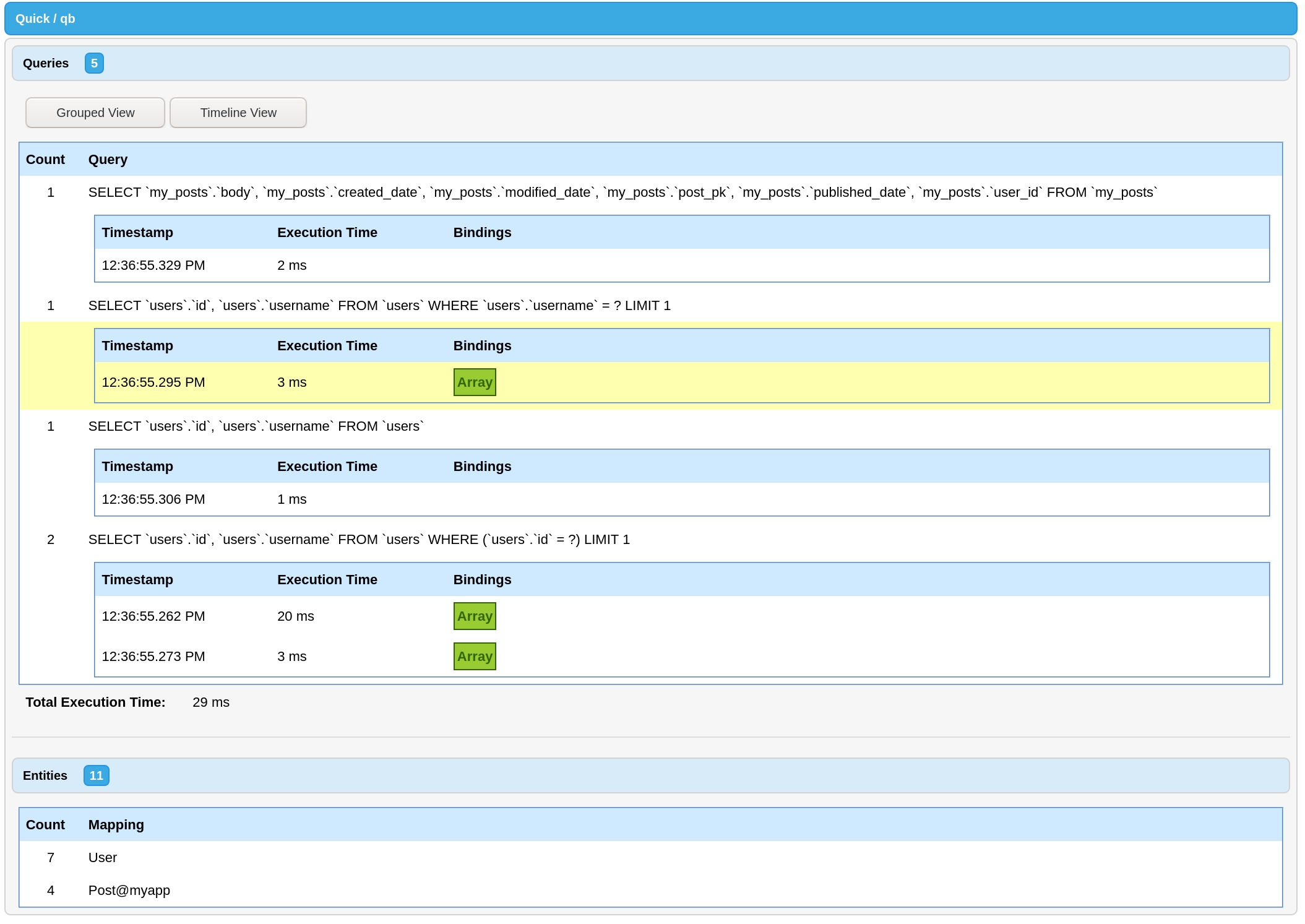
Starting in cbDebugger 2.0.0 you can view all your qb queries for a request. This is enabled by default if you have qb installed. Make sure your debug output is configured correctly and scroll to the bottom of the page to find the debug output.
qb is set to log all queries to a debug log out of the box. To enable this behavior, configure LogBox to allow debug logging from qb's grammar classes.
ColdBox Interception Points can also be used for logging, though you may find it easier to use LogBox. See the documentation for qb's Interception Points for more information.
Name
Common Table Expressions (CTEs) are powerful SQL concept that allow you to create re-usable temporal result sets, which can be referenced as a table within your SQL. CTEs are available in many common database engines and are available in latest versions of all of the support grammars.
CTEs come in two basic types:
Non-recursive — These are statements that do not reference themselves, in simplified terms they are like a derived table that can be referenced by a user-defined name.
Recursive — Recursive CTEs reference themselves and are generally used for creating hierarchical data—such as creating a parent/child relationship within a table.
While all of the grammars currently support CTEs, there is enough difference between the various databases implementations of CTEs that unless your CTEs are fairly basic, using CTEs within your project will most likely tie your project to a specific database, unless you account for the differences in your code.
However, CTEs are can be extremely useful to solve certain use cases.
To add CTEs to your queries, you have two methods available:
with() — Allows you to define a non-recursive CTE.
withRecursive() — Allows you to define a recursive CTE.
You can build a CTE using a function:
Alternatively, you can use a QueryBuilder instance instead of a function:
A single query can reference multiple CTEs:
IMPORTANT — The way the SQL in a recursive CTEs are written, using them in your code is likely to lock in you in to a specific database engine, unless you structure your code to build the correct SQL based on the current grammar being used.
Here is an example of building a recursive CTE using SQL Server which would return all parent/child rows and show their generation/level depth:
Before v13.0.0, internally columns were stored as string values or raw Expression instances. Now, they are stored as structs representing the column. This was to allow aliasing and renaming of subselect columns more easily.
This change shouldn't break anything for end users. The only people who need to check their code are Grammar authors, as the Grammars will now be passed an array of column structs instead of simple values.
Column types follow the format: { "type": "string", "value": "any" }. For simple columns this shows as { "type": "simple", "value": "name" }. For expressions this shows as { "type": "raw", "value": Expression Instance } , etc.
Previously, when passing a query param struct as a binding, qb would use the keys it cared about and would ignore the rest. Now, qb will validate the incoming param to make sure it is a valid query param struct. A valid query param struct contains NO keys that are not found on cfqueryparam. The main reason for this is to catch bugs where the value of a column should be JSON and instead of passing the result of serializeJSON the struct itself is passed.
This change may cause some of your existing queries to begin throwing QBInvalidQueryParam exceptions. Remove the non-standard keys to fix the error.
autoAddScale settingIt is no longer possible to disable auto scale being added. You can still override any scale by providing it in your query param struct.
strictDateDetection settingIt is no longer possible to disable strict date detection being performed. You can still override the cfsqltype by specifying it in your query param struct.
autoDeriveNumericType settingIt is no longer possible to disable the numeric type detection. You can specify the numeric types you want used in your settings. You can also override the cfsqltype by specifying it in your query param struct.
The , , , and methods now accept a defaultValue argument. This comes before the defaultOptions argument. If you are using positional parameters with any of these functions, update your code to the new method signature.
This only affects people instantiating QueryUtils manually (such as non-ColdBox users) and instantiating with positional arguments.
Please review the QueryUtils init function and update your code to the new method signature, if needed.
cfsqltype attributes no longer include the CF_SQL_ prefixAlthough it shouldn't impact any running application, out of an abundance of caution, we are labeling the drop of theCF_SQL_ prefix as a breaking change. This prefix has been optional since Adobe ColdFusion 11.
Grammars will be able to influence the cfsqltype and value when passing in a literal boolean value as a binding. Postgres and SQLite have boolean support, so they will keep the literal boolean value and use acfsqltype of CF_SQL_OTHER. SQL Server uses CF_SQL_BIT, Oracle usersCF_SQL_NUMERIC, and MySQL uses CF_SQL_TINYINT — all of these will convert literal boolean values to either 1 or 0. This behavior is skipped when providing a custom cfsqltype. Custom grammars can implement thegetBooleanSqlType and convertBooleanValue methods to customize this behavior.
Most people will not need to change anything in their code for this breaking change.
In certifying qb for BoxLang, we discovered that some of the way qb had worked for years was due to a lucky interaction between properties and functions sharing a name. Both of these values are put into the variables scope, and the way qb shared some of these names like the from method as well as the from property only worked because of the way Lucee and ACF ordered defining the function and properties. BoxLang is more strict in this regard and probably for the best. You can probably imagine how setting variables.from inside a function called from would maybe work once and then cause a very strange bug when trying to call the from function internally again. Because of these reasons, the following properties have had their names changed:
from -> tableName
nullable -> isNullable
unique -> isUnique
unsigned -> isUnsigned
The following functions have had their signatures updated:
compileFrom -> compileTableName( required QueryBuilder query, required any tableName )
For the majority of users, this will not take any updates to their code to work with qb 10. For users who have created a custom grammar, column type, or a custom QueryBuilder class, you will need to make sure you code uses the updated property names and functions.
Adobe has ended support for ACF 2016, and so must we.
uuid split into and CFML's uuid does not match other languages; it's one character shorter. Because of this, the value from createUUID() cannot be used in some database column types like SQL Server's uniqueidentifier. This made for some confusion in SchemaBuilder since it wasn't clear if uuid meant CFML's definition or the wider world's definition.
So, the types have been split, following Lucee's pattern, into (matching CFML's ) and (matching Java's UUID or on Lucee).
If you are using uuid with 36 character UUIDs or SQL Server's uniqueidentifier columns, please migrate your uuid calls to guid.
Popular grid frameworks like Quasar and Datatables use values of 0 or -1 to return all rows from a query. This is now supported in qb. Previously, it generated an invalid query (SELECT * FROM users LIMIT 0 OFFSET 0).
If this behavior is fine for your application, you don't need to change anything.
This behavior can be customized by providing a callback to the shouldMaxRowsOverrideToAll setting or init argument.
If you need to revert to the previous behavior, provide the following as the shouldMaxRowsOverrideToAll setting:
Introduced in , this feature uses separate SQL types for integers and decimals to increase performance in certain database grammars. This feature is now the default, but the previous behavior can be enabled by setting autoDeriveNumericType to false.
This behavior should be an improvement in most every case without any changes needed.
If you need to revert to the previous behavior, provide the following as the autoDeriveNumericType setting:
Note: The option to revert to the old behavior will be removed in the next major version.
Introduced in , this feature only returns a SQL type of CF_SQL_TIMESTAMP if the param is a date object, not just a string that looks like a date. This helps avoid situations where some strings were incorrectly interpreted as dates. For many, the migration path is straightforward — calls to are already date objects as well as any function that operates on a date. If you need to parse a string as a date, the built-in function can accomplish that.
If you are relying on qb treating any strings as dates you will need to parse them as actual date objects first. (You can do so using functions like .
If you need to revert to the previous behavior, provide the following as the strictDateDetection setting:
Note: The option to revert to the old behavior may be removed in the next major version.
This isn't a breaking change that will affect most people. In fact, it will most likely improve your code.
Previously, when using the control flow function, you were fully responsible for the wrapping of your where statements. For example, the following query:
Would generate the following SQL:
The problem with this statement is that the OR can short circuit the active check.
The fix is to wrap the LIKE statements in parenthesis. This is done in qb using a function callback to where.
When using the when control flow function, it was easy to miss this. This is because you are already in a closure - it looks the same as when using where to group the clauses.
In qb 8.0.0, when will automatically group added where clauses when needed. That means our original example now produces the SQL we probably expected.
Grouping is not needed if there is no OR combinator. In these cases no grouping is added.
If you had already wrapped your expression in a group inside the when callback, nothing changes. Your code works as before. The OR combinator check only works on the top most level of added where clauses.
Additionally, if you do not add any where clauses inside a when callback, nothing changes from qb 7.
The breaking change part is if you were relying on these statements residing at the same level without grouping. In those cases, you may pass the withoutScoping flag to the when callback.
Support for Lucee 4.5 and Adobe ColdFusion 11 has been dropped. If you need support for these engines, please remain on an earlier version of qb.
MSSQLGrammar was visually too close to MySQLGrammar and was hard to differentiate quickly. SqlServerGrammar is much more unique and easily identifiable. Additionally, more people that use this library refer to their database engine as "SQL Server" than "MSSQL".
To migrate, replace any instances of MSSQLGrammar with SqlServerGrammar. Make sure to also append the @qb namespace, if needed,
Variadic parameter support was the ability to pass any number of arguments to certain methods like select.
This code came with a slight performance cost and readability cost. That, combined with the fact that the above syntax is very close to an array, we are dropping support for variadic parameters. To migrate, wrap instances of variadic parameters in an array:
In previous versions, the value passed to defaultGrammar was used to look up a mapping in the @qb namespace. This made it difficult to add or use grammars that weren't part of qb. (You could get around this be registering your custom grammar in the @qb namespace, but doing so seemed strange.)
To migrate this code, change your defaultGrammar to be the full WireBox mapping in your moduleSettings:
A defaultValue parameter and optional exception throwing was added to value. This pushed the options struct to the end of the method. If you are using positional parameters with value, you will need to update your method calls to either use named parameters or the new positions.
callback to queryAll methods that could conceivably take a subquery as well as a value now accept a closure or another builder instance to use as a subquery. This led to changing the callback argument to query in the following cases:
whereSub
whereInSub
whereExists
If you are using named parameters with any of the above methods you will need to migrate your method calls.
Version v5.0.0 brings support for SchemaBuilder inside qb. To avoid naming confusion, Builder was renamed to QueryBuilder. Any references in your code to Builder@qb need to be updated to QueryBuilder@qb.
Dropping tables straightforward in qb.
For dropping columns or constraints, see Alter.
Drop a table from the database.
Example:
SchemaBuilder
SQL (MySQL)
Drop a table from the database if it exists.
Example:
SchemaBuilder
SQL (MySQL)
Drop a table from the database.
Example:
SchemaBuilder
SQL (MySQL)
Truncates the data from a table.
Example:
SchemaBuilder
SQL (MySQL)
// manually
var schema = new qb.models.schema.SchemaBuilder(
grammar = new qb.models.grammars.MySQLGrammar(),
defaultOptions = { datasource: "my_datasource" }
defaultSchema = ""
);
// WireBox
var schema = wirebox.getInstance( "SchemaBuilder@qb" );schema.create( "users", function( table ) {
table.increments( "id" );
table.string( "email" );
table.string( "password" );
table.timestamp( "created_date" ).nullable();
table.timestamp( "modified_date" ).nullable();
} );CREATE TABLE `users` (
`id` INTEGER UNSIGNED NOT NULL AUTO_INCREMENT,
`email` VARCHAR(255) NOT NULL,
`password` VARCHAR(255) NOT NULL,
`created_date` TIMESTAMP,
`modified_date` TIMESTAMP,
CONSTRAINT `pk_users_id` PRIMARY KEY (`id`)
)schema.alter( "users", function( table ) {
table.addConstraint( table.unique( "username" ) );
table.dropColumn( "last_logged_in" );
} );ALTER TABLE `users` ADD CONSTRAINT `unq_users_username` UNIQUE (`username`);
ALTER TABLE `users` DROP COLUMN `last_logged_in`;schema.drop( "user_logins" );DROP TABLE `user_logins`schema.rename( "posts", "blog_posts" );RENAME TABLE `posts` TO `blog_posts`schema.hasTable( "users" );SELECT 1
FROM `information_schema`.`tables`
WHERE `table_name` = 'users'schema.hasColumn( "users", "last_logged_in" );SELECT 1
FROM `information_schema`.`columns`
WHERE `table_name` = 'users'
AND `column_name` = 'last_logged_in'var q = query.from( "users" )
.where( "active", "=", 1 );
writeOutput( q.toSQL() );SELECT * FROM "users" WHERE "active" = ?var q = query.from( "users" )
.where( "active", "=", 1 );
writeOutput( q.toSQL( showBindings = true ) );SELECT * FROM "users" WHERE "active" = {"value":1,"cfsqltype":"CF_SQL_NUMERIC","null":false}var q = query.from( "users" )
.where( "active", "=", 1 );
writeOutput( q.toSQL( showBindings = "inline" ) );SELECT * FROM "users" WHERE "active" = 1query.from( "users" )
.tap( function( q ) {
writeOutput( q.toSQL() & "<br>" );
} )
.where( "active", "=", 1 )
.tap( function( q ) {
writeOutput( q.toSQL() & "<br>" );
} );SELECT * FROM "users"
SELECT * FROM "users" WHERE "active" = ?query.from( "users" )
.dump()
.where( "active", "=", 1 )
.dump( label = "after where", showBindings = true, abort = true )
.get();SELECT * FROM "users"
SELECT * FROM "users" WHERE "active" = ?[
{
"sql": "SELECT * FROM `users` WHERE `active` = ?",
"bindings": [ { "value": 1, "sqltype": "bit" } ],
"options": { "datasource": "main" },
"returnObject": "array",
"pretend": false,
"result": {},
"executionTime": 21
}
]logbox = {
debug = [ "qb.models.Grammars" ]
};A callback function used to define the table body. It is passed a Blueprint as the only argument.
options
struct
false
{}
Options to pass to queryExecute.
execute
boolean
false
true
Run the query immediately after building it.
A callback function used to define the changes to the table. It is passed a Blueprint as the only argument.
options
struct
false
{}
Options to pass to queryExecute.
execute
boolean
false
true
Run the query immediately after building it.
Options to pass to queryExecute.
execute
boolean
false
true
Run the query immediately after building it.
The new table name.
options
struct
false
{}
Options to pass to queryExecute.
execute
boolean
false
true
Run the query immediately after building it.
Options to pass to queryExecute.
execute
boolean
false
true
Run the query immediately after building it.
The column to check for in the table.
options
struct
false
{}
Options to pass to queryExecute.
execute
boolean
false
true
Run the query immediately after building it.
columns
Array<String>
false
[]
An optional array containing the columns to include in the CTE.
recursive
boolean
false
false
Determines if the CTE statement should be a recursive CTE. Passing this as an argument is discouraged. Use the dedicated withRecursive where possible.
columns
Array<String>
false
[]
An optional array containing the columns to include in the CTE.
Name
Type
Required
Default
Description
name
string
true
The name of the CTE.
input
QueryBuilder | Function
true
Name
Type
Required
Default
Description
name
string
true
The name of the CTE.
input
QueryBuilder | Function
true
Either a QueryBuilder instance or a function to define the derived query.
Either a QueryBuilder instance or a function to define the derived query.
default -> defaultValue
comment -> commentValue
onUpdate -> onUpdateAction
onDelete -> onDeleteAction
orWhereExistswhereNotExists
andWhereNotExists
orWhereNotExists
whereNullSub
orderBySub
subSelect
execute
boolean
false
true
Run the query immediately after building it.
Options to pass to queryExecute.
execute
boolean
false
true
Run the query immediately after building it.
Options to pass to queryExecute.
execute
boolean
false
true
Run the query immediately after building it.
Argument
Type
Required
Default
Description
table
string
true
The name of the table to drop.
options
struct
false
{}
Options to pass to queryExecute.
execute
boolean
false
true
Run the query immediately after building it.
Argument
Type
Required
Default
Description
table
string
true
The name of the table to drop.
options
struct
false
{}
view
string
true
The name of the view to drop.
options
struct
false
table
string
true
The name of the table to truncate the data.
options
struct
false
Options to pass to queryExecute.
{}
{}
// qb
query.with( "UserCTE", function ( q ) {
q
.select( [ "fName as firstName", "lName as lastName" ] )
.from( "users" )
.where( "disabled", 0 );
} )
.from( "UserCTE" )
.get();WITH `UserCTE` AS (
SELECT
`fName` as `firstName`,
`lName` as `lastName`
FROM `users`
WHERE `disabled` = 0
) SELECT * FROM `UserCTE`// qb
var cte = query
.select( [ "fName as firstName", "lName as lastName" ] )
.from( "users" )
.where( "disabled", 0 );
query.with( "UserCTE", cte )
.from( "UserCTE" )
.get();WITH `UserCTE` AS (
SELECT
`fName` as `firstName`,
`lName` as `lastName`
FROM `users`
WHERE `disabled` = 0
)
SELECT * FROM `UserCTE`query.with( "UserCTE", function ( q ) {
q.select( [ "id", "fName as firstName", "lName as lastName" ] )
.from( "users" )
.where( "disabled", 0 );
} )
.with( "BlogCTE", function ( q ) {
q.from( "blogs" )
.where( "disabled", 0 );
} )
.from( "BlogCTE as b" )
.join( "UserCTE as u", "b.Creator", "u.id" )
.get();WITH `UserCTE` AS (
SELECT
`id`,
`fName` as `firstName`,
`lName` as `lastName`
FROM `users`
WHERE `disabled` = 0
),
`BlogCTE` AS (
SELECT *
FROM `blogs`
WHERE `disabled` = 0
)
SELECT *
FROM `BlogCTE` AS `b`
INNER JOIN `UserCTE` AS `u`
ON `b`.`Creator` = `u`.`id`query
.withRecursive( "Hierarchy", function ( q ) {
q.select( [ "Id", "ParentId", "Name", q.raw( "0 AS [Generation]" ) ] )
.from( "Sample" )
.whereNull( "ParentId" )
// use recursion to join the child rows to their parents
.unionAll( function ( q ) {
q.select( [
"child.Id",
"child.ParentId",
"child.Name",
q.raw( "[parent].[Generation] + 1" )
] )
.from( "Sample as child" )
.join( "Hierarchy as parent", "child.ParentId", "parent.Id" );
} );
}, [ "Id", "ParentId", "Name", "Generation" ] )
.from( "Hierarchy" )
.get();WITH [Hierarchy] ([Id], [ParentId], [Name], [Generation]) AS (
SELECT
[Id],
[ParentId],
[Name],
0 AS [Generation]
FROM [Sample]
WHERE [ParentId] IS NULL
UNION ALL
SELECT
[child].[Id],
[child].[ParentId],
[child].[Name],
[parent].[Generation] + 1
FROM [Sample] AS [child]
INNER JOIN [Hierarchy] AS [parent]
ON [child].[ParentId] = [parent].[Id]
) SELECT * FROM [Hierarchy]moduleSettings = {
"qb": {
"shouldMaxRowsOverrideToAll": function( maxRows ) {
return false;
}
}
};moduleSettings = {
"qb": {
"autoDeriveNumericType": false
}
};moduleSettings = {
"qb": {
"strictDateDetection": false
}
};qb.from( "users" )
.where( "active", 1 )
.when( len( url.q ), function( q ) {
q.where( "username", "LIKE", q & "%" )
.orWhere( "email", "LIKE", q & "%" );
} );SELECT *
FROM "users"
WHERE "active" = ?
AND "username" = ?
OR "email" = ?qb.from( "users" )
.where( "active", 1 )
.where( function( q ) {
q.where( "username", "LIKE", q & "%" )
.orWhere( "email", "LIKE", q & "%" );
} );SELECT *
FROM "users"
WHERE "active" = ?
AND (
"username" = ?
OR "email" = ?
)// qb 8.0.0
qb.from( "users" )
.where( "active", 1 )
.when( len( url.q ), function( q ) {
q.where( "username", "LIKE", q & "%" )
.orWhere( "email", "LIKE", q & "%" );
} );SELECT *
FROM "users"
WHERE "active" = ?
AND (
"username" = ?
OR "email" = ?
)// qb 8.0.0
qb.from( "users" )
.where( "active", 1 )
.when( url.keyExists( "admin" ), function( q ) {
q.where( "admin", 1 )
.whereNotNull( "hireDate" );
} );SELECT *
FROM "users"
WHERE "active" = ?
AND "admin" = ?
AND "hireDate IS NOT NULLqb.from( "users" )
.where( "active", 1 )
.when( len( url.q ), function( q ) {
q.where( function( q2 ) {
q2.where( "username", "LIKE", q & "%" )
.orWhere( "email", "LIKE", q & "%" );
} );
} );SELECT *
FROM "users"
WHERE "active" = ?
AND (
"username" = ?
OR "email" = ?
)// qb 8.0.0
qb.from( "users" )
.where( "active", 1 )
.when(
condition = len( url.q ),
onTrue = function( q ) {
q.where( "username", "LIKE", q & "%" )
.orWhere( "email", "LIKE", q & "%" );
},
withoutScoping = true
);SELECT *
FROM "users"
WHERE "active" = ?
AND "username" = ?
OR "email" = ?qb.select( "name", "email", "createdDate" );qb.select( [ "name", "email", "createdDate" ] );moduleSettings = {
"qb": {
"defaultGrammar": "MSSQLGrammar@qb"
}
};public any function value(
required string column,
string defaultValue = "",
boolean throwWhenNotFound = false,
struct options = {}
);schema.drop( "user_logins" );DROP TABLE `user_logins`schema.dropIfExists( "user_logins" );DROP TABLE IF EXISTS `user_logins`schema.view( "user_logins" );DROP VIEW `user_logins`schema.truncate( "user_logins" );TRUNCATE TABLE `user_logins`You may not always want to select all columns from a database table. You can influence the select list of a query with the following methods.
Individual columns can contain fully-qualified names (some_table.some_column), table aliases (alias.some_column), and even set column aliases themselves (some_column AS c). The columns argument can be a single column, a list of columns (comma-separated), or an array of columns.
When calling select any previous columns are discarded. If you want to incrementally select columns, use the addSelect method.
If you pass no columns to this method, it will default to "*".
Calling distinct will cause the query to be executed with the DISTINCT keyword.
This method adds the columns passed to it to the currently selected columns.
If the QueryBuilder is currently selecting all columns ("*") when this method is called, the incoming columns will becoming the only columns selected.
A shortcut to use a raw expression in the select clause.
The expression is added to the other already selected columns.
(To learn more about raw and expressions, check out the docs on .)
The method lets you pass either a callback or a QueryBuilder instance to be used as a subselect expression. If a callback is passed it will be passed a new query instance as the only parameter.
The subselect is added to the other already selected columns.
Clears out the selected columns for a query along with any configured select bindings.
Clears out the selected columns for a query along with any configured select bindings. Then sets a selection of columns to select from the query. Any valid argument to can be passed here.
Clears out the selected columns for a query along with any configured select bindings. Then adds an Expression or array of expressions to the already selected columns.
Name
Type
Required
Default
Description
columns
string | array
false
"*"
A single column, list of columns, or array of columns to retrieve.
Name
Type
Required
Default
Description
state
boolean
false
true
Value to set the distinct flag.
Name
Type
Required
Default
Description
columns
string | array
true
A single column, list of columns, or array of columns to add to the select.
Name
Type
Required
Default
Description
expression
any
true
The raw expression for the select statement.
bindings
array
false
[]
Name
Type
Required
Default
Description
alias
string
true
The alias for the subselect expression.
query
Function | QueryBuilder
true
Name
Type
Required
Default
Description
No arguments
``
Name
Type
Required
Default
Description
columns
string | array
false
"*"
A single column, list of columns, or array of columns to retrieve.
Name
Type
Required
Default
Description
expression
any
true
The raw expression for the select statement.
bindings
array
false
[]
Any bindings needed for the raw expression.
The callback or query to use in the subselect.
Any bindings needed for the raw expression.
query.select( [ "fname AS firstName", "age" ] ).from( "users" );SELECT `fname` AS `firstName`, `age` FROM `users`query.select( "username" ).distinct().from( "users" );SELECT DISTINCT `username` FROM `users`query.addSelect( [ "fname AS firstName", "age" ] ).from( "users" );SELECT `fname` AS `firstName`, `age` FROM `users`query.selectRaw( "YEAR(birthdate) AS birth_year" ).from( "users" );SELECT YEAR(birthdate) AS birth_year FROM `users`query.subSelect( "last_login_date", function( q ) {
q.selectRaw( "MAX(created_date)" )
.from( "logins" )
.whereColumn( "users.id", "logins.user_id" );
} ) ).from( "users" );SELECT (
SELECT MAX(created_date)
FROM `logins`
WHERE `users`.`id` = `logins`.`user_id`
) AS `last_login_date`
FROM `usersquery.from( "users" )
.select( [ "fname AS firstName", "age" ] )
.clearSelect();SELECT * FROM `users`query.from( "users" )
.select( [ "fname AS firstName", "age" ] )
.reselect( "username" );SELECT `username` FROM `users`query.from( "users" )
.select( [ "fname AS firstName", "age" ] )
.reselectRaw( "YEAR(birthdate) AS birth_year" );SELECT YEAR(birthdate) AS birth_year FROM `users`Fixed another instance of updating the interceptorService to correctly use announce or processState.
Fix for mechanism used to determine if the interceptor service should use announce or processState.
Use announce as the default method for announcing interception points. (Falls back to processState on ColdBox versions before 6.0.0.)
Process subqueries when a closure or Builder instance is passed as the second column to .
Fix retrieving count for pagination when the query has both a GROUP BY and an ORDER BY clause.
BoxLang: Minor fix for isBuilder checks on BoxLang
Remove duplicate calls for performance improvements.
SqlServerGrammar: Move clause to last position
Fix for using operators in
Reset tableName in aggregate queries
Persist constructor argument in QueryUtils.
This was added in 12.0.0, but because it was not persisted until now, this may appear as a breaking change in your application. A reminder that if you rely on empty strings being inserted into your application as empty strings to turn this setting off.
Apply a .limit( 1 ) to the aggregate.
Allow null values in the update clause of queries.
Aliases in subselects are now renamed correctly when using .
TestBox Helpers:
expectToHaveCount
expectNotToHaveCount
Previously, when passing a query param struct as a binding, qb would use the keys it cared about and would ignore the rest. Now, qb will validate the incoming param to make sure it is a valid query param struct. A valid query param struct contains NO keys that are not found on cfqueryparam. The main reason for this is to catch bugs where the value of a column should be JSON and instead of passing the result of serializeJSON the struct itself is passed.
This change may cause some of your existing queries to begin throwing QBInvalidQueryParam exceptions. Remove the non-standard keys to fix the error.
QueryUtils: Add name as a valid query param key.
qb now checks the shape of query param structs passed as bindings and will throw a QBInvalidQueryParam if there are any invalid keys.
This is to help developers who may have passed a struct as a param that they meant to first serialize to JSON.
qb now automatically converts an empty string value to null when inserting into a query. If your application relies on inserting or updating values to an empty string, set this setting to false.
autoAddScale setting.qb now always automatically adds a scale to decimal and float query params. This has been the default since . This can still be overridden by providing a full struct query param when adding bindings.
strictDateDetection settingqb will now only use type introspection over the isDate function for all date detection. This has been the default since .
autoDeriveNumericType settingqb will only use INTEGER or DECIMLAL sql types instead of the more ambiguous NUMERIC. This has been the default since .
The argument order change to account for the new defaultValue argument. If you are using positional parameters with these functions, please migrate to the new function signatures.
CF_SQL prefixThe CF_SQL prefix for cfsqltype has been optional since , so while this change should not impact any running application, we are labelling it as a breaking change out of an abundance of caution.
QueryUtilsTo support removal of the settings above and to add a new setting to convert empty strings to null, the QueryUtils class' initializer has been modified. If you are creating this class manually, please check the API docs and upgrade to the new initializer arguments.
New DerbyGrammar support.
Allow queries .
Add a new shortcut method for returning( "*" ).
Compatibility fixes for BoxLang and Adobe ColdFusion.
Compatibility for pure BoxLang (without the bx-compat-cfml module).
Fix the count method for pagination when being used with a query with DISTINCT turned on.
QueryBuilder: Support JOINS in DELETE statements for supported grammars, like MySQL and SQL Server.
QueryBuilder: Don't overly specify that grammars must extend BaseGrammar. It's just an implicit interface, after all.
QueryBuilder: Have aliases work with full server qualifications, like ServerName.schemaName.tableName.
Either a Grammar setting (setShouldWrapValues( true|false )) or for a one-off Query Builder ( / ) can control whether identifiers like table names, columns, etc. are wrapped.
This release includes updates to be compatible with the latest releases of BoxLang.
Grammars will be able to influence the cfsqltype and value when passing in a literal boolean value as a binding. Postgres and SQLite have boolean support, so they will keep the literal boolean value and use a cfsqltype of CF_SQL_OTHER. SQL Server uses CF_SQL_BIT, Oracle users CF_SQL_NUMERIC, and MySQL uses CF_SQL_TINYINT — all of these will convert literal boolean values to either 1 or 0. This behavior is skipped when providing a custom cfsqltype.
Additionally, attempting to change the grammar with any bindings currently configured will throw an exception. This is because the bindings are converted via the grammar when added to the builder and cannot be changed retroactively when setting a new grammar. Set the grammar first before configuring the query to avoid this exception.
QueryUtils: Fix timestamp formatting losing timezone information
QueryUtils: Manually construct ISO 8601 timestamps due to lack of Adobe support
Full compatibility for running on with the module.
Internal property name changes for BoxLang compatibility as well as cleaner code. (This may cause breaking changes, in rare cases. See the for more details.)
Fix missing parseNumber function for ACF
Add alias to clone()
Support alias renaming using
Add in missing join compilations.
Implement and for supported Grammars
Expand type annotation for from. This can be a string or an Expression.
Make and publicly accessible.
Add MariaDB support to AutoDiscover@qb grammar. (It will choose the MySQLGrammar@qb.)
Add and methods, inspired by .
Better Support for OracleGrammar in SchemaBuilder
Fix trigger creation by escaping colons (:).
Try to drop associated sequences and triggers when dropping a table.
Better support for creating a table in a different schema by only checking for the last identifier as the table name in and .
Allow for setting a property on a SchemaBuilder instance.
The defaultSchema will be used for methods like and . A passed in schema will still take precedence.
Use CHAR for GUID and UUID types in MySQL.
Don't call getUtils from inside QueryUtils.
Make publicly available in QueryUtils.
This is used by qb to inline query bindings in toSQL or dump calls and can be used to inline the bindings in other tools like.
Use named parameters when passing to BaseGrammar. This avoids problems where custom Grammars have extra arguments and we add arguments to the official grammar.
Add the ability to pretend to run queries, both in and .
Add query logging to and instances.
Use varchar for clob when converting to a CFML query. This is used when removing a column like in Oracle pagination.
Handle more numeric SQL types like AtomicInteger and Long.
Add millisecond accuracy to inline bindings.
Separate having bindings from where bindings.
We now support the returning function inside update and delete statements for supported Grammars. Supported grammars are SQL Server, Postgres, and SQLite.
Fix raw table name parsing in update queries for SqlServerGrammar.
Fix truncating text in nested wheres inside joins.
Fix out of order bindings in joinSub
Switch from table_catalog to table_schema when referencing schema for PostgresGrammar.
CommandBox-friendly injections for SQL Commenter.
Add support for from bindings, used especially in fromSub queries.
This release reverts the use of native returntypes. There are too many bugs between engine implementations to make it viable. No end-user changes should be visible.
Make withReturnFormat a public method.
Add ability to inline bindings when calling toSQL and dump. These strings can be executed in a DBMS application.
Move coldbox namespace injection to the function body so CommandBox doesn't blow up.
Correctly apply native returntypes after newQuery and withReturnFormat.
Fix losing defaultOptions when calling newQuery.
Shortcut for no return format using none.
Allow for native struct returntypes. Requires a return format of none.
Fix RouteInfoCommenter file name.
Adobe has ended support for ACF 2016, and so must we.
uuid split into and CFML's uuid does not match other languages; it's one character shorter. Because of this, the value from createUUID() cannot be used in some database column types like SQL Server's uniqueidentifier. This made for some confusion in SchemaBuilder since it wasn't clear if uuid meant CFML's definition or the wider world's definition.
So, the types have been split, following Lucee's pattern, into (matching CFML's ) and (matching Java's UUID or on Lucee).
Popular grid frameworks like Quasar and Datatables use values of 0 or -1 to return all rows from a query. This is now supported in qb. Previously, it generated an invalid query (SELECT * FROM users LIMIT 0 OFFSET 0).
This behavior can be customized by providing a callback to the shouldMaxRowsOverrideToAll setting or init argument. For instance, to revert to the previous behavior you would set the function as follows:
Introduced in , this feature uses separate SQL types for integers and decimals to increase performance in certain database grammars. This feature is now the default, but the previous behavior can be enabled by setting autoDeriveNumericType to false.
Note: the option to revert to the old behavior will be removed in the next major version.
Introduced in , this feature only returns a SQL type of CF_SQL_TIMESTAMP if the param is a date object, not just a string that looks like a date. This helps avoid situations where some strings were incorrectly interpreted as dates. For many, the migration path is straightforward — calls to are already date objects as well as any function that operates on a date. If you need to parse a string as a date, the built-in function can accomplish that.
Note: the option to revert to the old behavior may be removed in the next major version.
Thanks to , qb now supports SQLite for both QueryBuilder and SchemaBuilder. You can use it in your apps by specifying SQLiteGrammar@qb as the default grammar.
sqlCommenter is a for adding contextual information as a comment at the end of a SQL statement. This can give insights into your application, especially when diagnosing slow queries. Examples of the information you can append to your queries are route, handler, action, version, and others, as well as the ability to add your own, such as loggedInUser and more.
There's a new shortcut method to return qb.sum( qb.raw( expression ) ). You're welcome. 😉
Some grammars, like SQL Server, do not treat simple indexes as constraints. For this reason, we've added a method alongside the existing .
will return either an array of column names for the configured table or the query that is generated by cfdbinfo for the configured table. Especially useful when working with dynamically generated grids.
Correctly compile insertUsing statements that use Common Table Expressions (CTEs).
Update announceInterception calls for ColdBox 7. (Thank you, Michael Born.)
Fixed insertUsing not placing Common Table Expressions (CTEs) in the correct order.
Add a fetch method inspired by .
There are now used during the inferSQLType check in QueryUtils. This is an opt-in feature, enabled by setting the autoDeriveNumericType setting. The previous approach was to use CF_SQL_NUMERIC for all numeric types which could cause performance issues in some grammars as they interpreted all CF_SQL_NUMERIC as floating point numbers.
HOLDLOCK and READPAST are mutually exclusive table locks in SQL Server but were mistakenly being applied together.
Specify defaultOptions
Better parsing of raw statements when deriving columns.
Insert data based off of a callback or builder using .
Insert data ignoring duplicate key errors using .
Use a callback or builder as the source for an statement.
Don't uppercase quoted aliases in Oracle.
Fix for aliases in update statements.
Don't sort columns for insertUsing.
Fix for Oracle returning custom column types when renaming a column.
Explicit arguments scoping.
arrayEach is slow compared to merging arrays.
Fix wheres with joins in update statements.
Add better null handling to inferSqlType.
Correctly format columns being updated.
Add an method. upsert can update or insert multiple records at once depending on if a column is matched.
Allow expressions in and . Also add a and helper method to make that pattern more ergonomic.
Allow . (This is not supported on Oracle.)
Better handling of and clauses in queries.
Allow any value to be returned from including strings, numbers, and dates.
Provide default values for and if no records are returned.
Correctly wrap CTE expressions with parenthesis when required in certain grammars.
SchemaBuilder can now be configured with . (Default options will still be overridden by options passed to each SchemaBuilder method.)
Add a method to QueryBuilder.
Add helpers such as , , , and .
Correct return aggregate values for date values from max and min executors.
Add support for and .
Swap master branch to main branch.
Remove unnecessary injection for QueryUtils.
Account for raw expressions when generating mementos for comparison
Add support for & types for MySQLGrammar.
Fix limit on .
Migrate release process to GitHub Actions.
Add a simplePaginate pagination method for quicker performance when total records or total pages are not needed or too slow.
Introduce a setting to specify the default numeric SQL type.
Default to html for the dump format argument to writeDump.
Correctly use the passed in strictDateDetection to the QueryUtils.cfc.
📹
Added a command to aid in debugging a query while chaining.
📹
now can accept bindings.
A new, optional setting is available to check the underlying Java class of a date object instead of using isDate.
Ignore select bindings for aggregate queries.
Allow spaces in table aliases.
Split FLOAT and DECIMAL column types in SQL Server.
Clear orderBy bindings when calling clearOrders.
Trim table definitions before searching for aliases. Makes qb more lenient with extra whitespace.
📹
`` callbacks now automatically scope and group where clauses when an OR combinator is used.
Combine and orderBy with a new method.
Clear current selected columns with .
Combine and either or with and respectively.
Expose nested where functions to enable advanced query manipulation in downstream libraries like Quick.
Fixes for OracleGrammar including table aliases and wrapped subqueries.
Allow nullable in MySQL.
Return 0 on null .
Match type hints to documentation for functions
Handle enhanced numeric checks with Secure Profile enabled.
Allow raw statements in basic where clauses.
Passed along the options struct to the method when calling .
Allow for space-delimited directions like column DESC.
Add helpful message when trying to use a closure with instead of .
`` and now work with
Handle multi-word columns in queryRemoveColumns.
Remove elvis operator due to ACF compatibility issues
Add support for and data types to .
Fix wrapping of types for Postgres.
Compatibility fix for ACF 2018 and listLast parsing.
Include current_timestamp default for columns in SchemaBuilder.
Ignore table qualifiers for insert and update.
Fix a bug with preventDuplicateJoins when using the closure syntax with a join.
Add executionTime to the data output from BaseGrammar, including being available in interceptors.
Fix a case where a column was not wrapped correctly when a where used a subquery for the value.
Avoid duplicate function due to cbORM / Hibernate bugs when used in the same application.
Split off a private whereBasic method. This is used in Quick to provide extra sql type features.
Add a method. Any already configured orders are cleared. Any orders added after this call will be added as normal.
now can take an array of expressions.
Fixed an issue using column formatters with update and insert.
Using a new preventDuplicateJoins setting in the module settings, qb can detect duplicate joins and ignore them. This is especially useful in a heavily filtered and dynamic query where you may or may not need the join at all or more than one column may need the same join. preventDuplicateJoins defaults to false, so it is opt-in. It may be turned on by default in a future breaking release of qb.
Enhance order by's with more direction options ()
You can now use two shortcut methods: orderByAsc and orderByDesc. Additionally, orderBySub or using orderBy with a closure or builder instance will respect the direction argument.
Fix using whereBetween with query param structs ()
Ignore orders in aggregate queries ()
Format with cfformat ()
Improve column wrapping with trimming ()
Prefer the parent query over magic methods when the parent query has the exact method. ()
Switch to using .
Allow passing query options in to paginate ()
Fix for inserting null values directly ()
Use cfformat for automatic formatting ()
Add a type to the onMissingMethod exception ()
Correctly wrap in MySQLGrammar.
Publish qb apidocs to .
Fix for null values breaking the new checkIsActuallyNumeric method in QueryUtils.
Add a parameterLimit public property to SqlServerGrammar. This property is used in Quick to split up eager loading to work around the 2100 param limit of SQL Server.
Allow a to be set. A parent query will receive any method calls that are not found on the Query Builder instance. This is especially useful for instances like to allow Quick features like scopes to be available inside any closures.
Lambdas (arrow functions) are now allowed wherever closures are allowed.
Add an method.
Allow for fully-qualified column names (table_name.column.name) in the and methods.
Please see the for more information on these changes.
Drop support for Lucee 4.5 and Adobe ColdFusion 11.
MSSQLGrammar renamed to SqlServerGrammar
Remove variadic parameters support in builder functions like select.
Completely revamped documentation! (You're looking at it right now.)
Add new flag to to replace question marks (?) with cfqueryparam-compatible structs for debugging.
Preserve column case and order when converting a query to an array using the default "array" return format.
****
expectToExist
expectNotToExist
New createAs method available on SchemaBuilder.
TRUNCATE tables with SchemaBuilder.truncate( ... ).
SQL Server: Add support for FOR ... clauses.
SQL Server: Allow restricting the DELETE UNMATCHED clause in upsert.
Postgres: Add jsonb() support in SchemaBuilder.
MySQL: Use JSON type for json() columns.
Fix for UPDATE queries with RETURNING clauses being invalid.
Improve performance for exists queries.
Postgres: Use the native UUID type for guid() columns.
Oracle: Support Unicode versions of table column types (e.g. unicodeText())
Added the missing keyword in the Postgres upsert syntax.
Don't add DISTINCT when doing a COUNT(*).
Support aggregates for unioned queries.
Add a new skipLocked flag to lockForUpdate.
Maintain column order when using source in upsert.
Allow updates with subselects using closures or builder instances.
Automatically add a scale to an incoming query param when needed.
Add a whereNotLike shortcut method.
Correctly format a COUNT(DISTINCT column) query.
Only use bulk insert syntax when needed in OracleGrammar due to interactions between the result parameter to cfquery, Lucee, and the Oracle JDBC driver.
Correctly format RETURNING clauses with column formatters and ignoring table qualifiers.
The defaultGrammar mapping needs to be the full WireBox mapping, including the @qb, if needed.
For instance, MSSQLGrammar would become MSSQLGrammar@qb.
This will allow for other grammars to be more easily contributed via third party modules.
The argument names of forPage changed to match the new paginate method.
Add defaultValue and optional exception throwing to value. (This changed the argument order.)
All methods that could conceivably take a subquery as well as a value now accept a closure or another builder instance to use as a subquery. (This changed the argument names in some instances.)
Add a new paginate method to generate a pagination struct alongside the results. This can be customized using a custom PaginationCollector.
Allow raw values in insert calls.
Allow default queryExecute options to be configure at a Query Builder level. This also enables custom QueryBuilders a la Hyper.
Add a whereLike method.
Allow closures to be used in left and right joins.
Provide an addUpdate method to programmatically build the SET clause of an update query.
Add a new chunk method to grab records from the database in small sets.
Add raw in alterTable segments.
Add dropAllObjects support for SqlServerGrammar and OracleGrammar to support migrate fresh from cfmigrations.
Add a renameTable alias for rename.
Remove default constraints when dropping columns with a default on SqlServerGrammar.
Add more column types and column helpers to SchemaBuilder, including:
datetimeTz
lineString
nullableTimestamps
point
polygon
softDeletes
softDeletesTz
timeTz
timestamps
timestampTz
timestampsTz
withCurrent
Argument
Type
Required
Default
Description
comment
string
true
The comment text.
Example:
SchemaBuilder
SQL (MySQL)
Sets a default value for the column.
Note: The value is not escaped, allowing you to specify functions like NOW() or literals like 1. To specify a literal string, wrap the value in quotes.
Argument
Type
Required
Default
Description
value
string
true
The default value.
Example:
SchemaBuilder
SQL (MySQL)
Sets the column to allow null values.
Argument
Type
Required
Default
Description
No arguments
All columns are created as NOT NULL by default. As such, there is no notNull method.
Example:
SchemaBuilder
SQL (MySQL)
Adds the column as a primary key for the table.
Argument
Type
Required
Default
Description
indexName
string
false
A derived name built from the table name and column name.
The name to use for the primary key constraint.
The primaryKey method returns a TableIndex instance. Additional methods can be chained off of it.
Example:
SchemaBuilder
SQL (MySQL)
Creates a foreign key constraint for the column.
Argument
Type
Required
Default
Description
value
string
true
The default value.
IMPORTANT: Additional configuration of the foreign constraint is done by calling methods on the returned TableIndex instance.
Example:
SchemaBuilder
SQL (MySQL)
Sets the column as unsigned.
Argument
Type
Required
Default
Description
No arguments
Example:
SchemaBuilder
SQL (MySQL)
Sets the column to have the UNIQUE constraint.
Argument
Type
Required
Default
Description
No arguments
Example:
SchemaBuilder
SQL (MySQL)
Sets the column to have the a default value of CURRENT_TIMESTAMP.
Argument
Type
Required
Default
Description
No arguments
Example:
SchemaBuilder
SQL (Postgres)
Creates a stored computed column. Computed columns are defined as expressions between other columns and/or constant values. Stored computed columns are saved in the database to avoid computing on every query.
Argument
Type
Required
Default
Description
expression
string
true
The SQL used to define the computed column.
Creates a virtual computed column. Computed columns are defined as expressions between other columns and/or constant values. Virtual computed columns are computed on every query.
Argument
Type
Required
Default
Description
expression
string
true
The SQL used to define the computed column.
qb.from( "users" ).whereAge( ">=", 18 );moduleSettings = {
"qb": {
"shouldMaxRowsOverrideToAll": function( maxRows ) {
return false;
}
}
};schema.create( "products", function( table ) {
table.integer( "price" );
table.integer( "tax" ).storedAs( "price * 0.0675" );
} );CREATE TABLE `products` (
`price` INTEGER NOT NULL,
`tax` INTEGER GENERATED ALWAYS AS (price * 0.0675) STORED NOT NULL
)CREATE TABLE [products] (
[price] INTEGER NOT NULL,
[tax] AS (price * 0.0675) PERSISTED
)CREATE TABLE "products" (
"price" INTEGER NOT NULL,
"tax" INTEGER NOT NULL GENERATED ALWAYS AS (price * 0.0675) STORED
)CREATE TABLE "PRODUCTS" (
"PRICE" NUMBER(10, 0) NOT NULL,
"TAX" NUMBER(10, 0) GENERATED ALWAYS AS (price * 0.0675)
)schema.create( "products", function( table ) {
table.integer( "price" );
table.integer( "tax" ).virtualAs( "price * 0.0675" );
} );CREATE TABLE `products` (
`price` INTEGER NOT NULL,
`tax` INTEGER GENERATED ALWAYS AS (price * 0.0675) VIRTUAL NOT NULL
)CREATE TABLE [products] (
[price] INTEGER NOT NULL,
[tax] AS (price * 0.0675)
)CREATE TABLE "products" (
"price" INTEGER NOT NULL,
"tax" INTEGER GENERATED ALWAYS AS (price * 0.0675) STORED
)CREATE TABLE "PRODUCTS" (
"PRICE" NUMBER(10, 0) NOT NULL,
"TAX" NUMBER(10, 0) GENERATED ALWAYS AS (price * 0.0675) VIRTUAL
)schema.create( "users", function( table ) {
table.integer( "age" ).comment( "Do not lie about your age" );
} );CREATE TABLE `users` (
`age` INTEGER NOT NULL COMMENT `Do not lie about your age`
)schema.create( "users", function( table ) {
table.boolean( "is_active" ).default( 1 );
table.timestamp( "created_date" ).default( "NOW()" );
tablVIRTUAL NOT NULLe.string( "country" ).default( "'USA'" );
} );CREATE TABLE `users` (
`is_active` TINYINT(1) DEFAULT 1,
`created_date` TIMESTAMP DEFAULT NOW(),
`country` VARCHAR(255) DEFAULT 'USA'
)schema.create( "users", function( table ) {
table.timestamp( "last_logged_in" ).nullable()
} );CREATE TABLE `users` (
`last_logged_in` TIMESTAMP
)schema.create( "users", function( table ) {
table.uuid( "id" ).primaryKey();
} );CREATE TABLE `users` (
`id` CHAR(35) NOT NULL,
CONSTAINT `pk_users_id` PRIMARY KEY (`id`)
)schema.create( "users", function( table ) {
table.unsignedInteger( "country_id" ).references( "id" ).onTable( "countries" ).onDelete( "cascade" );
} );CREATE TABLE `users` (
`country_id` INTEGER UNSIGNED NOT NULL,
CONSTRAINT `fk_users_country_id` FOREIGN KEY (`country_id`) REFERENCES `countries` (`id`) ON UPDATE NO ACTION ON DELETE CASCADE
)schema.create( "users", function( table ) {
table.integer( age" ).unsigned();
} );CREATE TABLE `users` (
`age` INTEGER UNSIGNED NOT NULL
)schema.create( "email", function( table ) {
table.string( email" ).unique();
} );CREATE TABLE `users` (
`email` VARCHAR(255) NOT NULL UNIQUE
)schema.create( "posts", function( table ) {
table.timestamp( "posted_date" ).withCurrent();
} );CREATE TABLE "posts" (
"posted_date" TIMESTAMP NOT NULL DEFAULT CURRENT_TIMESTAMP
)Name
Type
Required
Default
Description
column
any
true
The name of the column to order by. An can be passed as well.
direction
string
false
"asc"
Calling orderBy multiple times will append to the order list.
You can also provide an Expression.
Name
Type
Required
Default
Description
column
any
true
The list of the columns to order by. Each column can optionally declare it's sort direction after a pipe delimiter. (e.g. `"height
desc"`).
direction
string
Name
Type
Required
Default
Description
column
any
true
The array of the columns to order by. Each column can optionally declare it's sort direction after a pipe delimiter. (e.g. `"height
desc"`).
direction
string
Name
Type
Required
Default
Description
column
any
true
The array of the columns to order by. Each column can optionally declare it's sort direction using a struct. The struct should have a column key and an optional direction key. (e.g. { column = "favorite_color", direction = "desc" }).
direction
string
false
"asc"
Name
Type
Required
Default
Description
column
any
true
The name of the column to order by. An can be passed as well. An array can be passed with any combination of simple values, array, struct, or list for each entry in the array (an example with all possible value styles: column = [ "last_name", [ "age", "desc" ], { column = "favorite_color", direction = "desc" }, "height|desc" ];. The column argument can also just accept a comman delimited list with a pipe ( | ) as the secondary delimiter denoting the direction of the order by. The pipe delimiter is also used when parsing the column argument when it is passed as an array and the entry in the array is a pipe delimited string.
direction
string
false
"asc"
You can order with a subquery using either a function or a QueryBuilder instance.
Name
Type
Required
Default
Description
expression
string
true
The raw SQL expression to use.
bindings
array
false
[]
No arguments
Name
Type
Required
Default
Description
No arguments
Clears the currently configured orders for the query. Usually used by downstream libraries like Quick.
Name
Type
Required
Default
Description
column
any
true
The name of the column to order by. An can be passed as well.
direction
string
false
"asc"
Clears the currently configured orders for the query and sets the new orders passed in. Any valid argument to orderBy can be passed here. Usually used by downstream libraries like Quick.
SELECT *
FROM `users`
ORDER BY RAND()SELECT *
FROM [users]
ORDER BY NEWID()SELECT *
FROM "users"
ORDER BY RANDOM()SELECT *
FROM "USERS"
ORDER BY DBMS_RANDOM.VALUESELECT *
FROM "users"
ORDER BY RANDOM()SELECT *
FROM "users"
ORDER BY RANDOM()query.from( "users" )
.orderBy( "email" );SELECT *
FROM `users`
ORDER BY `email` ASCquery.from( "users" )
.orderBy( "email" )
.orderBy( "username", "desc" );SELECT *
FROM `users`
ORDER BY
`email` ASC,
`username` DESCquery.from( "users" )
.orderBy( query.raw( "DATE(created_at)" ) );SELECT *
FROM `users`
ORDER BY DATE(created_at)query.from( "users" )
.orderBy( "email|asc,username", "desc" );SELECT *
FROM `users`
ORDER BY
`email` ASC,
`username` DESCquery.from( "users" )
.orderBy( [ "email|asc", "username" ], "desc" );SELECT *
FROM `users`
ORDER BY
`email` ASC,
`username` DESCquery.from( "users" )
.orderBy( [
{ "column": "email", "direction": "asc" },
"username"
], "desc" );SELECT *
FROM `users`
ORDER BY
`email` ASC,
`username` DESCquery.from( "users" )
.orderBy( function( q ) {
q.selectRaw( "MAX(created_date)" )
.from( "logins" )
.whereColumn( "users.id", "logins.user_id" );
} );SELECT *
FROM `users`
ORDER BY (
SELECT MAX(created_date)
FROM `logins`
WHERE `users`.`id` = `logins`.`user_id`
)query.from( "users" )
.orderByRaw( "CASE WHEN status = ? THEN 1 ELSE 0 END DESC", [ 1 ] );SELECT *
FROM `users`
ORDER BY CASE WHEN status = ? THEN 1 ELSE 0 END DESCquery.from( "users" )
.orderByRandom();query.from( "users" )
.orderBy( "email" )
.clearOrders();SELECT *
FROM `users`query.from( "users" )
.orderBy( "email" )
.reorder( "username" );SELECT *
FROM `users`
ORDER BY `username` ASCThe direction by which to order the query. Accepts "asc"or "desc".
false
"asc"
The direction by which to order the query. Accepts "asc"or "desc". This value will be used as the default value for all entries in the column list that fail to specify a direction for a specific column.
false
"asc"
The direction by which to order the query. Accepts "asc"or "desc". This value will be used as the default value for all entries in the column array that fail to specify a direction for a specific column.
The direction by which to order the query. Accepts "asc"or "desc". This value will be used as the default value for all entries in the column array that fail to specify a direction for a specific column.
Ignored when using a Function or QueryBuilder instance.
Any bindings (?) used in the expression.
The direction by which to order the query. Accepts "asc"or "desc".
The alter method loads up an existing table in order to make modifications. These modifications may include adding, renaming, or dropping columns and constraints.
To begin altering an existing table, call the alter method off of the SchemaBuilder. This method takes a callback as the second parameter that is passed a Blueprint object, much like the create method.
Calling multiple methods inside a single
altercallback creates multiple SQL statements to be executed. qb takes care of this execution for you by default.
The following methods off of Blueprint let you modify the table inside the callback:
Add a new column to an existing table. Takes a Column instance as the only argument.
Any instance of Column is valid like those returned by the (integer, string, etc.) as well as the (unsigned, nullable, etc.).
Example:
SchemaBuilder
SQL (MySQL)
An escape hatch to directly insert any sql in to the statement.
Example:
SchemaBuilder
SQL (MySQL)
Drop a column on an existing table.
Example:
SchemaBuilder
SQL (MySQL)
Modify an existing column on a table.
Example:
SchemaBuilder
SQL (MySQL)
Rename a column on a table. A full Column instance is required as the second argument for Grammars that need to redeclare the column definition when renaming.
Example:
SchemaBuilder
SQL (MySQL)
Add an index or key to an existing table. Any TableIndex instance is valid, like those created by the (unique, index, primaryKey, etc.).
Example:
SchemaBuilder
SQL (MySQL)
Drop an existing table constraint.
Example:
SchemaBuilder
SQL (MySQL)
Drop an existing index.
Example:
SchemaBuilder
SQL (MySQL)
SQL (SQL Server)
Rename an existing table constraint.
Example:
SchemaBuilder
SQL (MySQL)
Rename an existing table.
Example:
SchemaBuilder
SQL (MySQL)
An alias for renameTable.
Example:
SchemaBuilder
SQL (MySQL)
Shortcut method frop dropView and createView together.
struct
false
{}
Options to pass to queryExecute.
execute
boolean
false
true
Run the query immediately after building it.
A callback function used to define the table body. It is passed a QueryBuilder as the only argument.
options
struct
false
{}
Options to pass to queryExecute.
execute
boolean
false
true
Run the query immediately after building it.
Argument
Type
Required
Default
Description
table
string
true
The name of the table to alter.
callback
function
true
A callback function used to define the alterations to the table. It is passed a Blueprint as the only argument.
Argument
Type
Required
Default
Description
column
Column
true
A column object to add to the table.
Argument
Type
Required
Default
Description
sql
string
true
The sql to insert directly into the statement.
Argument
Type
Required
Default
Description
name
string
true
The name of the column to drop.
Argument
Type
Required
Default
Description
name
string
true
The name of the column to modify.
column
Column
true
Argument
Type
Required
Default
Description
name
string
true
The current name of a column.
column
Column
true
Argument
Type
Required
Default
Description
constraint
TableIndex
true
The TableIndex instance to add to the table.
Argument
Type
Required
Default
Description
name
string OR TableIndex
true
The name of the constraint to drop. You can alternatively pass a TableIndex instance to use the dynamic name generated.
Argument
Type
Required
Default
Description
name
string OR TableIndex
true
The name of the index to drop. You can alternatively pass a TableIndex instance to use the dynamic name generated.
Argument
Type
Required
Default
Description
oldName
string OR TableIndex
true
The old or current name of the constraint to rename. You can alternatively pass a TableIndex instance to use the dynamic name generated.
newName
string OR TableIndex
true
Argument
Type
Required
Default
Description
oldName
string
true
The old or current name of the table to rename.
newName
string
true
Argument
Type
Required
Default
Description
oldName
string
true
The old or current name of the table to rename.
newName
string
true
view
string
true
The name of the view to drop and create.
callback
function
true
options
A column object to replace the named column.
A column object with the new column name and definition.
The new name of the constraint. You can alternatively pass a TableIndex instance to use the dynamic name generated.
The new name of the table.
The new name of the table.
schema.alter( "users", function( table ) {
table.addColumn( table.boolean( "is_active" ) );
} );ALTER TABLE `users` ADD `is_active` TINYINT(1) NOT NULLschema.alter( "registrars", function ( table ) {
table.addColumn(
table.raw( "HasDNSSecAPI bit NOT NULL CONSTRAINT DF_registrars_HasDNSSecAPI DEFAULT (0)" )
);
} );ALTER TABLE `registrars`
ADD HasDNSSecAPI bit NOT NULL
CONSTRAINT DF_registrars_HasDNSSecAPI DEFAULT (0)schema.alter( "users", function( table ) {
table.dropColumn( "username" );
} );ALTER TABLE `users` DROP COLUMN `username`schema.alter( "users", function( table ) {
table.modifyColumn( "name", table.string( "username" ) );
} );ALTER TABLE `users` CHANGE `name` `username` VARCHAR(255) NOT NULLschema.alter( "users", function( table ) {
table.renameColumn( "name", table.string( "username" ) );
} );ALTER TABLE `users` CHANGE `name` `username` VARCHAR(255) NOT NULLschema.alter( "users", function( table ) {
table.addConstraint( table.unique( "username" ) );
} );ALTER TABLE `users` ADD CONSTRAINT `unq_users_username` UNIQUE (`username`)schema.alter( "users", function( table ) {
table.dropConstraint( "unq_users_full_name" );
table.dropConstraint( table.unique( "username" ) );
} );ALTER TABLE `users` DROP INDEX `unq_users_full_name`
ALTER TABLE `users` DROP INDEX `unq_users_username`schema.alter( "users", function( table ) {
table.dropIndex( "idx_username" );
table.dropIndex( table.index( "username" ) );
} );ALTER TABLE `users` DROP INDEX `idx_username`
ALTER TABLE `users` DROP INDEX `idx_users_username`DROP INDEX [users].[idx_username]
DROP INDEX [users].[idx_users_username]schema.alter( "users", function( table ) {
table.renameConstraint( "unq_users_first_name_last_name", "unq_users_full_name" );
} );ALTER TABLE `users` RENAME INDEX `unq_users_first_name_last_name` TO `unq_users_full_name`schema.renameTable( "workers", "employees" );RENAME TABLE `workers` TO `employees`schema.rename( "workers", "employees" );RENAME TABLE `workers` TO `employees`Name
Type
Required
Default
Description
columns
The get method is the most common method used for retrieving results. It executes using the configured QueryBuilder and returns the results.
get can also take a list or array of columns to use as a shortcut. If any are passed, those columns will be used instead of any columns previously set on the QueryBuilder.
If you just need to retrieve a single row from the database table, you may use the first method. This method will return a single record (a Struct by default). If no row is found an empty Struct will be returned by default.
throws: RecordNotFound
Returns the first matching row for the configured query, just like . If no records are found, it throws an RecordNotFound exception.
Adds an id constraint to the query and returns the first record from the query.
Throws: RecordNotFound
Adds an id constraint to the query and returns the first record from the query. If no record is found, it throws an RecordNotFound exception.
If you don't even need an entire row, you may extract a single value from each record using the values method. The values method will return the column of your choosing as a simple array.
An expression can also be passed to values:
The values method will return the expression given for each row as a simple array.
This method is similar to values except it only returns a single, simple value. Where values calls get under the hood, this method calls first.
If no records are returned from the query, one of two things will happen. If the throwWhenNotFound boolean is set to true, a RecordCountException will be thrown. Otherwise the defaultValue provided to the method will be returned.
An expression can also be passed to value:
The value method will return the expression given for the first row found.
Large datasets can be broken up and retrieved in chunks. This allows you to work with a subset of results at once to keep your memory footprint under control.
chunk can be called on any query like you would call get. You can stop the retrieving and processing early by returning false from the callback.
Generates a pagination struct along with the results of the executed query. It does this by calling both count and forPage.
The behavior when a maxRows of 0 or lower is passed is determined by the shouldMaxRowsOverrideToAll callback function. The default callback returns all rows for values <= 0. You can customize this behavior by passing a new callback to the shouldMaxRowsOverrideToAll setting or init argument.
Generates a simple pagination struct along with the results of the executed query. It does so without getting a count of the number of records the query would return. This can be desirable for performance reasons if your query count is rather large. It instead determines if there are more records by asking for one more row that your specified maxRows. If the number of rows returned exceeds your specified maxRows then the pagination returns hasMore: true. The results will always contain your specified maxRows (or less, if there aren't enough records).
The behavior when a maxRows of 0 or lower is passed is determined by the shouldMaxRowsOverrideToAll callback function. The default callback returns all rows for values <= 0. You can customize this behavior by passing a new callback to the shouldMaxRowsOverrideToAll setting or init argument.
A pagination collector is the name given to the struct returned from calling the method. It can be a struct or a component. It needs one function defined and will be passed the following parameters.
You can set your custom pagination collector either in the constructor using the paginationCollector argument or by calling setPaginationCollector on a query builder instance.
By default, qb ships with as its pagination collector. The return format of cbpaginator is the example shown above.
In qb 8.4.0 the simplePaginate method was added. This uses a new method on the paginationCollector.
Any additional queryExecute options.
The name of the id column to constrain.
options
struct
false
{}
Any additional queryExecute options.
The name of the id column to constrain.
options
struct
false
{}
Any additional queryExecute options.
throwWhenNotFound
boolean
false
false
If true, it throws a RecordCountException if no records are returned from the query.
options
struct
false
{}
Any additional queryExecute options.
throwWhenNotFound
boolean
false
false
If true, it throws a RecordCountException if no records are returned from the query.
options
struct
false
{}
Any additional queryExecute options.
{}
Any additional queryExecute options.
options
struct
false
{}
Any additional queryExecute options.
options
struct
false
{}
Any additional queryExecute options.
The maximum number of rows retrieved per page.
string | array
false
A shortcut parameter to retrieve only these columns overriding any columns previously set on the QueryBuilder.
options
struct
false
{}
Any additional queryExecute options.
Name
Type
Required
Default
Description
options
struct
false
{}
Any additional queryExecute options.
errorMessage
string
false
An optional string error message or callback to produce a string error message. If a callback is used, it is passed the QueryBuilder instance as the only argument.
options
struct
false
id
any
true
The id value to look up.
idColumn
string
false
"id"
id
any
true
The id value to look up.
idColumn
string
false
"id"
Name
Type
Required
Default
Description
column
any
true
The name of the column to retrieve or an Expression to retrieve.
options
struct
false
{}
Name
Type
Required
Default
Description
column
string
true
The sql to use as an Expression.
options
struct
false
{}
Name
Type
Required
Default
Description
column
any
true
The name of the column to retrieve or an Expression to retrieve.
defaultValue
string
false
(empty string)
Name
Type
Required
Default
Description
column
string
true
The sql to use as an Expression.
defaultValue
string
false
(empty string)
Name
Type
Default
Description
max
numeric
The number of results to return in each chunk.
callback
Function
The function that will be called with each chunk.
options
Name
Type
Required
Default
Description
page
numeric
false
1
The page number to retrieve.
maxRows
numeric
false
25
Name
Type
Required
Default
Description
page
numeric
false
1
The page number to retrieve.
maxRows
numeric
false
25
Name
Type
Description
totalRecords
numeric
The total records count.
results
any
The results of the query execution. It will be passed as whatever return format the user has defined.
page
numeric
The current page number.
maxRows
Name
Type
Description
results
any
The results of the query execution. It will be passed as whatever return format the user has defined.
page
numeric
The current page number.
maxRows
numeric
The maximum number of rows retrieved per page.
{}
Any additional queryExecute options.
Any additional queryExecute options.
The default value returned if there are no records returned for the query.
The default value returned if there are no records returned for the query.
struct
The number of records per page. If a number less than 0 is passed, 0 is used instead.
The number of records per page. If a number less than 0 is passed, 0 is used instead.
numeric
query.from( "users" ).get();SELECT * FROM `users`query.from( "users" ).get( [ "id", "name" ] );SELECT `id`, `name` FROM `users`query.from( "users" ).first();SELECT * FROM `users`
LIMIT(1)query.from( "users" ).firstOrFail();SELECT * FROM `users`
LIMIT(1)query.from( "users" ).find( 1 );SELECT * FROM `users`
WHERE `id` = ?
LIMIT(1)query.from( "users" ).find( 415015 );SELECT * FROM `users`
WHERE `id` = ?
LIMIT(1)query.from( "users" ).values( "firstName" );[ "jon", "jane", "jill", ... ]qb.from( "users" ).values( qb.raw( "CONCAT(fname, ' ', lname) AS fullName" ) );query.from( "users" ).valuesRaw( "CONCAT(fname, ' ', lname) AS fullName" );query.from( "users" ).value( "firstName" );"jon"qb.from( "users" ).value( qb.raw( "CONCAT(fname, ' ', lname) AS fullName" ) );query.from( "users" ).valueRaw( "CONCAT(fname, ' ', lname) AS fullName" );query.from( "users" ).chunk( 100, function( users ) {
// Process the users here
// Returning false from the callback stops processing
} );query.from( "users" )
.paginate();{
"pagination": {
"maxRows": 25,
"offset": 0,
"page": 1,
"totalPages": 2,
"totalRecords": 45
},
"results": [ { /* ... */ }, ]
}query.from( "users" )
.simplePaginate();{
"pagination": {
"maxRows": 25,
"offset": 0,
"page": 1,
"hasMore": true
},
"results": [ { /* ... */ }, ]
}Table of Contents
Adds a where clause to a query.
You can also pass an as the value.
Any of the following operators can be used in a where clause.
When using the "=" constraint, you can use a shortcut and define the value as the second argument.
To group where statements together, pass a function to the where clause as the only parameter.
A Function or QueryBuilder can be used as a subselect expression when passed to value.
This method is simply an alias for with the combinator set to "and".
This method is simply an alias for with the combinator set to "or".
Adds a where between clause to the query.
If a function or QueryBuilder is passed it is used as a subselect expression.
Adds a where not in clause to the query. This behaves identically to the method with the negateflag set to true. See the documentation for for usage and examples.
Adds a where clause to a query that compares two columns.
Just as with where, when using "=" as the operator you can use a shorthand passing the second column in as the operator and leaving the second column null.
Expressions can be passed in place of either column.
Adds a where exists clause to the query.
It can be configured with a function.
It can also be configured with a QueryBuilder instance.
Adds a where not in clause to the query. This behaves identically to the method with the negateflag set to true. See the documentation for for usage and examples.
A shortcut for calling with "like" set as the operator.
A shortcut for calling with "not like" set as the operator.
Adds a where in clause to the query.
The values passed to whereIn can be a single value, a list of values, or an array of values.
Some database grammars have a hard limit on the number of parameters passed to a SQL statement. Keep this in mind while writing your queries.
If a list of values is passed in, it is converted to an array of values using a single comma (",") delimiter.
Any value in the list or array can also be passed using a to have more control over the parameter settings.
Expressions can be freely mixed in with other values.
A function or QueryBuilder instance can be passed to be used as a subquery expression instead of a list of values.
You may find a whereExists method performs better for you than a whereIn with a subquery.
Adds a where not in clause to the query. This behaves identically to the whereIn method with the negateflag set to true. See the documentation for for usage and examples.
Shorthand to add a raw SQL statement to the where clauses.
Adds a where null clause to the query.
Adds a where not in clause to the query. This behaves identically to the method with the negateflag set to true. See the documentation for for usage and examples.
qb uses onMissingMethod to provide a few different helpers when working with where... methods.
Every where... method in qb can be called prefixed with either and or or. Doing so will call the original method using the corresponding combinator.
If you call a method starting with where that does not match an existing qb method, qb will instead call the where method using the rest of the method name as the first column name. (The rest of the arguments will be shifted to account for this.) This also applies to andWhere{Column} and orWhere{Column} method signatures.
value
any
false
The value with which to constrain the column. An can be passed as well. If a QueryBuilder or Function is passed, it will be used as a subselect expression.
combinator
string
false
"and"
The boolean combinator for the clause. Valid options are "and" or "or". Avoid passing this parameter explicitly. Where possible use the and methods instead.
ilike
&
|
^
<<
>>
rlike
regexp
not regexp
~
~*
!~
!~*
similar to
not similar to
value
any
false
The value with which to constrain the column. An can be passed as well. If a QueryBuilder or Function is passed, it will be used as a subselect expression.
value
any
false
The value with which to constrain the column. An can be passed as well. If a QueryBuilder or Function is passed, it will be used as a subselect expression.
end
any | Function | QueryBuilder
true
The end value of the BETWEEN statement. If a function or QueryBuilder is passed it is used as a subselect expression.
combinator
string
false
"and"
The boolean combinator for the clause. Valid options are "and" or "or". Avoid passing this parameter explicitly. Where possible use the andWhere and orWhere instead.
negate
boolean
false
false
False for BETWEEN, True for NOT BETWEEN.
end
any | Function | QueryBuilder
true
The end value of the BETWEEN statement. If a function or QueryBuilder is passed it is used as a subselect expression.
combinator
string
false
"and"
The boolean combinator for the clause. Valid options are "and" or "or". Avoid passing this parameter explicitly. Where possible use the andWhere and orWhere instead.
second
string | Expression
false
The name of the second column or with which to constrain the query.
combinator
string
false
"and"
The boolean combinator for the clause. Valid options are "and" or "or". Avoid passing this parameter explicitly. Where possible use the andWhere and orWhere instead.
negate
boolean
false
false
False for EXISTS, True for NOT EXISTS.
combinator
string
false
"and"
The boolean combinator for the clause. Valid options are "and" or "or". Avoid passing this parameter explicitly. Where possible use the andWhere and orWhere instead.
combinator
string
false
"and"
The boolean combinator for the clause. Valid options are "and" or "or". Avoid passing this parameter explicitly. Where possible use the andWhere and orWhere instead.
combinator
string
false
"and"
The boolean combinator for the clause. Valid options are "and" or "or". Avoid passing this parameter explicitly. Where possible use the andWhere and orWhere instead.
negate
boolean
false
false
False for IN, True for NOT IN.
combinator
string
false
"and"
The boolean combinator for the clause. Valid options are "and" or "or". Avoid passing this parameter explicitly. Where possible use the andWhere and orWhere instead.
combinator
string
false
"and"
The boolean combinator for the clause. Valid options are "and" or "or". Avoid passing this parameter explicitly. Where possible use the andWhere and orWhere instead.
negate
boolean
false
false
False for NULL, True for NOT NULL.
negate
boolean
false
false
False for NULL, True for NOT NULL.
Name
Type
Required
Default
Description
column
string | Expression | Function
true
The name of the column or Expression with which to constrain the query. A function can be passed to begin a nested where statement.
operator
string | Expression
false
Valid Operators
=
<
>
<=
>=
<>
!=
like
like binary
not like
Name
Type
Required
Default
Description
column
string | Expression | Function
true
The name of the column or Expression with which to constrain the query. A function can be passed to begin a nested where statement.
operator
string | Expression
false
Name
Type
Required
Default
Description
column
string | Expression | Function
true
The name of the column or Expression with which to constrain the query. A function can be passed to begin a nested where statement.
operator
string | Expression
false
Name
Type
Required
Default
Description
column
string | Expression
true
The name of the column or Expression with which to constrain the query.
start
any | Function | QueryBuilder
true
Name
Type
Required
Default
Description
column
string | Expression
true
The name of the column or Expression with which to constrain the query.
start
any | Function | QueryBuilder
true
Name
Type
Required
Default
Description
first
string | Expression
true
The name of the first column or Expression with which to constrain the query.
operator
string | Expression
true
Name
Type
Required
Default
Description
query
Function | QueryBuilder
true
A function or QueryBuilder instance to be used as the exists subquery.
combinator
string
false
"and"
Name
Type
Required
Default
Description
query
Function | QueryBuilder
true
A function or QueryBuilder instance to be used as the not exists subquery.
combinator
string
false
"and"
Name
Type
Required
Default
Description
column
string | Expression
true
The name of the column or Expression with which to constrain the query.
value
any
false
Name
Type
Required
Default
Description
column
string | Expression
true
The name of the column or Expression with which to constrain the query.
value
any
false
Name
Type
Required
Default
Description
column
string | Expression
true
The name of the column or Expression with which to constrain the query.
values
string | array | Expression | Function | QueryBuilder
true
Name
Type
Required
Default
Description
column
string | Expression
true
The name of the column or Expression with which to constrain the query.
values
string | array | Expression | Function | QueryBuilder
true
Name
Type
Required
Default
Description
sql
string
true
The raw SQL to add to the query.
whereBindings
array
false
[]
Name
Type
Required
Default
Description
column
string | Expression
true
The name of the column to check if it is NULL. Can also pass an Expression.
combinator
string
false
"and"
Name
Type
Required
Default
Description
column
string | Expression
true
The name of the column to check if it is NULL. Can also pass an Expression.
combinator
string
false
"and"
The operator to use for the constraint (i.e. "=", "<", ">=", etc.). A value can be passed as the operator and the value left null as a shortcut for equals (e.g. where( "column", 1 ) == where( "column", "=", 1 ) ).
between
The operator to use for the constraint (i.e. "=", "<", ">=", etc.). A value can be passed as the operator and the value left null as a shortcut for equals (e.g. where( "column", 1 ) == where( "column", "=", 1 ) ).
The operator to use for the constraint (i.e. "=", "<", ">=", etc.). A value can be passed as the operator and the value left null as a shortcut for equals (e.g. where( "column", 1 ) == where( "column", "=", 1 ) ).
The beginning value of the BETWEEN statement. If a function or QueryBuilder is passed it is used as a subselect expression.
The beginning value of the BETWEEN statement. If a function or QueryBuilder is passed it is used as a subselect expression.
The operator to use for the constraint (i.e. "=", "<", ">=", etc.). A value can be passed as the operator and the value left null as a shortcut for equals (e.g. where( "column", 1 ) == where( "column", "=", 1 ) ).
The boolean combinator for the clause. Valid options are "and" or "or". Avoid passing this parameter explicitly. Where possible use the andWhere and orWhere instead.
The boolean combinator for the clause. Valid options are "and" or "or". Avoid passing this parameter explicitly. Where possible use the andWhere and orWhere instead.
The value with which to constrain the column. An can be passed as well. If a QueryBuilder or Function is passed, it will be used as a subselect expression.
The value with which to constrain the column. An can be passed as well. If a QueryBuilder or Function is passed, it will be used as a subselect expression.
A single value, list of values, or array of values to constrain a column with. may be used in any place a value is used. Alternatively, a function or QueryBuilder instance can be passed in to be used as a subquery expression.
A single value, list of values, or array of values to constrain a column with. may be used in any place a value is used. Alternatively, a function or QueryBuilder instance can be passed in to be used as a subquery expression.
Any bindings needed for the raw SQL. Bindings can be simple values or .
The boolean combinator for the clause. Valid options are "and" or "or". Avoid passing this parameter explicitly. Where possible use the andWhere and orWhere instead.
The boolean combinator for the clause. Valid options are "and" or "or". Avoid passing this parameter explicitly. Where possible use the andWhere and orWhere instead.
The following methods all have the same return value:
query.from( "users" )
.where( "active", "=", 1 );SELECT *
FROM `users`
WHERE `active` = ?query.from( "users" )
.where( "last_logged_in", ">", query.raw( "NOW()" ) );SELECT *
FROM `users`
WHERE `last_logged_in` > NOW()query.from( "users" )
.where( "active", 1 );SELECT *
FROM `users`
WHERE `active` = ?query.from( "users" )
.where( function( q ) {
q.where( "active", 1 )
.where( "last_logged_in", ">", dateAdd( "ww", -1, now() ) )
} );SELECT *
FROM `users`
WHERE (
`active` = ?
AND
`last_logged_in` > ?
)query.from( "users" )
.where( "email", "foo" )
.orWhere( "id", "=", function( q ) {
q.select( q.raw( "MAX(id)" ) )
.from( "users" )
.where( "email", "bar" );
} );SELECT *
FROM `users`
WHERE `email` = ?
OR `id` = (
SELECT MAX(id)
FROM `users`
WHERE `email` = ?
)query.from( "users" )
.whereBetween( "id", 1, 2 );SELECT *
FROM `users`
WHERE `id` BETWEEN ? AND ?query.from( "users" )
.whereBetween(
"id",
function( q ) {
q.select( q.raw( "MIN(id)" ) )
.from( "users" )
.where( "email", "bar" );
},
builder.newQuery()
.select( builder.raw( "MAX(id)" ) )
.from( "users" )
.where( "email", "bar" )
);SELECT *
FROM `users`
WHERE `id` BETWEEN (
SELECT MIN(id)
FROM `users`
WHERE `email` = ?
)
AND (
SELECT MAX(id)
FROM `users`
WHERE `email` = ?
)query.from( "users" )
.whereColumn( "first_name", "=", "last_name" );SELECT *
FROM `users`
WHERE `first_name` = `last_name`query.from( "users" )
.whereColumn( "first_name", "last_name" );SELECT *
FROM `users`
WHERE `first_name` = `last_name`query.from( "users" )
.whereColumn( "first_name", query.raw( "LOWER(first_name)" ) );SELECT *
FROM `users`
WHERE `first_name` = LOWER(first_name)query.from( "orders" )
.whereExists( function( q ) {
q.select( q.raw( 1 ) )
.from( "products" )
.whereColumn( "products.id", "orders.id" );
} );SELECT *
FROM `orders`
WHERE EXISTS (
SELECT 1
FROM `products`
WHERE `products`.`id` = `orders`.`id`
)var existsQuery = query.newQuery()
.select( q.raw( 1 ) )
.from( "products" )
.whereColumn( "products.id", "orders.id" );
query.from( "orders" )
.whereExists( existsQuery );SELECT *
FROM `orders`
WHERE EXISTS (
SELECT 1
FROM `products`
WHERE `products`.`id` = `orders`.`id`
)query.from( "users" )
.whereLike( "username", "J%" );SELECT *
FROM `users`
WHERE `username` LIKE ?query.from( "users" )
.whereNotLike( "username", "J%" );SELECT *
FROM `users`
WHERE `username` NOT LIKE ?query.from( "orders" )
.whereIn( "id", [ 1, 4, 66 ] );SELECT *
FROM `orders`
WHERE `id` IN (?, ?, ?)query.from( "orders" )
.whereIn( "id", "1,4,66" );SELECT *
FROM `orders`
WHERE `id` IN (?, ?, ?)query.from( "orders" )
.whereIn( "id", [ 1, 4, { value = "66", cfsqltype = "CF_SQL_VARCHAR" } ] );SELECT *
FROM `orders`
WHERE `id` IN (?, ?, ?)query.from( "orders" )
.whereIn( "id", [ query.raw( "MAX(id)" ), 4, 66 ] );SELECT *
FROM `orders`
WHERE `id` IN (MAX(id), ?, ?)query.from( "users" )
.whereIn( "id", function( q ) {
q.select( "id" )
.from( "users" )
.where( "age", ">", 25 );
} );SELECT *
FROM `users`
WHERE IN (
SELECT `id`
FROM `users`
WHERE `age` > ?
)query.from( "users" )
.whereRaw(
"id = ? OR email = ? OR is_admin = 1",
[ 1, "foo" ]
);SELECT *
FROM `users`
WHERE id = ? OR email = ? OR is_admin = 1query.from( "users" )
.whereNull( "id" );SELECT *
FROM `users`
WHERE `id` IS NULLquery.from( "users" )
.where( "username", "like", "j%" )
.andWhere( function( q ) {
q.where( "isSubscribed", 1 )
.orWhere( "isOnFreeTrial", 1 );
} );SELECT *
FROM `users`
WHERE `username` LIKE ?
AND (
`isSubscribed` = ?
OR
`isOnFreeTrial` = ?
)query.from( "users" )
.whereUsername( "like", "j%" )
.whereActive( 1 );SELECT *
FROM `users`
WHERE `username` LIKE ?
AND `active` = ?values
struct | array<struct>
true
A struct or array of structs to insert in to the table.
options
struct
false
{}
Any additional queryExecute options.
You can insert a single record by passing a struct:
You can specify any query param options such as the SQL type by passing a struct with the parameters you would pass to cfqueryparam.
Raw values can be supplied to an insert statement.
Multiple rows can be inserted in a batch by passing an array of structs to insert.
values
struct | array<struct>
true
A struct or array of structs to insert in to the table.
target
array<string>
false
[]
An array of key column names to match on. (SQL Server and Oracle grammars only.)
Inserts data into a table while ignoring duplicate key conflicts.
source
function | QueryBuilder
true
A callback or builder instance to serve as the source of the insert.
columns
array<string>
false
An array of column names that will be inserted. If no columns are passed, the columns will be derived from the source columns and aliases.
Inserts data into a table using a subquery as the source.
You can also pass in an array of column names to avoid aliasing in your source query.
Alternatively, the source can be defined as a QueryBuilder object:
values
struct
false
{}
A struct of column and value pairs to update. These column and value pairs are appended to any already set with the method.
options
struct
false
{}
Any additional queryExecute options.
Updates a table with a struct of column and value pairs.
You can specify any query param options such as the SQL type by passing a struct with the parameters you would pass to cfqueryparam.
Any constraining of the update query should be done using the appropriate WHERE statement before calling update.
You can update a column based on another column using a raw expression.
Null values can be inserted by using queryparam syntax:
if you are using full null support the following (easier) syntax is also allowed:
Subselects can be used to update values by passing a closure as the value
You can also pass a builder instance in place of the closure.
qb will correctly format JOIN clauses in your UPDATE statements for your database grammar.
OracleGrammar does not support JOIN clauses inUPDATE statements. Consider using subselects in your UPDATE statement instead.
values
struct
true
A struct of column and value pairs to add to the update clause.
values
struct
true
A struct of column and value pairs to either update or insert.
options
boolean
false
{}
Any additional queryExecute options.
Performs an update statement if the configured query returns true for exists. Otherwise, performs an insert statement.
If an update statement is performed qb applies a limit( 1 ) to the update statement.
If the configured query returns 0 records, then an insert statement is performed.
values
struct | array<struct> | array<string>
true
A struct or array of structs to insert into or update on the table. If a source is provided, this should be an array of column names to update instead.
target
string | array<string>
true
A column name or array of column names to match the values to the table. If a match is found, the record will be updated. Otherwise, a new record will be inserted. Most database grammars required these columns to have either a primary key or a unique index.
An upsert is a batch operation that either inserts or updates a row depending on if a target match is found. If a row is matched with the target column(s), then the matched row is updated. Otherwise a new row is inserted.
In most database grammars, the target columns are required to be primary key or unique indexes.
The update clause in a upsert can also accept raw values, making it very useful for tracking data like statistics.
A source callback or QueryBuilder instance can be used instead of explicit values. This allows you to do upserts across tables or subqueries.
To do this, provide a source that is either a function to configure a new QueryBuilder instance or an already configured QueryBuilder instance. Then specify the columns that will be affected as an array of strings to values.
id
any
false
A convenience argument for `where( "id", "=", arguments.id ). The query can be constrained by normal methods as well.
idColumn
string
false
"id"
The name of the id column for the delete shorthand.
Deletes all records that the query returns.
The id argument is a convenience to delete a single record by id.
columns
string | array
true
A single column, a list or columns, or an array of columns to return from the inserted query.
returning is only supported in PostgresGrammar, SqlServerGrammar, and SQLiteGrammar. Using this method on unsupported grammars will result in an UnsupportedOperation exception. Be aware that using this method constrains your grammar choices.
Specifies columns to be returned from the insert query.
The returning function also applies to update and delete calls.
You can also use raw Expressions in a returning call. This is especially useful for SQL Server returning both the old and new values from an update call.
No arguments
Shortcut method for returning( "*" ).
Join clauses range from simple to complex including joining complete subqueries on multiple conditions. qb has your back with all of these use cases.
INSERT INTO `users` (`email`, `name`)
VALUES (?, ?), (?, ?)INSERT ALL
INTO "USERS" ("EMAIL", "NAME") VALUES (?, ?)
INTO "USERS" ("EMAIL", "NAME") VALUES (?, ?)
SELECT 1 FROM dualINSERT IGNORE INTO `users` (`email`, `name`)
VALUES (?, ?), (?, ?)MERGE [users] AS [qb_target]
USING (VALUES (?, ?), (?, ?)) AS [qb_src] ([email], [name])
ON [qb_target].[email] = [qb_src].[email]
WHEN NOT MATCHED BY TARGET THEN
INSERT ([email], [name]) VALUES ([email], [name]);INSERT INTO "users" ("email", "name")
VALUES (?, ?), (?, ?)
ON CONFLICT DO NOTHINGMERGE INTO "USERS" "QB_TARGET"
USING (SELECT ?, ? FROM dual UNION ALL SELECT ?, ? FROM dual) "QB_SRC"
ON "QB_TARGET"."EMAIL" = "QB_SRC"."EMAIL"
WHEN NOT MATCHED THEN
INSERT ("EMAIL", "NAME")
VALUES ("QB_SRC"."EMAIL", "QB_SRC"."NAME")UPDATE `employees`
SET `departmentName` = (
SELECT `name`
FROM `departments`
WHERE `employees`.`departmentId` = `departments`.`id`
)UPDATE `employees`
INNER JOIN `departments`
ON `departments`.`id` = `employees`.`departmentId`
SET `employees`.`departmentName` = departments.nameUPDATE [employees]
SET [employees].[departmentName] = departments.name
FROM [employees]
INNER JOIN [departments]
ON [departments].[id] = [employees].[departmentId]UPDATE "employees"
SET "employees"."departmentName" = departments.name
FROM "departments"
WHERE "departments"."id" = "employees"."departmentId"INSERT INTO `users`
(`active`, `createdDate`, `modifiedDate`, `username`)
VALUES
(?, ?, ?, ?),
(?, ?, ?, ?)
ON DUPLICATE KEY UPDATE
`active` = VALUES(`active`),
`modifiedDate` = VALUES(`modifiedDate`)MERGE [users] AS [qb_target]
USING (VALUES (?, ?, ?, ?), (?, ?, ?, ?)) AS [qb_src]
([active], [createdDate], [modifiedDate], [username])
ON [qb_target].[username] = [qb_src].[username]
WHEN MATCHED THEN UPDATE
SET [active] = [qb_src].[active],
[modifiedDate] = [qb_src].[modifiedDate]
WHEN NOT MATCHED BY TARGET THEN INSERT
([active], [createdDate], [modifiedDate], [username])
VALUES
([active], [createdDate], [modifiedDate], [username])INSERT INTO "users"
("active", "createdDate", "modifiedDate", "username")
VALUES
(?, ?, ?, ?),
(? ,? ,? ,?)
ON CONFLICT ("username") DO UPDATE
"active" = EXCLUDED."active",
"modifiedDate" = EXCLUDED."modifiedDate"MERGE INTO "USERS" "QB_TARGET"
USING (
SELECT ?, ?, ?, ? FROM dual
UNION ALL
SELECT ?, ?, ?, ? FROM dual
) "QB_SRC"
ON "QB_TARGET"."USERNAME" = "QB_SRC"."USERNAME"
WHEN MATCHED THEN UPDATE
SET "ACTIVE" = "QB_SRC"."ACTIVE",
"MODIFIEDDATE" = "QB_SRC"."MODIFIEDDATE"
WHEN NOT MATCHED THEN INSERT
("ACTIVE", "CREATEDDATE", "MODIFIEDDATE", "USERNAME")
VALUES
("QB_SRC"."ACTIVE", "QB_SRC"."CREATEDDATE", "QB_SRC"."MODIFIEDDATE", "QB_SRC"."USERNAME")INSERT INTO `stats`
(`postId`, `viewedDate`, `views`)
VALUES
(?, ?, ?),
(?, ?, ?)
ON DUPLICATE KEY UPDATE
`views` = stats.views + 1MERGE [stats] AS [qb_target]
USING (VALUES (?, ?, ?), (?, ?, ?)) AS [qb_src]
([postId], [viewedDate], [views])
ON [qb_target].[postId] = [qb_src].[postId]
AND [qb_target].[viewedDate] = [qb_src].[viewedDate]
WHEN MATCHED THEN UPDATE
SET [views] = stats.views + 1
WHEN NOT MATCHED BY TARGET THEN INSERT
([postId], [viewedDate], [views])
VALUES
([postId], [viewedDate], [views])INSERT INTO "stats"
("postId", "viewedDate", "views")
VALUES
(?, ?, ?),
(?, ?, ?)
ON CONFLICT ("postId", "viewedDate") DO UPDATE
"views" = stats.views + 1MERGE INTO "STATS" "QB_TARGET"
USING (
SELECT ?, ?, ? FROM dual
UNION ALL
SELECT ?, ?, ? FROM dual
) "QB_SRC"
ON "QB_TARGET"."POSTID" = "QB_SRC"."POSTID"
AND "QB_TARGET"."VIEWEDDATE" = "QB_SRC"."VIEWEDDATE"
WHEN MATCHED THEN UPDATE
SET "VIEWS" = stats.views + 1
WHEN NOT MATCHED THEN INSERT
("POSTID", "VIEWEDDATE", "VIEWS")
VALUES
("QB_SRC"."POSTID", "QB_SRC"."VIEWEDDATE", "QB_SRC"."VIEWS")INSERT INTO `users`
(`username`, `active`, `createdDate`, `modifiedDate`)
SELECT `username`, `active`, `createdDate`, `modifiedDate`
FROM `activeDirectoryUsers`
ON DUPLICATE KEY UPDATE
`active` = VALUES(`active`),
`modifiedDate` = VALUES(`modifiedDate`)MERGE [users] AS [qb_target]
USING (
SELECT [username], [active], [createdDate], [modifiedDate]
FROM [activeDirectoryUsers]
) AS [qb_src]
ON [qb_target].[username] = [qb_src].[username]
WHEN MATCHED THEN UPDATE
SET [active] = [qb_src].[active],
[modifiedDate] = [qb_src].[modifiedDate]
WHEN NOT MATCHED BY TARGET THEN INSERT
([username], [active], [createdDate], [modifiedDate])
VALUES ([username], [active], [createdDate], [modifiedDate]);INSERT INTO "users"
("username", "active", "createdDate", "modifiedDate")
SELECT "username", "active", "createdDate", "modifiedDate"
FROM "activeDirectoryUsers"
ON CONFLICT ("username") DO UPDATE
"active" = EXCLUDED."active",
"modifiedDate" = EXCLUDED."modifiedDate"MERGE INTO "USERS" "QB_TARGET"
USING (
SELECT "USERNAME", "ACTIVE", "CREATEDADATE", "MODIFIEDDATE"
FROM "ACTIVEDIRECTORYUSERS"
) "QB_SRC"
ON "QB_TARGET"."USERNAME" = "QB_SRC"."USERNAME"
WHEN MATCHED THEN UPDATE
SET "ACTIVE" = "QB_SRC"."ACTIVE",
"MODIFIEDDATE" = "QB_SRC"."MODIFIEDDATE"
WHEN NOT MATCHED THEN INSERT
("USERNAME", "ACTIVE", "CREATEDDATE", "MODIFIEDDATE")
VALUES
(
"QB_SRC"."USERNAME",
"QB_SRC"."ACTIVE",
"QB_SRC"."CREATEDDATE",
"QB_SRC"."MODIFIEDDATE"
)INSERT INTO [users] ([email], [name])
OUTPUT INSERTED.[id]
VALUES (?, ?)INSERT INTO "users" ("email", "name")
VALUES (?, ?)
RETURNING "id"INSERT INTO "users" ("email", "name")
VALUES (?, ?)
RETURNING "id"UPDATE [users]
SET [email] = ?
OUTPUT INSERTED.[id], INSERTED.[modifiedDate]
WHERE [id] = ?UPDATE "users"
SET "email" = ?
WHERE "id" = ?
RETURNING "id", "modifiedDate"UPDATE "users"
SET "email" = ?
WHERE "id" = ?
RETURNING "id", "modifiedDate"DELETE FROM [users]
OUTPUT DELETED.[id]
WHERE [active] = ?DELETE FROM "users" WHERE "active" = ?
RETURNING "id"DELETE FROM "users" WHERE "active" = ?
RETURNING "id"UPDATE [users]
SET [email] = ?
OUTPUT
DELETED.modifiedDate AS oldModifiedDate,
INSERTED.modifiedDate AS newModifiedDate
WHERE [id] = ?INSERT INTO [users] ([email], [name])
OUTPUT INSERTED.*
VALUES (?, ?)INSERT INTO "users" ("email", "name")
VALUES (?, ?)
RETURNING *INSERT INTO "users" ("email", "name")
VALUES (?, ?)
RETURNING *{
"result": "Value of the `result` parameter to `queryExecute`",
"query": "Return value of running `queryExecute` - a CFML query object"
}query.from( "users" )
.insert( {
"name" = "Robert",
"email" = "[email protected]",
"age" = 55
} );INSERT INTO `users` (`age`, `email`, `name`)
VALUES (?, ?, ?)query.from( "users" )
.insert( {
"name" = "Robert",
"email" = "[email protected]",
"age" = { value = 55, cfsqltype = "CF_SQL_INTEGER" }
} );INSERT INTO `users` (`age`, `email`, `name`)
VALUES (?, ?, ?)query.from( "users" )
.insert( {
"name" = "Robert",
"email" = "[email protected]",
"updatedDate" = query.raw( "NOW()" )
} );INSERT INTO `users` (`age`, `email`, `updatedDate`)
VALUES (?, ?, NOW())query.from( "users" ).insert( [
{ "email" = "[email protected]", "name" = "John Doe" },
{ "email" = "[email protected]", "name" = "Jane Doe" }
] );query.from( "users" )
.insertIgnore(
values = [
{ "email" = "foo", "name" = "bar" },
{ "email" = "baz", "name" = "bam" }
],
target = [ "email" ]
);qb.from( "users" )
.insertUsing( function( q ) {
q.from( "activeDirectoryUsers" )
.select( [ "email", "modifiedDate AS createdDate" ] )
.where( "active", 1 );
} );INSERT INTO `users` (`email`, `createdDate`)
SELECT `email`, `modifiedDate` AS `createdDate`
FROM `activeDirectoryUsers`
WHERE `active` = ?qb.from( "users" )
.insertUsing(
columns = [ "email", "createdDate" ],
source = function( q ) {
q.from( "activeDirectoryUsers" )
.select( [ "email", "modifiedDate" ] )
.where( "active", 1 );
}
);INSERT INTO `users` (`email`, `createdDate`)
SELECT `email`, `modifiedDate`
FROM `activeDirectoryUsers`
WHERE `active` = ?qb.from( "users" )
.insertUsing(
qb.newQuery()
.from( "activeDirectoryUsers" )
.select( [ "email", "modifiedDate AS createdDate" ] )
.where( "active", 1 )
);INSERT INTO `users` (`email`, `createdDate`)
SELECT `email`, `modifiedDate` AS `createdDate`
FROM `activeDirectoryUsers`
WHERE `active` = ?query.from( "users" )
.update( {
"email" = "foo",
"name" = "bar"
} );UPDATE `users`
SET `email` = ?,
`name` = ?query.from( "users" )
.update( {
"email" = "foo",
"name" = "bar",
"updatedDate" = { value = now(), cfsqltype = "CF_SQL_TIMESTAMP" }
} );UPDATE `users`
SET `email` = ?,
`name` = ?,
`updatedDate` = ?query.from( "users" )
.whereId( 1 )
.update( {
"email" = "foo",
"name" = "bar"
} );UPDATE `users`
SET `email` = ?,
`name` = ?
WHERE `Id` = ?query.from( "hits" )
.where( "page", "someUrl" )
.update( {
"count" = query.raw( "count + 1" )
} );UPDATE `hits`
SET `count` = count + 1
WHERE `page` = ?query.from("user")
.whereId( 10 )
.update( {
manager_FK = { value = "", null=true },
} )query.from("user")
.whereId( 10 )
.update( {
manager_FK = { value = null },
} )qb.table( "employees" )
.update( {
"departmentName" = function( q ) {
q.from( "departments" )
.select( "name" )
.whereColumn( "employees.departmentId", "departments.id" );
} )
} );qb.table( "employees" )
.update( {
"departmentName" = qb.newQuery()
.from( "departments" )
.select( "name" )
.whereColumn( "employees.departmentId", "departments.id" )
} )
} );qb.table( "employees" )
.join( "departments", "departments.id", "employees.departmentId" )
.update( {
"employees.departmentName": qb.raw( "departments.name" )
} );query.from( "users" )
.whereId( 1 )
.addUpdate( {
"email" = "foo",
"name" = "bar"
} )
.when( true, function( q ) {
q.addUpdate( {
"foo": "yes"
} );
} )
.when( false, function( q ) {
q.addUpdate( {
"bar": "no"
} );
} )
.update();UPDATE `users`
SET `email` = ?,
`foo` = ?,
`name` = ?
WHERE `Id` = ?query.from( "users" )
.where( "email", "foo" )
.updateOrInsert( {
"email" = "foo",
"name" = "baz"
} );UPDATE `users`
SET `email` = ?,
`name` = ?
WHERE `email` = ?
LIMIT 1query.from( "users" )
.where( "email", "foo" )
.updateOrInsert( {
"email" = "foo",
"name" = "baz"
} );INSERT INTO `users` (`email`, `name`)
VALUES (?, ?)qb.table( "users" )
.upsert(
values = [
{
"username": "johndoe",
"active": 1,
"createdDate": "2021-09-08 12:00:00",
"modifiedDate": "2021-09-08 12:00:00"
},
{
"username": "janedoe",
"active": 1,
"createdDate": "2021-09-10 10:42:13",
"modifiedDate": "2021-09-10 10:42:13"
},
],
target = [ "username" ],
update = [ "active", "modifiedDate" ],
);qb.table( "stats" )
.upsert(
values = [
{ "postId": 1, "viewedDate": "2021-09-08", "views": 1 },
{ "postId": 2, "viewedDate": "2021-09-08", "views": 1 }
],
target = [ "postId", "viewedDate" ],
update = { "views": qb.raw( "stats.views + 1" ) }
);qb.table( "stats" )
.upsert(
source = function( q ) {
q.from( "activeDirectoryUsers" )
.select( [
"username",
"active",
"createdDate",
"modifiedDate"
] );
},
values = [ "username", "active", "createdDate", "modifiedDate" ],
target = [ "username" ],
update = [ "active", "modifiedDate" ]
);query.from( "users" )
.where( "email", "foo" )
.delete();DELETE FROM `users`
WHERE `email` = ?query.from( "users" )
.delete( 1 );DELETE FROM `users`
WHERE `id` = ?query.from( "users" )
.returning( "id" )
.insert( {
"email" = "foo",
"name" = "bar"
} );query.table( "users" )
.returning( [ "id", "modifiedDate" ] )
.where( "id", 1 )
.update( { "email": "[email protected]" } );query.table( "users" )
.returning( "id" )
.where( "active", 0 )
.delete();qb.from( "users" )
.where( "id", 1 )
.returningRaw( [
"DELETED.modifiedDate AS oldModifiedDate",
"INSERTED.modifiedDate AS newModifiedDate"
] )
.update( { "email": "[email protected]" } );query.from( "users" )
.returningAll()
.insert( {
"email" = "foo",
"name" = "bar"
} );toSQL
boolean
false
false
If true, returns the raw SQL string instead of running the query. Useful for debugging.
options
struct
false
{}
Any additional queryExecute options.
toSQL
boolean
false
false
If true, returns the raw SQL string instead of running the query. Useful for debugging.
options
struct
false
{}
Any additional queryExecute options.
toSQL
boolean
false
false
If true, returns the raw SQL string instead of running the query. Useful for debugging.
toSQL
boolean
false
false
If true, returns the raw SQL string instead of running the query. Useful for debugging.
toSql
boolean
false
false
If true, returns the raw SQL string instead of running the query. Useful for debugging.
update
array | struct
false
null
Either an array of columns to update using the current value matched or a struct containing the column names as keys and the corresponding to update. If blank, it will update all the columns in the passed in value.
source
function | QueryBuilder
false
null
A callback function or QueryBuilder object to use as the source for the upsert. When using this parameter, values must be an array of column names to update.
deleteUnmatched
any
false
false
Boolean flag or callback to delete any unmatched source records as part the upsert. (SQL Server only.)
If a callback is passed, it will be called with a QueryBuilder instance that can be restricted for the DELETE UNMATCHED clause.
options
boolean
false
{}
Any additional queryExecute options.
toSql
boolean
false
false
If true, returns the raw SQL string instead of running the query. Useful for debugging.
options
boolean
false
{}
Any additional queryExecute options.
toSql
boolean
false
false
If true, returns the raw SQL string instead of running the query. Useful for debugging.
Name
Type
Required
Default
Description
table
string | |
true
The name of the table or a object from which the query is based. Alternatively, a configured instance can be passed.
first
string | | Function
false
Applies a join to the query. The simplest join is to a table based on two columns:
When doing a simple join using = as the operator, you can omit it and pass just the column names:
``Expressions are also supported as the table argument (though you may prefer the readability of the joinRaw method):
Using raw will most likely tie your code to a specific database, so think carefully before using the raw method if you want your project to be database agnostic.
When you need to specify more clauses to join, you can pass a function as the second argument:
You can specify where clauses in your joins as well.
Conditions inside a join clause can be grouped using a function.
A preconfigured JoinClause can also be passed to the join function. This allows you to extract shared pieces of code out to different functions.
Name
Type
Required
Default
Description
table
string
true
The raw SQL string to use as the table.
first
string | | Function
false
Adds a join to another table based on a WHERE clause instead of an ON clause. WHERE clauses introduce parameters and parameter bindings whereas on clauses join between columns and don't need parameter bindings.
For simple joins, this specifies a column on which to join the two tables:
For complex joins, a function can be passed to first. This allows multiple on and where conditions to be applied to the join. See the documentation for join for more information.
Name
Type
Required
Default
Description
table
string
true
The raw SQL string to use as the table.
first
string | | Function
false
Uses the raw SQL provided to as the table for the join clause. All the other functionality of joinRaw matches the join method. Additionally, there are leftJoinRaw, rightJoinRaw, and crossJoinRaw methods available.
Using joinRaw will most likely tie your code to a specific database, so think carefully before using the joinRaw method if you want your project to be database agnostic.
Name
Type
Required
Default
Description
alias
string
true
The alias for the derived table.
input
Function | QueryBuilder
true
Adds a join to a derived table. All the functionality of the join method applies to constrain the query. The derived table can be defined using a QueryBuilder instance:
Alternatively, a function may be used to define the derived table:
Complex join conditions are also possible by passing a function as the third parameter:
Name
Type
Required
Default
Description
table
string | |
true
The name of the table or a object from which the query is based. Alternatively, a configured instance can be passed.
(Note: a instance may have a different join type than a left join. The instance's join type will be used.)
first
string | Expression | Function
false
The first column or to join the table on. Alternatively, a function can be passed to configure complex join statements.
operator
string
false
"="
The boolean operator for the join clause.
second
string |
false
The second column or to join the table on.
where
boolean
false
false
Sets if the value of second should be interpreted as a column or a value. Passing this as an argument is discouraged. Use a closure to define the where clauses where possible.
Name
Type
Required
Default
Description
table
string
true
The raw SQL string to use as the table.
first
string | | Function
false
Uses the raw SQL provided to as the table for the left join clause. All the other functionality of leftJoinRaw matches the join method.
Using leftJoinRaw will most likely tie your code to a specific database, so think carefully before using the leftJoinRaw method if you want your project to be database agnostic.
Name
Type
Required
Default
Description
alias
string
true
The alias for the derived table.
input
Function | QueryBuilder
true
Adds a left join to a derived table. All the functionality of the joinSub method applies to define and constrain the query.
Name
Type
Required
Default
Description
table
string | |
true
The name of the table or a object from which the query is based. Alternatively, a configured instance can be passed.
(Note: a instance may have a different join type than a right join. The instance's join type will be used.)
first
string | | Function
false
The first column or to join the table on. Alternatively, a function can be passed to configure complex join statements.
operator
string
false
"="
The boolean operator for the join clause.
second
string |
false
The second column or to join the table on.
where
boolean
false
false
Sets if the value of second should be interpreted as a column or a value. Passing this as an argument is discouraged. Use a closure to define the where clauses where possible.
Name
Type
Required
Default
Description
table
string
true
The raw SQL string to use as the table.
first
string | | Function
false
Uses the raw SQL provided to as the table for the right join clause. All the other functionality of rightJoinRaw matches the join method.
Using rightJoinRaw will most likely tie your code to a specific database, so think carefully before using the rightJoinRaw method if you want your project to be database agnostic.
Name
Type
Required
Default
Description
alias
string
true
The alias for the derived table.
input
Function | QueryBuilder
true
Adds a right join to a derived table. All the functionality of the joinSub method applies to define and constrain the query.
Name
Type
Required
Default
Description
table
string | |
true
The name of the table or a object from which the query is based. Alternatively, a configured instance can be passed.
(Note: a instance may have a different join type than a cross join. The instance's join type will be used.)
Name
Type
Required
Default
Description
table
string
true
The raw SQL string to use as the table.
Uses the raw SQL provided to as the table for the cross join clause. Cross joins cannot be further constrained with on or where clauses.
Using crossJoinRaw will most likely tie your code to a specific database, so think carefully before using the crossJoinRaw method if you want your project to be database agnostic.
Name
Type
Required
Default
Description
alias
string
true
The alias for the derived table.
input
Function | QueryBuilder
true
Adds a cross join to a derived table. The derived table can be defined using a QueryBuilder instance or a function just as with joinSub. Cross joins cannot be constrained, however.
name
string
true
The name for the cross apply table
tableDef
function | QueryBuilder
true
Adds a cross apply join using a derived table. The derived table can be defined using a QueryBuilder instance or a function just as with joinSub.
name
string
true
The name for the cross apply table
tableDef
function | QueryBuilder
true
Adds a outer apply join using a derived table. The derived table can be defined using a QueryBuilder instance or a function just as with joinSub.
Name
Type
Required
Default
Description
table
string |
true
The name of the table or a object from which the query is based.
type
string
false
"inner"
Creates a new JoinClause. A JoinClause is a specialized version of a QueryBuilder. You may call on or orOn to constrain the JoinClause. You may also call any where methods.
Creating a JoinClause directly is useful when you need to share a join between different queries. You can create and configure the JoinClause in a function and pass it to queries as needed.
Although a JoinClause can be passed to join, leftJoin, rightJoin, and crossJoin, the type of the JoinClause will override the type of the function.
A JoinClause is a specialized version of a QueryBuilder. You may call on or orOn to constrain the JoinClause. You may also call any where methods.
Name
Type
Required
Default
Description
first
string | | Function
false
The first column or of the condition. Alternatively, a function can be passed to nest conditions with parenthesis.
operator
string
false
"="
Applies a join condition to the JoinClause. An alias for whereColumn.
Name
Type
Required
Default
Description
first
string | | Function
false
The first column or of the condition. Alternatively, a function can be passed to nest conditions with parenthesis.
operator
string
false
"="
Applies a join condition to the JoinClause using an or combinator. An alias for orWhereColumn.
You can optionally configure qb to ignore duplicate joins. With this setting turned on each JoinClause is inspected and checked if it matches any existing JoinClause instances on the query. This is useful if you have a table shared between optional constraints and want to ensure it is only added once.
You can opt-in to this behavior by setting preventDuplicateJoins = true in your moduleSettings in config/ColdBox.cfc.
Table of Contents
query.from( "users" )
.join( "posts", "users.id", "=", "posts.author_id" );SELECT *
FROM `users`
JOIN `posts`
ON `users`.`id` = `posts`.`author_id`query.from( "users" )
.join( "posts", "users.id", "posts.author_id" );SELECT *
FROM `users`
JOIN `posts`
ON `users`.`id` = `posts`.`author_id`query.from( "users" )
.join( query.raw( "posts (nolock)" ), "users.id", "=", "posts.author_id" );SELECT *
FROM [users]
JOIN posts (nolock)
ON [users].[id] = [posts].[author_id]query.from( "users" )
.join( "posts", function( j ) {
j.on( "users.id", "=", "posts.author_id" );
j.on( "users.prefix", "=", "posts.prefix" );
} );SELECT *
FROM `users`
JOIN `posts`
ON `users`.`id` = `posts`.`author_id`
AND `users`.`prefix` = `posts`.`prefix`query.from( "users" )
.join( "posts", function( j ) {
j.on( "users.id", "=", "posts.author_id" );
j.whereNotNull( "posts.published_date" );
} );SELECT *
FROM `users`
JOIN `posts`
ON `users`.`id` = `posts`.`author_id`
AND `posts`.`published_date` IS NOT NULLquery.from( "users" )
.join( "posts", function( j ) {
j.on( function( j1 ) {
j1.on( "users.id", "posts.author_id" )
.orOn( "users.id", "posts.reviewer_id" );
} );
j.whereNotNull( "posts.published_date" );
} );SELECT *
FROM `users`
JOIN `posts`
ON (
`users`.`id` = `posts`.`author_id`
OR `users`.`id` = `posts`.`reviewer_id`
)
AND `posts`.`published_date` IS NOT NULLvar j = query.newJoin( "contacts" )
.on( "users.id", "posts.author_id" );
query.from( "users" ).join( j );SELECT *
FROM `users`
JOIN `posts`
ON `users`.`id` = `posts`.`author_id`query.from( "users" )
.joinWhere( "contacts", "contacts.balance", "<", 100 );SELECT *
FROM `users`
JOIN `contacts`
WHERE `contacts`.`balance` < ?query.from( "users" )
.joinRaw( "posts (nolock)", "users.id", "posts.author_id" );SELECT *
FROM [users]
JOIN posts (nolock)
ON [users].[id] = [posts].[author_id]var sub = query.newQuery()
.select( "id" )
.from( "contacts" )
.whereNotIn( "id", [ 1, 2, 3 ] );
query.from( "users as u" )
.joinSub( "c", sub, "u.id", "=", "c.id" );SELECT *
FROM `users` AS `u`
JOIN (
SELECT `id`
FROM `contacts`
WHERE `id` NOT IN (?, ?, ?)
) AS `c`
ON `u`.`id` = `c`.`id`query.from( "users as u" )
.joinSub( "c", function ( q ) {
q.select( "id" )
.from( "contacts" )
.whereNotIn( "id", [ 1, 2, 3 ] );
}, "u.id", "=", "c.id" );SELECT *
FROM `users` AS `u`
JOIN (
SELECT `id`
FROM `contacts`
WHERE `id` NOT IN (?, ?, ?)
) AS `c`
ON `u`.`id` = `c`.`id`query.from( "users as u" )
.joinSub( "c", function ( q ) {
q.select( "id" )
.from( "contacts" )
.whereNotIn( "id", [ 1, 2, 3 ] );
}, function( j ) {
j.on( "u.id", "c.id" );
j.on( "u.type", "c.type" );
} );SELECT *
FROM `users` AS `u`
JOIN (
SELECT `id`
FROM `contacts`
WHERE `id` NOT IN (?, ?, ?)
) AS `c`
ON `u`.`id` = `c`.`id`
AND `u`.`type` = `c`.`type`query.from( "posts" )
.leftJoin( "users", "users.id", "posts.author_id" );SELECT *
FROM `posts`
LEFT JOIN `users`
ON `users`.`id` = `posts`.`author_id`query.from( "posts" )
.leftJoinRaw( "users (nolock)", "users.id", "posts.author_id" );SELECT *
FROM [posts]
LEFT JOIN users (nolock)
ON [users].[id] = [posts].[author_id]var sub = query.newQuery()
.select( "id" )
.from( "contacts" )
.whereNotIn( "id", [ 1, 2, 3 ] );
query.from( "users as u" )
.leftJoinSub( "c", sub, "u.id", "=", "c.id" );SELECT *
FROM `users` AS `u`
LEFT JOIN (
SELECT `id`
FROM `contacts`
WHERE `id` NOT IN (?, ?, ?)
) AS `c`
ON `u`.`id` = `c`.`id`query.from( "users" )
.rightJoin( "posts", "users.id", "posts.author_id" );SELECT *
FROM `users`
RIGHT JOIN `posts`
ON `users`.`id` = `posts`.`author_id`query.from( "users" )
.rightJoinRaw( "posts (nolock)", "users.id", "posts.author_id" );SELECT *
FROM [users]
LEFT JOIN posts (nolock)
ON [users].[id] = [posts].[author_id]var sub = query.newQuery()
.select( "id" )
.from( "contacts" )
.whereNotIn( "id", [ 1, 2, 3 ] );
query.from( "users as u" )
.rightJoinSub( "c", sub, "u.id", "=", "c.id" );SELECT *
FROM `users` AS `u`
RIGHT JOIN (
SELECT `id`
FROM `contacts`
WHERE `id` NOT IN (?, ?, ?)
) AS `c`
ON `u`.`id` = `c`.`id`query.from( "users" ).crossJoin( "posts" );SELECT *
FROM `users`
CROSS JOIN `posts`query.from( "users" ).crossJoinRaw( "posts (nolock)" );SELECT *
FROM [users]
CROSS JOIN posts (nolock)var sub = query.newQuery()
.select( "id" )
.from( "contacts" )
.whereNotIn( "id", [ 1, 2, 3 ] );
query.from( "users as u" ).crossJoinSub( "c", sub );SELECT *
FROM `users` AS `u`
CROSS JOIN (
SELECT `id`
FROM `contacts`
WHERE `id` NOT IN (?, ?, ?)
)qb.from( "users as u" )
.select( [ "u.ID", "childCount.c" ] )
.crossApply( "childCount", function( qb ) {
qb.selectRaw( "count(*) c" )
.from( "children" )
.whereColumn( "children.parentID", "=", "users.ID" )
.where( "children.someCol", "=", 0 );
} )
.where( "childCount.c", ">", 1 )SELECT
[u].[ID],
[childCount].[c]
FROM [users] AS [u]
CROSS APPLY (
SELECT count(*) c
FROM [children]
WHERE [children].[parentID] = [users].[ID]
AND [children].[someCol] = ?
) AS [childCount]
WHERE [childCount].[c] > ?qb.from( "users as u" )
.select( [ "u.ID", "childCount.c" ] )
.outerApply( "childCount", function( qb ) {
qb.selectRaw( "count(*) c" )
.from( "children" )
.whereColumn( "children.parentID", "=", "users.ID" )
.where( "children.someCol", "=", 0 );
} )
.where( "childCount.c", ">", 1 )SELECT
[u].[ID],
[childCount].[c]
FROM [users] AS [u]
OUTER APPLY (
SELECT count(*) c
FROM [children]
WHERE [children].[parentID] = [users].[ID]
AND [children].[someCol] = ?
) AS [childCount]
WHERE [childCount].[c] > ?var j = query.newJoin( "contacts" )
.on( "users.id", "posts.author_id" );
query.from( "users" ).join( j );SELECT *
FROM `users`
JOIN `posts`
ON `users`.`id` = `posts`.`author_id`// This is still an inner join because
// the JoinClause is an inner join
var j = query.newJoin( "contacts", "inner" )
.on( "users.id", "posts.author_id" );
query.from( "users" ).leftJoin( j );-- This is still an inner join because
-- the JoinClause is an inner join
SELECT *
FROM `users`
JOIN `posts`
ON `users`.`id` = `posts`.`author_id`var j = query.newJoin( "contacts" )
.on( "users.id", "posts.author_id" );
query.from( "users" ).join( j );SELECT *
FROM `users`
JOIN `posts`
ON `users`.`id` = `posts`.`author_id`var j = query.newJoin( "contacts" )
.on( "users.id", "posts.author_id" )
.orOn( "users.id", "posts.reviewer_id" );
query.from( "users" ).join( j );SELECT *
FROM `users`
JOIN `posts`
ON `users`.`id` = `posts`.`author_id`
OR `users`.`id` = `posts`.`reviewer_id`moduleSettings = {
"qb": {
"preventDuplicateJoins": true
}
};The first column or Expression to join the table on. Alternatively, a function can be passed to configure complex join statements.
operator
string
false
"="
The boolean operator for the join clause.
second
string | Expression
false
The second column or Expression to join the table on.
type
string
false
"inner"
where
boolean
false
false
Sets if the value of second should be interpreted as a column or a value. Passing this as an argument is discouraged. Use the dedicated joinWhere or a join closure where possible.
The first column or Expression to join the table on. Alternatively, a function can be passed to configure complex join statements.
operator
string
false
"="
The boolean operator for the join clause.
second
string | Expression
false
The second column or Expression to join the table on.
type
string
false
"inner"
The first column or Expression to join the table on. Alternatively, a function can be passed to configure complex join statements.
operator
string
false
"="
The boolean operator for the join clause.
second
string | Expression
false
The second column or Expression to join the table on.
type
string
false
"inner"
The type of the join. Passing this as an argument is discouraged for readability. Use the dedicated methods like leftJoinRaw and rightJoinRaw where possible.
where
boolean
false
false
Sets if the value of second should be interpreted as a column or a value. Passing this as an argument is discouraged. Use a closure to define the where clauses where possible.
Either a QueryBuilder instance or a function to define the derived query.
first
string | Expression | Function
true
The first column or Expression to join the table on. Alternatively, a function can be passed to configure complex join statements.
operator
string
false
"="
The boolean operator for the join clause.
second
string | Expression
false
The second column or Expression to join the table on.
type
string
false
"inner"
The type of the join. Passing this as an argument is discouraged for readability. Use the dedicated methods like leftJoinSub and rightJoinSub where possible.
where
boolean
false
false
Sets if the value of second should be interpreted as a column or a value. Passing this as an argument is discouraged. Use a closure to define the where clauses where possible.
The first column or Expression to join the table on. Alternatively, a function can be passed to configure complex join statements.
operator
string
false
"="
The boolean operator for the join clause.
second
string | Expression
false
The second column or Expression to join the table on.
where
boolean
false
false
Sets if the value of second should be interpreted as a column or a value. Passing this as an argument is discouraged. Use a closure to define the where clauses where possible.
Either a QueryBuilder instance or a function to define the derived query.
first
string | Expression | Function
true
The first column or Expression to join the table on. Alternatively, a function can be passed to configure complex join statements.
operator
string
false
"="
The boolean operator for the join clause.
second
string | Expression
false
The second column or Expression to join the table on.
where
boolean
false
false
Sets if the value of second should be interpreted as a column or a value. Passing this as an argument is discouraged. Use a closure to define the where clauses where possible.
The first column or Expression to join the table on. Alternatively, a function can be passed to configure complex join statements.
operator
string
false
"="
The boolean operator for the join clause.
second
string | Expression
false
The second column or Expression to join the table on.
where
boolean
false
false
Sets if the value of second should be interpreted as a column or a value. Passing this as an argument is discouraged. Use a closure to define the where clauses where possible.
Either a QueryBuilder instance or a function to define the derived query.
first
string | Expression | Function
true
The first column or Expression to join the table on. Alternatively, a function can be passed to configure complex join statements.
operator
string
false
"="
The boolean operator for the join clause.
second
string | Expression
false
The second column or Expression to join the table on.
where
boolean
false
false
Sets if the value of second should be interpreted as a column or a value. Passing this as an argument is discouraged. Use a closure to define the where clauses where possible.
Either a QueryBuilder instance or a function to define the derived query.
A QueryBuilder instance or a function that accepts a new query builder instance to configure.
A QueryBuilder instance or a function that accepts a new query builder instance to configure.
The type of the join. Valid types are inner, left, right, or cross.
The boolean operator for the condition.
second
string | Expression
false
The second column or Expression of the condition.
combinator
string
false
"and"
The boolean combinator for the clause (e.g. "and" or "or").
The boolean operator for the condition.
second
string | Expression
false
The second column or Expression of the condition.
The Blueprint object has many column types available to construct your table schema. Additionally, you can modify the columns created with an additional set of methods and indexes.
Create an auto-incrementing column using an unsigned BIGINT type. This column is also set as the primary key for the table.
Example:
SchemaBuilder
SQL (MySQL)
Create a column using a BIGINT equivalent type for your database.
Example (no precision):
SchemaBuilder
SQL (MySQL)
Example (with precision):
SchemaBuilder
SQL (MySQL)
Create a column using a BIT equivalent type for your database. The length can be specified as the second argument.
Example (default length):
SchemaBuilder
SQL (MySQL)
Example (custom length):
SchemaBuilder
SQL (MySQL)
Create a column using a BOOLEAN equivalent type for your database.
Example:
SchemaBuilder
SQL (MySQL)
Create a column using a CHAR equivalent type for your database.
Example (default length):
SchemaBuilder
SQL (MySQL)
Example (custom length):
SchemaBuilder
SQL (MySQL)
Create a column using a DATE equivalent type for your database.
Example:
SchemaBuilder
SQL (MySQL)
Create a column using a DATETIME equivalent type for your database.
Example:
SchemaBuilder
SQL (MySQL)
Create a column using a timezone-specific DATETIME equivalent type for your database.
Example:
SchemaBuilder
SQL (SQL Server)
Create a column using a DECIMAL equivalent type for your database. The length and precision can be specified as the second and third arguments.
Example (with defaults):
SchemaBuilder
SQL (MySQL)
Example (with length):
SchemaBuilder
SQL (MySQL)
Example (with precision):
SchemaBuilder
SQL (MySQL)
Create a column using a ENUM equivalent type for your database.
Example:
SchemaBuilder
SQL (MySQL)
Create a column using a FLOAT equivalent type for your database. The length and precision can be specified as the second and third arguments.
Example (with defaults):
SchemaBuilder
SQL (MySQL)
Example (with length):
SchemaBuilder
SQL (MySQL)
Example (with precision):
SchemaBuilder
SQL (MySQL)
SQL Server: Create a column using a uniqueidentifier.
MySQL and Others: Create a column using a CHAR equivalent type for your database and a length of 36. Used in conjunction with the Lucee createGUID method or Java's java.util.UUID.randomUUID().
Example:
SchemaBuilder
MySQL (SQL Server)
SQL (MySQL)
Create an auto-incrementing column using an unsigned INTEGER type. This column is also set as the primary key for the table.
Example:
SchemaBuilder
SQL (MySQL)
Create a column using a INTEGER equivalent type for your database.
Example (no precision):
SchemaBuilder
SQL (MySQL)
Example (with precision):
SchemaBuilder
SQL (MySQL)
Create a column using a JSON equivalent type for your database.
Example:
SchemaBuilder
SQL (MySQL)
Create a column using a JSONB equivalent type for your database.
Example:
SchemaBuilder
Postgres
Create a column using a LINESTRING equivalent type for your database.
Example:
SchemaBuilder
SQL (MySQL)
Create a column using a LONGTEXT equivalent type for your database.
Example:
SchemaBuilder
SQL (MySQL)
Create an auto-incrementing column using an unsigned MEDIUMINT type. This column is also set as the primary key for the table.
Example:
SchemaBuilder
SQL (MySQL)
Create a column using a MEDIUMINT equivalent type for your database.
Example (no precision):
SchemaBuilder
SQL (MySQL)
Example (with precision):
SchemaBuilder
SQL (MySQL)
Create a column using a MEDIUMTEXT equivalent type for your database. For databases that distinguish between unicode and non-unicode fields, creates a non-unicode field.
Example:
SchemaBuilder
SQL (MySQL)
SQL (MSSQL)
Create a column using a MONEY equivalent type for your database.
Example:
SchemaBuilder
SQL (MySQL)
SQL (MSSQL)
Creates the necessary columns for a polymorphic relationship. It takes the name provided and creates an _id and an _type column.
If you want different names for your polymorphic relationship columns, feel free to call other schema builder methods individually.
Example:
SchemaBuilder
SQL (MySQL)
Creates the necessary columns for a polymorphic relationship. It takes the name provided and creates an _id and an _type column. The only difference between this method and morphs is that the columns created here are nullable.
If you want different names for your polymorphic relationship columns, feel free to call other schema builder methods individually.
Example:
SchemaBuilder
SQL (MySQL)
Creates the createdDate and modifiedDate TIMESTAMP columns. It creates the columns as nullable.
If you want different names for your timestamp columns, feel free to call other schema builder methods individually.
Example:
SchemaBuilder
SQL (MySQL)
Create a column using a POINT equivalent type for your database.
Example:
SchemaBuilder
SQL (MySQL)
Create a column using a POLYGON equivalent type for your database.
Example:
SchemaBuilder
SQL (MySQL)
An escape hatch to directly insert any sql in to the statement.
Example:
SchemaBuilder
SQL (MySQL)
Create an auto-incrementing column using an unsigned SMALLINT type. This column is also set as the primary key for the table.
Example:
SchemaBuilder
SQL (MySQL)
Create a column using a SMALLINT equivalent type for your database.
Example (no precision):
SchemaBuilder
SQL (MySQL)
Example (with precision):
SchemaBuilder
SQL (MySQL)
Create a column using a SMALLMONEY equivalent type for your database.
Example:
SchemaBuilder
SQL (MySQL)
SQL (MSSQL)
Creates a nullable deletedDate TIMESTAMP column.
If you want different names for your timestamp column, feel free to call other schema builder methods individually.
Example:
SchemaBuilder
SQL (MySQL)
Creates a nullable deletedDate timezone-specific TIMESTAMP column.
If you want different names for your timestamp column, feel free to call other schema builder methods individually.
Example:
SchemaBuilder
SQL (SQL Server)
Create a column using a VARCHAR equivalent type for your database. For databases that distinguish between unicode- and non-unicode string data types, this function will create a non-unicode string.
Example (with defaults):
SchemaBuilder
SQL (MySQL)
Example (with length):
SchemaBuilder
SQL (MySQL)
Create a column using a TEXT equivalent type for your database. For databases that distinguish between unicode- and non-unicode string data types, this function will create a non-unicode text field.
Example:
SchemaBuilder
SQL (MySQL)
Create a column using a TIME equivalent type for your database.
Example:
SchemaBuilder
SQL (Postgres)
Create a column using a timezone-specific TIME equivalent type for your database.
Example:
SchemaBuilder
SQL (Postgres)
Create a column using a TIMESTAMP equivalent type for your database.
Example:
SchemaBuilder
SQL (MySQL)
Creates the createdDate and modifiedDate TIMESTAMP columns.
If you want different names for your timestamp columns, feel free to call other schema builder methods individually.
Example:
SchemaBuilder
SQL (MySQL)
Create a column using a timezone-specific TIMESTAMP equivalent type for your database.
Example:
SchemaBuilder
SQL (Postgres)
Creates the createdDate and modifiedDate timezone-specific TIMESTAMP columns.
If you want different names for your timestamp columns, feel free to call other schema builder methods individually.
Example:
SchemaBuilder
SQL (Postgres)
Create an auto-incrementing column using an unsigned TINYINT type. This column is also set as the primary key for the table.
Example:
SchemaBuilder
SQL (MySQL)
Create a column using a TINYINT equivalent type for your database.
Example (no precision):
SchemaBuilder
SQL (MySQL)
Example (with precision):
SchemaBuilder
SQL (MySQL)
Create a column using a LONGTEXT equivalent type for your database. For databases that distinguish between unicode- and non-unicode string data types, this function will create a unicode text field.
Example:
SchemaBuilder
SQL (MySQL)
SQL (MSSQL)
Create a unicode-enabled column using a MEDIUMTEXT equivalent type for your database. For databases that distinguish between unicode- and non-unicode string data types, this function will create a unicode text field.
Example:
SchemaBuilder
SQL (MySQL)
SQL (MSSQL)
Create a column using a NVARCHAR equivalent type for your database. For databases that distinguish between unicode- and non-unicode string data types, this function will create a unicode string.
Example (with defaults):
SchemaBuilder
SQL (MySQL)
SQL (MSSQL)
Example (with length):
SchemaBuilder
SQL (MySQL)
SQL (MSSQL)
Create a column using a NTEXT equivalent type for your database.
Example:
SchemaBuilder
SQL (MySQL)
SQL (MSSQL)
Create a column using a UNSIGNED BIGINT equivalent type for your database.
Example (no precision):
SchemaBuilder
SQL (MySQL)
Example (with precision):
SchemaBuilder
SQL (MySQL)
Create a column using a UNSIGNED INTEGER equivalent type for your database.
Example (no precision):
SchemaBuilder
SQL (MySQL)
Example (with precision):
SchemaBuilder
SQL (MySQL)
Create a column using a UNSIGNED MEDIUMINT equivalent type for your database.
Example (no precision):
SchemaBuilder
SQL (MySQL)
Example (with precision):
SchemaBuilder
SQL (MySQL)
Create a column using a UNSIGNED SMALLINT equivalent type for your database.
Example (no precision):
SchemaBuilder
SQL (MySQL)
Example (with precision):
SchemaBuilder
SQL (MySQL)
Create a column using a UNSIGNED TINYINT equivalent type for your database.
Example (no precision):
SchemaBuilder
SQL (MySQL)
Example (with precision):
SchemaBuilder
SQL (MySQL)
Creates a column using a CHAR equivalent type for your database and a length of 35. Used in conjunction with the CFML createUUID method.
Example:
SchemaBuilder
SQL (MySQL)
precision
numeric
false
0
The precision of the column.
precision
numeric
false
0
The precision of the column.
Argument
Type
Required
Default
Description
name
string
true
The name for the column.
indexName
string
false
The name for the primary key index. If no name is passed in, the name will be dynamically created based off of the table name and column name.
Argument
Type
Required
Default
Description
name
string
true
The name for the column.
precision
numeric
false
Argument
Type
Required
Default
Description
name
string
true
The name for the column.
length
numeric
false
1
Argument
Type
Required
Default
Description
name
string
true
The name for the column.
Argument
Type
Required
Default
Description
name
string
true
The name for the column.
length
numeric
false
1
Argument
Type
Required
Default
Description
name
string
true
The name for the column.
Argument
Type
Required
Default
Description
name
string
true
The name for the column.
Argument
Type
Required
Default
Description
name
string
true
The name for the column.
Argument
Type
Required
Default
Description
name
string
true
The name for the column.
length
numeric
false
10
Argument
Type
Required
Default
Description
name
string
true
The name for the column.
Argument
Type
Required
Default
Description
name
string
true
The name for the column.
length
numeric
false
10
Argument
Type
Required
Default
Description
name
string
true
The name for the column.
Argument
Type
Required
Default
Description
name
string
true
The name for the column.
indexName
string
false
Argument
Type
Required
Default
Description
name
string
true
The name for the column.
precision
numeric
false
Argument
Type
Required
Default
Description
name
string
true
The name for the column.
Argument
Type
Required
Default
Description
name
string
true
The name for the column.
Argument
Type
Required
Default
Description
name
string
true
The name for the column.
Argument
Type
Required
Default
Description
name
string
true
The name for the column.
Argument
Type
Required
Default
Description
name
string
true
The name for the column.
indexName
string
false
Argument
Type
Required
Default
Description
name
string
true
The name for the column.
precision
numeric
false
10
Argument
Type
Required
Default
Description
name
string
true
The name for the column.
Argument
Type
Required
Default
Description
name
string
true
The name for the column.
Argument
Type
Required
Default
Description
name
string
true
The prefix for the polymorphic columns.
Argument
Type
Required
Default
Description
name
string
true
The prefix for the polymorphic columns.
Argument
Type
Required
Default
Description
No arguments
Argument
Type
Required
Default
Description
name
string
true
The name for the column.
Argument
Type
Required
Default
Description
name
string
true
The name for the column.
Argument
Type
Required
Default
Description
sql
string
true
The sql to insert directly into the statement.
Argument
Type
Required
Default
Description
name
string
true
The name for the column.
indexName
string
false
Argument
Type
Required
Default
Description
name
string
true
The name for the column.
precision
numeric
false
Argument
Type
Required
Default
Description
name
string
true
The name for the column.
Argument
Type
Required
Default
Description
No arguments
Argument
Type
Required
Default
Description
No arguments
Argument
Type
Required
Default
Description
name
string
true
The name for the column.
length
numeric
false
255
Argument
Type
Required
Default
Description
name
string
true
The name for the column.
Argument
Type
Required
Default
Description
name
string
true
The name for the column.
Argument
Type
Required
Default
Description
name
string
true
The name for the column.
Argument
Type
Required
Default
Description
name
string
true
The name for the column.
Argument
Type
Required
Default
Description
No arguments
Argument
Type
Required
Default
Description
name
string
true
The name for the column.
Argument
Type
Required
Default
Description
No arguments
Argument
Type
Required
Default
Description
name
string
true
The name for the column.
indexName
string
false
Argument
Type
Required
Default
Description
name
string
true
The name for the column.
precision
numeric
false
Argument
Type
Required
Default
Description
name
string
true
The name for the column.
Argument
Type
Required
Default
Description
name
string
true
The name for the column.
Argument
Type
Required
Default
Description
name
string
true
The name for the column.
length
numeric
false
255
Argument
Type
Required
Default
Description
name
string
true
The name for the column.
Argument
Type
Required
Default
Description
name
string
true
The name for the column.
precision
numeric
false
Argument
Type
Required
Default
Description
name
string
true
The name for the column.
precision
numeric
false
Argument
Type
Required
Default
Description
name
string
true
The name for the column.
precision
numeric
false
Argument
Type
Required
Default
Description
name
string
true
The name for the column.
precision
numeric
false
Argument
Type
Required
Default
Description
name
string
true
The name for the column.
precision
numeric
false
Argument
Type
Required
Default
Description
name
string
true
The name for the column.
The precision for the column.
The length for the column.
The length for the column.
The length of the column.
The length of the column.
The name for the primary key index. If no name is passed in, the name will be dynamically created based off of the table name and column name.
The precision for the column.
The name for the primary key index. If no name is passed in, the name will be dynamically created based off of the table name and column name.
The precision for the column.
The name for the primary key index. If no name is passed in, the name will be dynamically created based off of the table name and column name.
The precision for the column.
The length of the column.
The name for the primary key index. If no name is passed in, the name will be dynamically created based off of the table name and column name.
The precision for the column.
The length of the column.
The precision for the column.
The precision for the column.
The precision for the column.
The precision for the column.
The precision for the column.
schema.create( "users", function( table ) {
table.bigIncrements( "id" );
} );CREATE TABLE `users` (
`id` BIGINT UNSIGNED NOT NULL AUTO_INCREMENT,
CONSTRAINT `pk_users_id` PRIMARY KEY (`id`)
)schema.create( "users", function( table ) {
table.bigInteger( "salary" );
} );CREATE TABLE `users` (
`salary` BIGINT NOT NULL
)schema.create( "users", function( table ) {
table.bigInteger( "salary", 5 );
} );CREATE TABLE `users` (
`salary` BIGINT(5) NOT NULL
)schema.create( "users", function( table ) {
table.bit( "is_active" );
} );CREATE TABLE `users` (
`is_active` BIT(1) NOT NULL
)schema.create( "users", function( table ) {
table.bit( "is_active", 2 );
} );CREATE TABLE `users` (
`is_active` BIT(2) NOT NULL
)schema.create( "users", function( table ) {
table.boolean( "is_subscribed" );
} );CREATE TABLE `users` (
`is_subscribed` TINYINT(1) NOT NULL
)schema.create( "students", function( table ) {
table.char( "grade" );
} );CREATE TABLE `students` (
`grade` CHAR(1) NOT NULL
)schema.create( "users", function( table ) {
table.char( "tshirt_size", 4 );
} );CREATE TABLE `users` (
`tshirt_size` CHAR(4) NOT NULL
)schema.create( "users", function( table ) {
table.date( "birthday" );
} );CREATE TABLE `users` (
`birthday` DATE NOT NULL
)schema.create( "users", function( table ) {
table.datetime( "hire_date" );
} );CREATE TABLE `users` (
`hire_date` DATETIME NOT NULL
)schema.create( "posts", function( table ) {
table.datetimeTz( "posted_date" );
} );CREATE TABLE [posts] (
[posted_date] DATETIMEOFFSET NOT NULL
)schema.create( "weather", function( table ) {
table.decimal( "temperature" );
} );CREATE TABLE `weather` (
`temperature` DECIMAL(10,0) NOT NULL
)schema.create( "weather", function( table ) {
table.decimal( "temperature", 4 );
} );CREATE TABLE `weather` (
`temperature` DECIMAL(4,0) NOT NULL
)schema.create( "weather", function( table ) {
table.decimal( name = "temperature", precision = 2 );
} );CREATE TABLE `weather` (
`temperature` DECIMAL(10,2) NOT NULL
)schema.create( "users", function( table ) {
table.enum( "tshirt_size", [ "S", "M", "L", "XL", "XXL" ] );
} );CREATE TABLE `users` (
`tshirt_size` ENUM(`S`, `M`, `L`, `XL`, `XXL`) NOT NULL
)schema.create( "weather", function( table ) {
table.float( "temperature" );
} );CREATE TABLE `weather` (
`temperature` FLOAT(10,0) NOT NULL
)schema.create( "weather", function( table ) {
table.float( "temperature", 4 );
} );CREATE TABLE `weather` (
`temperature` FLOAT(4,0) NOT NULL
)schema.create( "weather", function( table ) {
table.float( name = "temperature", precision = 2 );
} );CREATE TABLE `weather` (
`temperature` FLOAT(10,2) NOT NULL
)schema.create( "users", function( table ) {
table.guid( "id" ).primaryKey();
} );CREATE TABLE `games` (
`id` uniqueidentifier NOT NULL,
CONSTRAINT `pk_games_id` PRIMARY KEY (`id`)
)CREATE TABLE `games` (
`id` VARCHAR(36) NOT NULL,
CONSTRAINT `pk_games_id` PRIMARY KEY (`id`)
)schema.create( "users", function( table ) {
table.increments( "id" );
} );CREATE TABLE `users` (
`id` INTEGER UNSIGNED NOT NULL AUTO_INCREMENT,
CONSTRAINT `pk_users_id` PRIMARY KEY (`id`)
)schema.create( "games", function( table ) {
table.integer( "score" );
} );CREATE TABLE `games` (
`score` INTEGER NOT NULL
)schema.create( "games", function( table ) {
table.integer( "score", 3 );
} );CREATE TABLE `games` (
`score` INTEGER(3) NOT NULL
)schema.create( "users", function( table ) {
table.json( "options" ).nullable();
} );CREATE TABLE `users` (
`options` JSON
)schema.create( "users", function( table ) {
table.jsonb( "options" ).nullable();
} );CREATE TABLE "users" (
"options" JSONB
)schema.create( "users", function( table ) {
table.lineString( "positions" );
} );CREATE TABLE `users` (
`positions` LINESTRING NOT NULL
)schema.create( "posts", function( table ) {
table.longText( "body" );
} );CREATE TABLE `posts` (
`body` LONGTEXT NOT NULL
)schema.create( "users", function( table ) {
table.mediumIncrements( "id" );
} );CREATE TABLE `users` (
`id` MEDIUMINT UNSIGNED NOT NULL AUTO_INCREMENT,
CONSTRAINT `pk_users_id` PRIMARY KEY (`id`)
)schema.create( "games", function( table ) {
table.mediumInteger( "score" );
} );CREATE TABLE `games` (
`score` MEDIUMINT NOT NULL
)schema.create( "games", function( table ) {
table.mediumInteger( "score", 5 );
} );CREATE TABLE `games` (
`score` MEDIUMINT(5) NOT NULL
)schema.create( "posts", function( table ) {
table.mediumText( "body" );
} );CREATE TABLE `posts` (
`body` MEDIUMTEXT NOT NULL
)CREATE TABLE `posts` (
`body` VARCHAR(MAX) NOT NULL
)schema.create( "transactions", function( table ) {
table.money( "amount" );
} );CREATE TABLE `transactions` (
`amount` INTEGER NOT NULL
)CREATE TABLE [transactions] (
[amount] MONEY NOT NULL
)schema.create( "tags", function( table ) {
table.morphs( "taggable" );
} );CREATE TABLE `tags` (
`taggable_id` INTEGER UNSIGNED NOT NULL,
`taggable_type` VARCHAR(255) NOT NULL,
INDEX `taggable_index` (`taggable_id`, `taggable_type`)
)schema.create( "tags", function( table ) {
table.nullableMorphs( "taggable" );
} );CREATE TABLE `tags` (
`taggable_id` INTEGER UNSIGNED,
`taggable_type` VARCHAR(255),
INDEX `taggable_index` (`taggable_id`, `taggable_type`)
)schema.create( "posts", function( table ) {
table.nullableTimestamps();
} );CREATE TABLE `posts` (
`createdDate` TIMESTAMP,
`modifiedDate` TIMESTAMP
)schema.create( "users", function( table ) {
table.point( "position" );
} );CREATE TABLE `users` (
`position` POINT NOT NULL
)schema.create( "users", function( table ) {
table.polygon( "positions" );
} );CREATE TABLE `users` (
`positions` POLYGON NOT NULL
)schema.create( "users", function( table ) {
table.raw( "`profile_image` BLOB NOT NULL" );
} );CREATE TABLE `users` (
`profile_image` BLOB NOT NULL
)schema.create( "users", function( table ) {
table.smallIncrements( "id" );
} );CREATE TABLE `users` (
`id` SMALLINT UNSIGNED NOT NULL AUTO_INCREMENT,
CONSTRAINT `pk_users_id` PRIMARY KEY (`id`)
)schema.create( "games", function( table ) {
table.smallInteger( "score" );
} );CREATE TABLE `games` (
`score` SMALLINT NOT NULL
)schema.create( "games", function( table ) {
table.smallInteger( "score", 3 );
} );CREATE TABLE `games` (
`score` SMALLINT(3) NOT NULL
)schema.create( "transactions", function( table ) {
table.smallMoney( "amount" );
} );CREATE TABLE `transactions` (
`amount` INTEGER NOT NULL
)CREATE TABLE [transactions] (
[amount] SMALLMONEY NOT NULL
)schema.create( "posts", function( table ) {
table.softDeletes();
} );CREATE TABLE `posts` (
`deletedDate` TIMESTAMP
)schema.create( "posts", function( table ) {
table.softDeletesTz();
} );CREATE TABLE [posts] (
[deletedDate] DATETIMEOFFSET
)schema.create( "users", function( table ) {
table.string( "username" );
} );CREATE TABLE `users` (
`username` VARCHAR(255) NOT NULL
)schema.create( "users", function( table ) {
table.string( "username", 50 );
} );CREATE TABLE `users` (
`username` VARCHAR(50) NOT NULL
)schema.create( "posts", function( table ) {
table.text( "body" );
} );CREATE TABLE `posts` (
`body` TEXT NOT NULL
)schema.create( "recurring_tasks", function( table ) {
table.time( "fire_time" );
} );CREATE TABLE "recurring_tasks" (
"fire_time" TIME NOT NULL
)schema.create( "recurring_tasks", function( table ) {
table.timeTz( "fire_time" );
} );CREATE TABLE "recurring_tasks" (
"fire_time" TIME WITH TIME ZONE NOT NULL
)schema.create( "users", function( table ) {
table.timestamp( "created_at" );
} );CREATE TABLE `users` (
`created_at` TIMESTAMP NOT NULL
)schema.create( "posts", function( table ) {
table.timestamps();
} );CREATE TABLE `posts` (
`createdDate` TIMESTAMP NOT NULL DEFAULT CURRENT_TIMESTAMP,
`modifiedDate` TIMESTAMP NOT NULL DEFAULT CURRENT_TIMESTAMP
)schema.create( "posts", function( table ) {
table.timestampTz( "posted_date" );
} );CREATE TABLE "posts" (
"posted_date" TIMESTAMP WITH TIME ZONE NOT NULL
)schema.create( "posts", function( table ) {
table.timestampsTz();
} );CREATE TABLE "posts" (
"createdDate" TIMESTAMP WITH TIME ZONE NOT NULL,
"modifiedDate" TIMESTAMP WITH TIME ZONE NOT NULL
)schema.create( "users", function( table ) {
table.tinyIncrements( "id" );
} );CREATE TABLE `users` (
`id` TINYINT UNSIGNED NOT NULL AUTO_INCREMENT,
CONSTRAINT `pk_users_id` PRIMARY KEY (`id`)
)schema.create( "games", function( table ) {
table.tinyInteger( "score" );
} );CREATE TABLE `games` (
`score` TINYINT NOT NULL
)schema.create( "games", function( table ) {
table.tinyInteger( "score", 3 );
} );CREATE TABLE `games` (
`score` TINYINT(3) NOT NULL
)schema.create( "posts", function( table ) {
table.longText( "body" );
} );CREATE TABLE `posts` (
`body` LONGTEXT NOT NULL
)CREATE TABLE [posts] (
[body] NVARCHAR(MAX) NOT NULL
)schema.create( "posts", function( table ) {
table.unicodeMediumText( "body" );
} );CREATE TABLE `posts` (
`body` MEDIUMTEXT NOT NULL
)CREATE TABLE [posts] (
[body] NVARCHAR(MAX) NOT NULL
)schema.create( "users", function( table ) {
table.unicodeString( "username" );
} );CREATE TABLE `users` (
`username` VARCHAR(255) NOT NULL
)CREATE TABLE [users] (
[username] NVARCHAR(255) NOT NULL
)schema.create( "users", function( table ) {
table.unicodeString( "username", 50 );
} );CREATE TABLE `users` (
`username` VARCHAR(50) NOT NULL
)CREATE TABLE [users] (
[username] NVARCHAR(50) NOT NULL
)schema.create( "posts", function( table ) {
table.unicodeText( "body" );
} );CREATE TABLE `posts` (
`body` TEXT NOT NULL
)CREATE TABLE [posts] (
[body] NVARCHAR(MAX) NOT NULL
)schema.create( "games", function( table ) {
table.unsignedBigInteger( "score" );
} );CREATE TABLE `games` (
`score` BIGINT UNSIGNED NOT NULL
)schema.create( "games", function( table ) {
table.unsignedBigInteger( "score", 3 );
} );CREATE TABLE `games` (
`score` BIGINT(3) UNSIGNED NOT NULL
)schema.create( "games", function( table ) {
table.unsignedInteger( "score" );
} );CREATE TABLE `games` (
`score` INTEGER UNSIGNED NOT NULL
)schema.create( "games", function( table ) {
table.unsignedInteger( "score", 3 );
} );CREATE TABLE `games` (
`score` INTEGER(3) UNSIGNED NOT NULL
)schema.create( "games", function( table ) {
table.unsignedMediumInteger( "score" );
} );CREATE TABLE `games` (
`score` MEDIUMINT UNSIGNED NOT NULL
)schema.create( "games", function( table ) {
table.unsignedMediumInteger( "score", 3 );
} );CREATE TABLE `games` (
`score` MEDIUMINT(3) UNSIGNED NOT NULL
)schema.create( "games", function( table ) {
table.unsignedSmallInteger( "score" );
} );CREATE TABLE `games` (
`score` SMALLINT UNSIGNED NOT NULL
)schema.create( "games", function( table ) {
table.unsignedSmallInteger( "score", 3 );
} );CREATE TABLE `games` (
`score` SMALLINT(3) UNSIGNED NOT NULL
)schema.create( "games", function( table ) {
table.unsignedTinyInteger( "score" );
} );CREATE TABLE `games` (
`score` TINYINT UNSIGNED NOT NULL
)schema.create( "games", function( table ) {
table.unsignedTinyInteger( "score", 3 );
} );CREATE TABLE `games` (
`score` TINYINT(3) UNSIGNED NOT NULL
)schema.create( "users", function( table ) {
table.uuid( "id" ).primaryKey();
} );CREATE TABLE `games` (
`id` VARCHAR(35) NOT NULL,
CONSTRAINT `pk_games_id` PRIMARY KEY (`id`)
)